
Topic research is the work of deciding which subjects your site should cover, and in what order, before anyone opens a keyword tool. It starts from your readers, your offer and the gaps in what already ranks. Only then does it check search demand for each candidate.
Most content calendars start from a keyword export, which is why so many of them fill up with articles nobody needed. A list sorted by volume tells you what people type. It doesn’t tell you which of those searches your business can answer better than the pages already ranking, or which ones lead anywhere near what you sell. A tool can’t make that judgment for you, and that judgment decides whether a year of publishing pays off.
What topic research is and how it differs from keyword research
The difference is the unit of work. Keyword research deals in the strings people type, while a topic is a subject a reader needs explained, and one topic can sit behind dozens of strings.
Take “choosing a heat pump for an old house.” Searches as different as “heat pump old radiators,” “do heat pumps work in old homes” and “heat pump insulation needed” all point to it. One good article can rank for all three. Treat them as three keywords and you end up with three thin pages competing with each other.
So the order matters. You pick the topic for research first, based on who reads your site and what you can say with authority. Then you use keyword data to size it and find the wording people use.
| Topic research | Keyword research | |
|---|---|---|
| Unit of work | A subject a reader needs explained | The strings people type |
| Starting question | Who reads the site, and what can we say with authority? | How many people search for it, and in what wording? |
| Output | An ordered list of topics, each written as one question | The primary keyword, close variants and intent for each topic |
| Tools | Support tickets, sales notes, team experts, results pages, Search Console | Keyword tools that measure search demand |
Topic research for a website versus a topic for an academic paper
The results for this search mix two jobs. A student choosing a paper topic starts from personal interest and career goals. They narrow a broad area to a manageable scope, check that enough literature exists, and look for a research gap. The fastest way to find that gap is to read the “future work” section of recent papers and review articles, where authors list the questions they left open.
A website faces a different test. The reader is a searcher with a problem, and the topic has to earn its place through demand and through its link to what the business offers. Originality also means something else here. A paper has to add new knowledge to its field. An article has to add something the pages already ranking for that search lack, such as a worked example, a clear recommendation or facts only your team has. Both jobs share two habits worth keeping. You narrow from broad to a single question, and you check your sources before you commit.
Where keyword research comes in once the topic is set
Once a topic passes your filters, keyword research does three things. It measures how many people search for the subject across all its phrasings, and Google Keyword Planner is one free way to size a broad term and its related ideas. From that data you pick the primary keyword and the close variants the article should use. Keyword research also shows the intent, because the pages Google ranks tell you whether searchers want a guide, a comparison or a quick answer. Use it to shape a topic, not to choose one.
Start with your readers and what your business sells
The topics worth writing about sit where a real reader problem meets something your business does or knows. Your own company already holds most of the raw material, usually scattered across inboxes and call notes.
Questions customers already ask your sales and support teams
Export the last three months of support tickets, pre-sales emails and sales call notes. Read through them and tag every question that comes up more than once. A question prospects ask every week is almost always a topic, and the way customers phrase it is often close to what they type into Google.
Watch for questions asked before a purchase. “Will this work with what I already have?” or “How long does setup take?” carry buying intent, and an article that answers them well helps the reader and the sales team at the same time. Questions asked after a purchase tend to fit how-to and troubleshooting articles, which build trust and cut support load.

Subjects where your team knows more than the competition
The academic advice to start from what interests you becomes something more useful for a business. Start from what your team knows deeply. Book 30 minutes with the people who do the work, such as installers, consultants or account managers, and ask three questions:
- What do customers most often get wrong before they come to us?
- What do competitor pages say that you disagree with?
- Which question takes you the longest to explain?
The answers point to topics where you can add facts generic pages don’t have. They also give you the expert and the examples the article will need later.
Where to find topic ideas for your site
Beyond your own customers, the best sources are the results page, the places where your audience talks, and your own Search Console data. Each one shows a different kind of gap.
People Also Ask, related searches and the results page itself show how Google reads a subject. Search a broad term from your niche and open every People Also Ask question, which loads more below it. Note the related searches at the bottom of the page. Then look at what ranks. If the top results are all listicles, or all product pages, that tells you which format a new topic would need.
Forums, reviews and industry reports show the problems people describe in their own words. Read Reddit threads and niche forums for questions that get long, messy answers. Read three-star reviews of products in your field, because they name what disappointed buyers. Industry reports and trade association surveys point to shifts your audience will soon search for, and they also become sources you can cite.
Competitor podcasts and popular videos in your niche show which subjects already hold your audience’s attention. Scroll through the episode lists of the podcasts your readers follow and note the themes that come up again and again. On YouTube, sort a competitor’s channel by most popular to see which questions drew the most views. A theme that fills hours of audio or video but has no solid written answer is a strong candidate.
Search Console queries your pages already half rank for
In the Performance report, sort queries by impressions and look at average positions between about 8 and 30. These are searches Google already connects with your site but doesn’t trust it enough to show at the top. When a query keeps appearing on a page whose main subject is something else, that query is usually a missing topic. A dedicated article on it often ranks faster than a topic the site has never touched.
Topics your competitors cover that you don’t
A content gap analysis for SEO compares your coverage with that of the sites that rank for your subjects. Those are not always your business competitors. Pick three to five of them, list the subjects their blogs and guides cover, and mark each one you haven’t written. Then filter the list hard. A gap is worth filling only if it matters to your readers and connects to your offer. Copying a competitor’s whole calendar just gives you their mistakes as well.
A content audit of the pages you already have
Before you plan anything new, run a content audit of your own site. List every published page with its main subject, its clicks and impressions from Search Console, and the pillar it belongs to. Pages that already bring steady traffic show the themes Google trusts you on, and new supporting articles on those themes tend to rank fastest. Clusters with only one or two thin pages show where coverage is missing. The audit also stops you from planning an article you already have, which is the quickest way to end up with two pages competing for one search.
Narrowing a broad subject into a topic you can write
A subject becomes a writable topic when one article can answer it fully. Most ideas arrive far too broad, so narrowing is where good topics are made.
One broad subject narrowed down to a single article
Here is one subject taken from a vague area to a single article, the kind of sequence a company selling heating systems might follow:
- Area. “Home heating” is a category, not a topic, and no single page could cover it.
- Subject. “Heat pumps” is still a pillar-sized subject with dozens of questions inside it.
- Segment. “Heat pumps for older houses” picks one group of readers with a shared problem.
- Angle. “Whether the existing radiators can stay” picks the doubt that stops those readers from buying.
- Question. “Can an air-to-water heat pump heat a house built before 1980 with its original radiators?” One article can answer this, and an expert can answer it with specifics.
Each step cuts readers out, and that is the point. The final question serves fewer people than “home heating,” but it serves them completely, and they are much closer to a purchase.
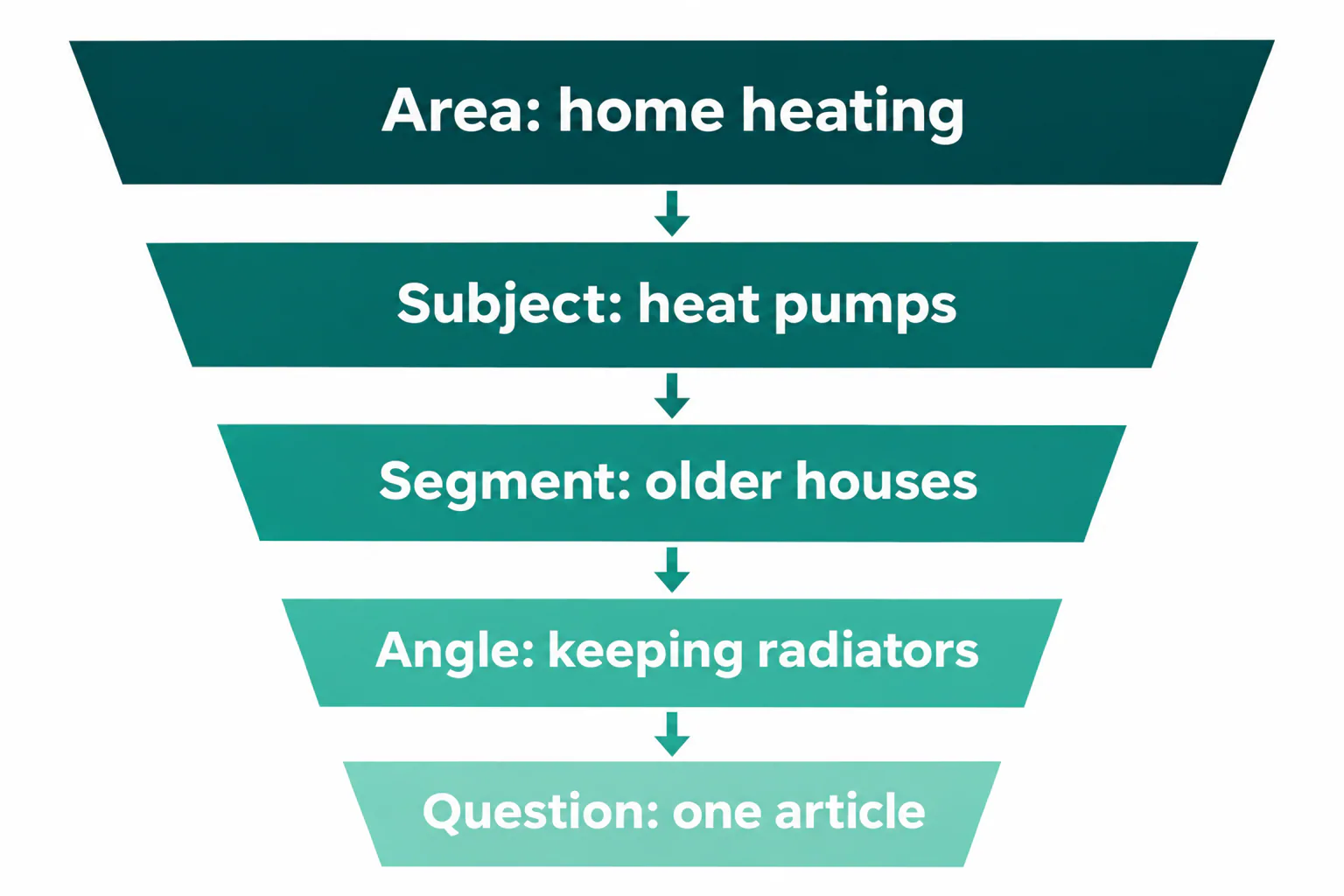
Turning the topic into the question the article answers
Write the topic as a question, then write the answer you would open the article with in two sentences. If you can’t, the topic is still too broad, or you don’t yet know enough to write it. Next, search the question and check that the ranking pages answer the same thing. If they all answer a neighboring question, adjust yours, because Google has already shown you what searchers mean by it.
How to judge a topic for demand, fit and authority
A topic earns a place in the plan when people search for it, it leads toward what you sell, and your site has a real chance to rank. Two checks come before any scoring.
The first is whether your site can realistically rank for it. Look at who holds the top five results. If they are large publishers and sites with far more links than yours, and your site has nothing on neighboring subjects yet, the topic belongs later in the plan. Write the smaller supporting pieces first, then come back to it.
The second is whether you have enough sources and expertise before you commit. Spend an hour researching a topic before it goes into the plan. Find at least two or three sources you could cite, and name the person on your team who can supply examples or check the draft. A topic with no sources and no expert produces exactly the generic article you were trying to avoid.
Search demand and the intent behind it
Size demand across the whole cluster of phrasings, not one keyword. A topic whose main term looks small can still bring steady traffic when twenty long-tail variants add up. Check the trend over two years in Google Trends to spot seasonal or fading subjects. Read the search intent from what ranks, because the ranking pages show whether a searcher wants a guide, a comparison or a quick answer. Informational topics build reach and trust, while comparison and cost topics sit closer to a sale.
Read that demand together with the keyword difficulty figure your keyword tool reports, and label it as an estimate, since every tool calculates it its own way. Healthy demand with low difficulty can go early in the plan. High demand with high difficulty sends you back to the top-five check above. If those results belong to sites far stronger than yours, hold the topic until your supporting pieces are live.
How closely the topic connects to your offer
Score each topic from 0 to 3. A 3 is a question asked right before buying what you sell. Give a 2 to a problem your product solves. A subject your audience cares about with no direct link to the offer gets a 1. Traffic for its own sake scores 0. Topics scoring 0 rarely deserve a slot, however large their volume.
Grouping topics into pillars and clusters
Once you have a scored list, group it by subject. Topical authority in SEO comes from covering one subject thoroughly, with pages that link to each other, rather than from scattered articles on many subjects.
Choosing the pillar topics for your site
A pillar is a broad subject that maps to a main part of your offer and can support roughly eight to fifteen deeper articles. One good test is whether you could list ten real questions under it without padding. Most businesses with three main services need three pillars, not ten. This guide works the same way. It covers topic research broadly and leaves the details of Search Console queries, competitor gaps and AI tools to supporting articles that each go one level deeper.
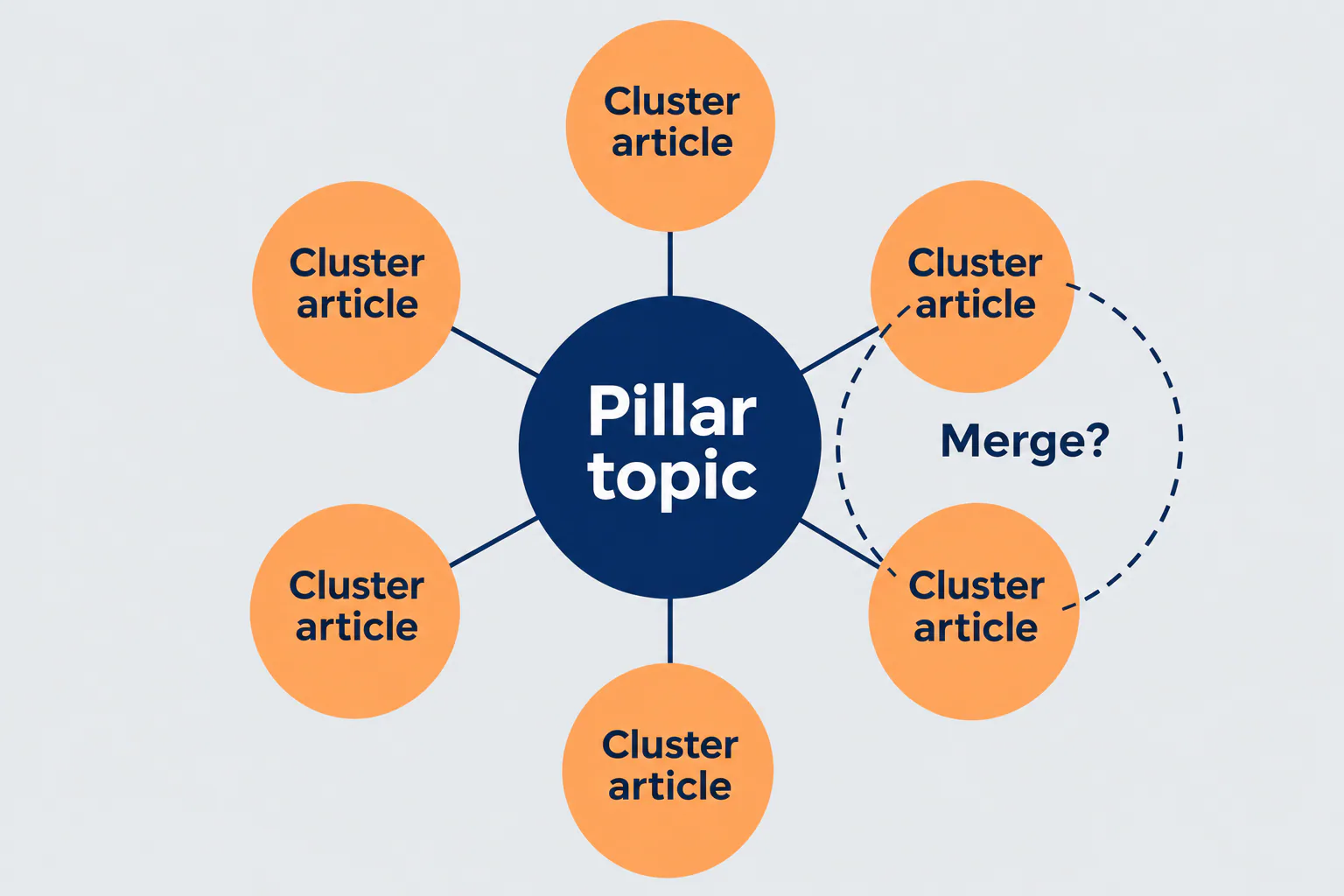
Assigning cluster articles without overlap or cannibalization
Give every cluster article one primary question and one primary keyword, and record them in a single map with the target URL. Before you add a new article, search its keyword and the keyword of its nearest sibling. If most of the top results are the same pages, Google treats them as one topic, so merge them into one article. After publishing, check Search Console for queries where two of your URLs take turns appearing. That pattern shows that two pages are splitting one search, and one of them should be merged into the other or redirected.
How AI helps with topic research and where it falls short
AI is good at the bulk sorting work and weak at judgment, which is why AI SEO topic research works best when a person makes the final call on every topic.
What AI tools speed up
A language model can turn three months of support tickets into a clean list of recurring questions in minutes. It can group a few hundred keywords by meaning, which used to take an afternoon in a spreadsheet. It can summarize what the top ten results cover for a search, suggest subtopics you missed, and draft a first brief you then correct. For idea generation, asking it for questions a specific reader would ask at a specific stage of buying gives far better output than asking for “blog ideas.”
AI search prompt research adds one more source of question ideas. People now put whole questions to AI assistants, and those questions are often longer and more specific than what they type into Google. Ask the assistants your readers use what people commonly want to know about a topic, and note the follow-up questions they suggest. Treat the results as questions to check, not as demand data. As with support tickets, the reader’s question should drive the topic.
What AI tools miss or get wrong
Models invent search volumes that look precise. Any number an AI produces is an estimate, and it should be labeled as one, never mixed with measured data from Google. AI also doesn’t know your business, so it can’t score fit to your offer or tell you which topics your experts can back up. Its suggestions also overlap heavily with what it gives every other site in your niche, so its ideas are a starting list, not a gap analysis. Finally, it can state intent with confidence without having seen the current results page. Search the query yourself before you trust it.
Turning topic research into a content plan
Research that stays in a document never gets written. Each approved topic needs to enter the plan with enough context that the writer doesn’t have to redo the research.
What each topic should carry into the plan
Put these fields on every topic in the content plan:
- The question the article answers and the two-sentence answer it opens with
- The primary keyword, close variants and the intent read from the results page
- The format that ranks, such as a guide, a comparison or a how-to
- The pillar it belongs to and the sibling articles it should link to
- Its fit score and the part of the offer it connects to
- Where the idea came from, such as a support ticket, Search Console or a competitor gap
- The sources to cite and the team expert who will check it
- What the ranking pages lack that this article will add
- Priority, owner and status
Keeping research, planning and writing in one workflow
The usual failure is context lost between tools. Research lives in a keyword tool, the plan in a spreadsheet, the brief in a document and the draft somewhere else, and each handoff drops something. An SEO content workflow for a small team works best when the brief is built from the research record and the draft is written from the brief. When you compare a content planning tool for SEO or a keyword research tool for content teams, check whether it shows where each number comes from, whether briefs carry the research with them, and whether you can see the status of every topic across all your sites in one view.
Mistakes that make topic research a waste of time
Most wasted research comes from a handful of habits, each with a simple fix.
- Sorting by volume and starting at the top. High-volume topics are usually the hardest to rank for and the furthest from a sale. Sort by fit score first, then by demand.
- Planning one article per keyword. Variants of one question become competing pages. Group by topic before you assign anything.
- Skipping the results page. Intent and format come from what ranks, not from the keyword. Search every topic before it enters the plan.
- Approving topics nobody can write well. Without sources or an expert, the draft turns generic. Name both at approval.
- Researching once and never again. Search Console shows new near-ranking queries every month, so review it monthly and rerun the full process every quarter.
If you manage this across several sites, it helps to keep it all in one place. We built RankFlow as one workspace for keyword research, competitor gaps, content plans, AI-assisted writing, publishing to WordPress and Search Console reporting. Its numbers are labeled as measured, calculated or estimated, so an AI guess never passes as Google data.
Frequently Asked Questions
What are the types of research questions?
What are the types of research questions?
The main types of research questions are:
- Descriptive, which asks what something is or how often it happens
- Comparative, which asks how two or more things differ
- Relational, which asks whether two things move together
- Causal, which asks whether one thing causes another
- Exploratory, which explores a subject that has little coverage yet
- Evaluative, which asks how well something works
For SEO, these map closely to definition, comparison and review articles.
Is there a free topic research tool worth using?
Is there a free topic research tool worth using?
Yes. Google Search Console is free and shows real queries your site already appears for, which makes it the most useful source for an existing site. Google Trends shows seasonality and whether interest is rising or fading. People Also Ask and related searches cost nothing and show how Google groups questions. Free tiers of paid keyword tools help with sizing demand, but check whether their numbers are measured or estimated.
How many cluster articles should one pillar topic have?
How many cluster articles should one pillar topic have?
Enough to answer the real questions under the pillar, which for most business sites means roughly eight to fifteen. Count the distinct questions with their own search results, not the keyword variants. If you can only find four, the pillar may be too narrow. If you can list forty, it is probably two or three pillars sharing one name.
How often should you redo topic research for a site?
How often should you redo topic research for a site?
Check Search Console once a month for new queries your pages almost rank for, and add the good ones to the plan. Rerun the full process each quarter, covering customer questions, competitor gaps and pillar coverage. Redo it right away when the business adds a new service or product, because that opens a subject your current plan doesn’t cover.
Can a small content team handle topic research without an SEO specialist?
Can a small content team handle topic research without an SEO specialist?
Yes, if the team follows a fixed routine. That means collecting customer questions, checking Search Console, reading the results page for each topic, scoring fit and demand, and grouping topics into clusters. None of it requires deep technical SEO. A specialist helps most with judging whether a site can compete for hard topics and with spotting cannibalization once the site has many pages.
How long does topic research take for a new site?
How long does topic research take for a new site?
A first pass usually takes a few working days. Plan about a day to collect customer questions and interview the team, a day for results pages and competitor gaps, and a day to score, group and enter topics into the plan. A new site has no Search Console data yet, so start that check about three months after the first articles go live.