An AI voice assistant for your website that answers every caller
Voice AI is an assistant that talks. A visitor clicks call in the chat on your website and it picks up at once, in your customers' language, replying in under a second. It writes down their name, number and address and leaves your team a lead with the whole conversation.
- Answers in under a second
- Picks up day and night
- Reads details back before saving
- Hi, my washing machine won't drain. Can someone come and look?0:03
- Of course. Can I take your name and a phone number?0:08 · answered in 0.8 s
- Jana Novak. Five five five, zero one, four two.0:14
- Thank you. That is 555 0142, right?0:19 · answered in 0.9 s
- Yes, that's right.0:22
- Name
- Jana Novak
- Phone
- 555 0142
- What they want
- Washing machine won't drain, wants a visit
Illustrative screen with sample data
Your website can now answer the customers who would rather talk than type.
They want to ask a quick question, describe a problem in their own words or agree on a time, and typing feels like work. With Voice AI they click call in the chat on your site and talk, right in the browser. It answers in under a second, day and night, and turns the call into a lead your team can act on.
How the AI receptionist on your website works
No menus to press through and no script to write. The caller talks, the assistant listens, answers and writes it all down.
- 01
A visitor clicks call
In the chat on your website. The call runs in the browser, with nothing to install and no number to dial.
- 02
It answers at once
In under a second, in the language of your site, with the voice, speed and tone you picked.
- 03
It answers from what you know
Your Chat AI knowledge, your products and the systems you connected, only the ones you switched on.
- 04
It checks what it heard
The phone number and the address are read back and saved only after the caller says yes.
- 05
Your team gets the lead
With what the caller wants, the whole call in writing and the appointment, if one was booked.
Customer calls answered with AI, every word in writing
A real call to a demo coffee roaster: a café owner looking for a new supplier. Pick a point to see what each part tells you.
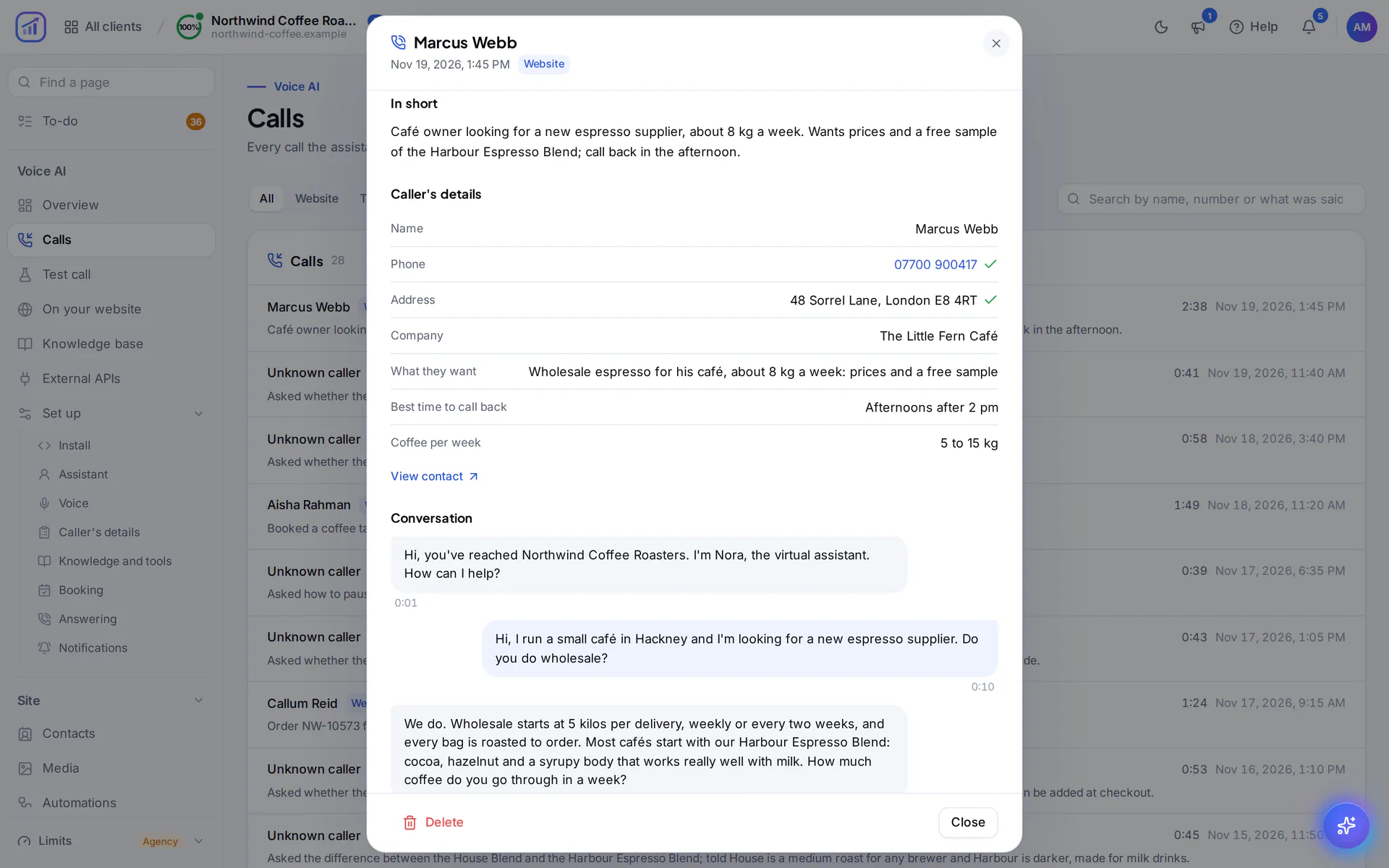
Who called and what they want, summed up when the call ends, so nobody has to read the whole conversation first.
The tick means the caller heard the number and the address read back and said yes. Your team calls back the right person.
Beyond a name and a number it asks what you need to know. Here: the best time to call back and how much coffee the café uses.
Every caller who leaves details is saved as a contact with what they want, and your team gets a notification.
Every turn of the conversation with its time, kept in writing rather than as a recording. You read a call, you don't sit through it.
One call, second by second
A visitor wants to book a coffee tasting. Nobody from your team is on the call, and nobody needs to be.
- Visitor
She clicks call in the chat
She would rather ask than read. The call starts in her browser, with nothing to install.
- RankFlow
Answered at once
The assistant greets her with your business name, in the voice you picked and the language of your site.
- RankFlow
It finds a free time
She asks for a tasting on Saturday. It looks at your Booking calendar while she waits and offers two o'clock.
- Visitor
She gives her name and number
She says the number in words. The assistant reads it back and notes it only after she says yes.
- RankFlow
It says the booking back
Day, time and place, said out loud. She says yes, and the appointment is in your calendar before she hangs up.
- RankFlow
Lead saved, team told
Her details, a one-line summary, every step the assistant took and the whole conversation are saved, and your team gets a notification.
Illustrative example
An AI receptionist that does more than take messages
It books, it sounds the way you want and it knows when a person should take over.
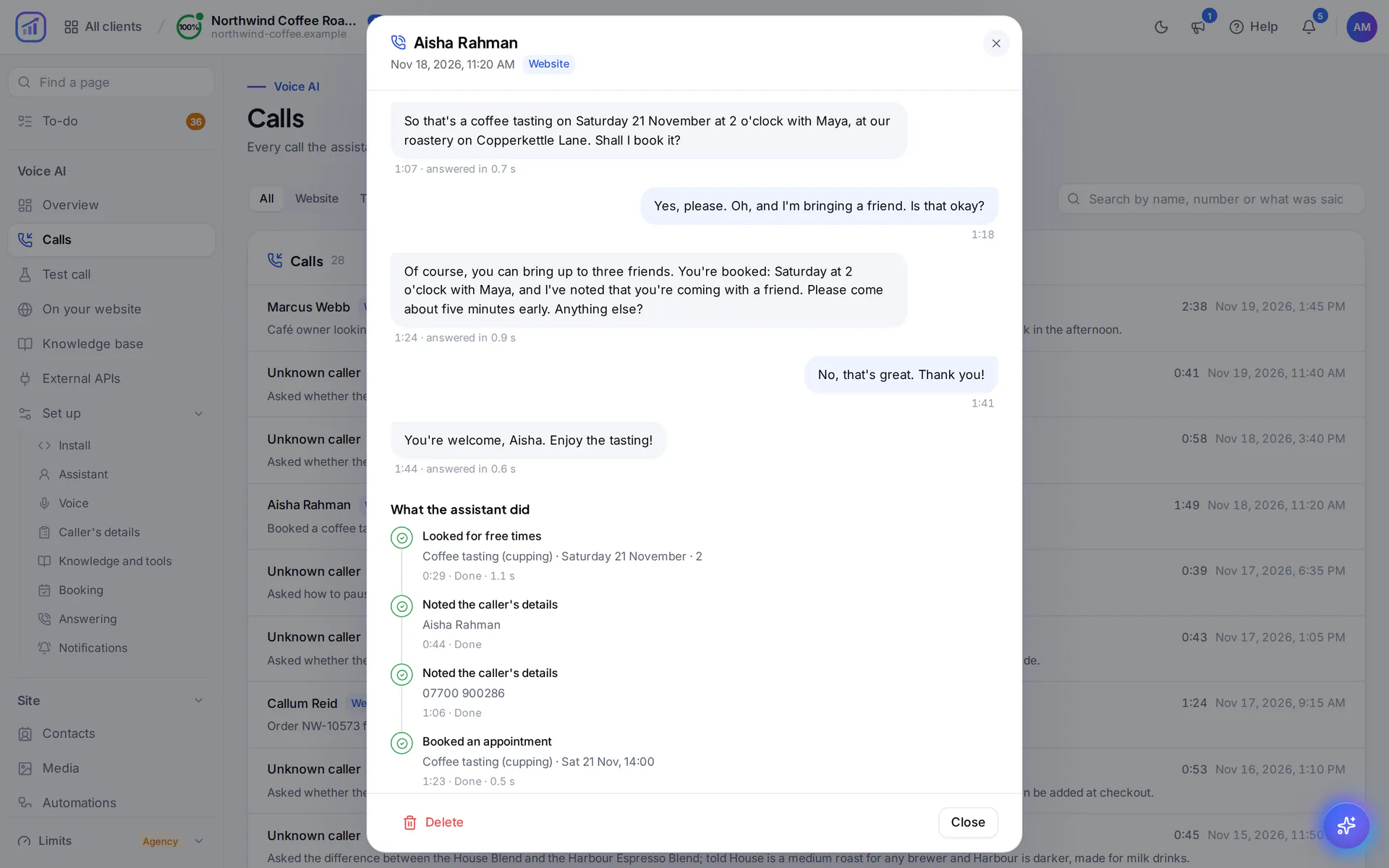
Books the appointment before the call ends
With RankFlow Booking set up, the assistant looks for free times in your calendar while the caller waits. It says the day, time and place back, books only when the caller says yes and confirms it out loud. A phone number is enough to book.
- Free times found during the call
- Day and time said back before anything is booked
- Every step it took listed on the call, with its time
Sounds the way your business should
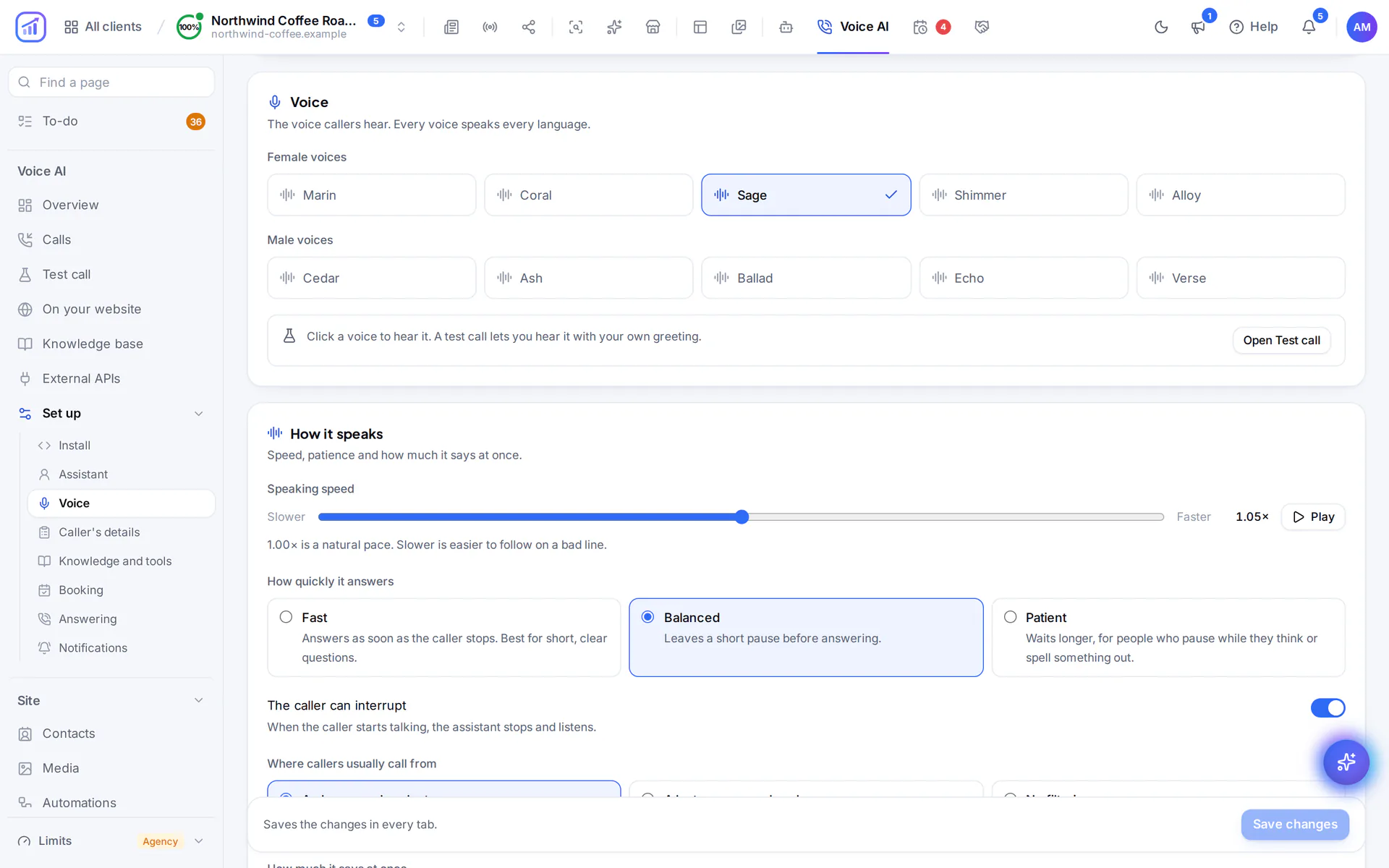
Pick one of ten voices and hear each one before you choose. Then set how fast it speaks, how quickly it takes its turn once the caller stops and whether callers can interrupt it. Polite or familiar, in the language of your site.
- Female and male voices, each heard first
- Quick replies, or patience for people who pause to think
- When the caller starts talking, it stops and listens
Your team answers, or it answers for them
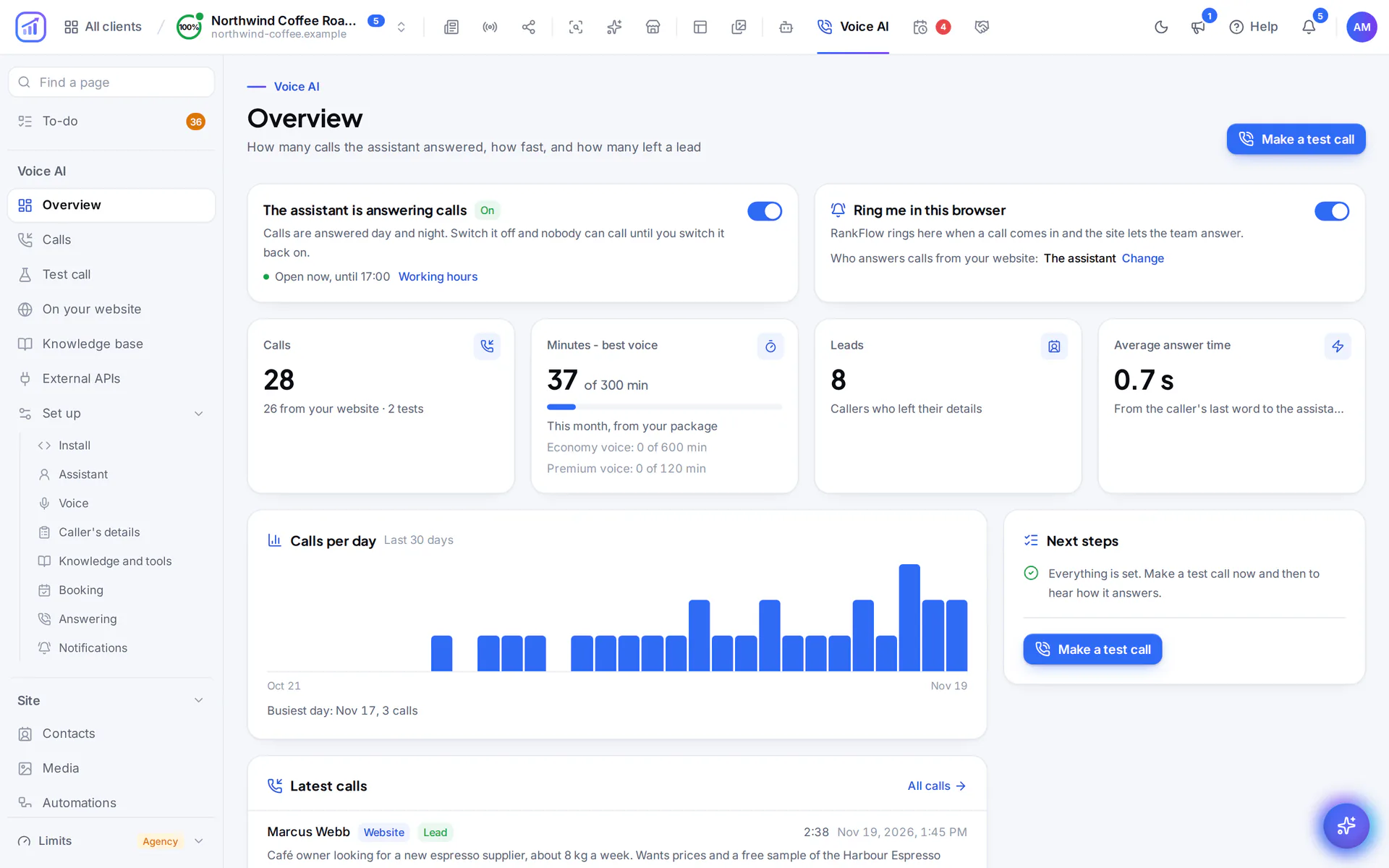
Choose who picks up a call from your website: the assistant alone, your team first with the assistant stepping in when nobody answers, or the assistant with a person on request. Your team answers in the browser with one click.
- It rings everyone on your team who lets RankFlow ring in the browser
- A caller who asks for a person is put through
- Calls switch off with one switch, and back on
- to answer, from the caller's last word
- < 1 s
- voices, each heard before you choose
- 10
Answer time measured on real calls. Every call shows its own.
Voice AI for business, built for real calls
Talk and type in one call
A caller can type a serial number or an email in the chat and the assistant reads it. Links and codes arrive in the chat instead of being read out.
Answers from what you know
Your Chat AI knowledge base, your product catalogue and any system with an API you connected. Each is used on calls only if you switch it on.
Asks the questions you add
A preferred day, the model of a device, a tax number. Each answer is noted on the call, and the ones that must be exact are read back first.
Says your names right
Brands, products, street names and people's names you list are words it listens for and learns to pronounce right.
Your hours, your rules
Set your working hours and how calls go after them: another greeting, who answers, or a note such as “we're closed, take the details, we call back at eight”.
Practise before customers call
Call the assistant from the app to hear it, or let RankFlow ring you while the assistant plays a customer. Website calls stay off until you switch them on.
It takes the calls. You set the rules.
Everything it does on a call runs by itself. Whether visitors can call at all, who answers and what it may use stay your decision.
Runs on its own
- Answers at any hour
Callers get an answer day and night, in under a second, in the language of your site.
- Checks what it heard
It reads the phone number and the address back and saves them only after a yes.
- Saves the lead and tells your team
The contact is saved with what the caller wants, and your team gets a notification.
- Takes the call when nobody can
If your team is rung first and nobody picks up, the assistant answers instead.
- Writes every call down
The conversation, the details, a one-line summary and the answer time are saved for each call it takes.
Always your decision
- Whether visitors can call
Calls from your website are off until you switch them on.
- Who picks up
The assistant alone, your team first, or the assistant with a person when the caller asks.
- What it may use
Your Chat AI knowledge, product catalogue and connected systems are each used only if you switch them on.
- How it sounds
The voice, the speaking speed and a formal or informal tone.
- Which voice quality answers
Best or economy, each with its own call minutes in your package.
Voice AI inside RankFlow
Real screens from a demo site with sample data. Select a screen to see it larger.
What you need
The chat on your website
Visitors call from the Chat AI chat on your site, so the chat has to be there.
A browser with a microphone
That is all the caller needs. Nothing to install and no number to dial.
Contacts, for leads
Leads from calls are saved with RankFlow's Contacts module.
Booking, for appointments
Booking on the call works when RankFlow Booking is set up for your site.
Call minutes in your package
Calls use the call minutes of your package, counted separately for the best and the economy voice.
Plans and allowances
AI work counts toward your plan's monthly limits. You always see how much is left, and you can request more whenever you need it.
Common questions
From the chat on your website. They click call, allow the microphone and talk in the browser, with nothing to install and no number to dial.
In under a second. On real calls we measured 0.7 to 1.0 seconds between the caller's last word and the assistant's first, and you see the answer time of every call.
It speaks the language of your site, in the voice, speed and tone you choose. We have tested it on calls in Serbian, most thoroughly, and in English and German.
It hears numbers said in words and a street with its number, floor and flat. Then it reads the number and the address back and waits for a yes before saving, so your team gets details the caller confirmed.
Yes, if you set it up that way. RankFlow can ring your team first and let the assistant take the call when nobody picks up, or the assistant answers and puts the caller through when they ask for a person. Your team answers in the browser with one click.
Yes. Make a test call from the app, or let RankFlow ring you while the assistant plays a customer. Calls from your website stay off until you switch them on.
In call minutes, which are part of your package. There are two voice qualities, best and economy, and each has its own minutes.
Related products
Ready to be found on Google?
Send us your web address and tell us what you publish. We'll reply by email and set you up on the plan that fits. Then you connect your site and the articles start coming.