
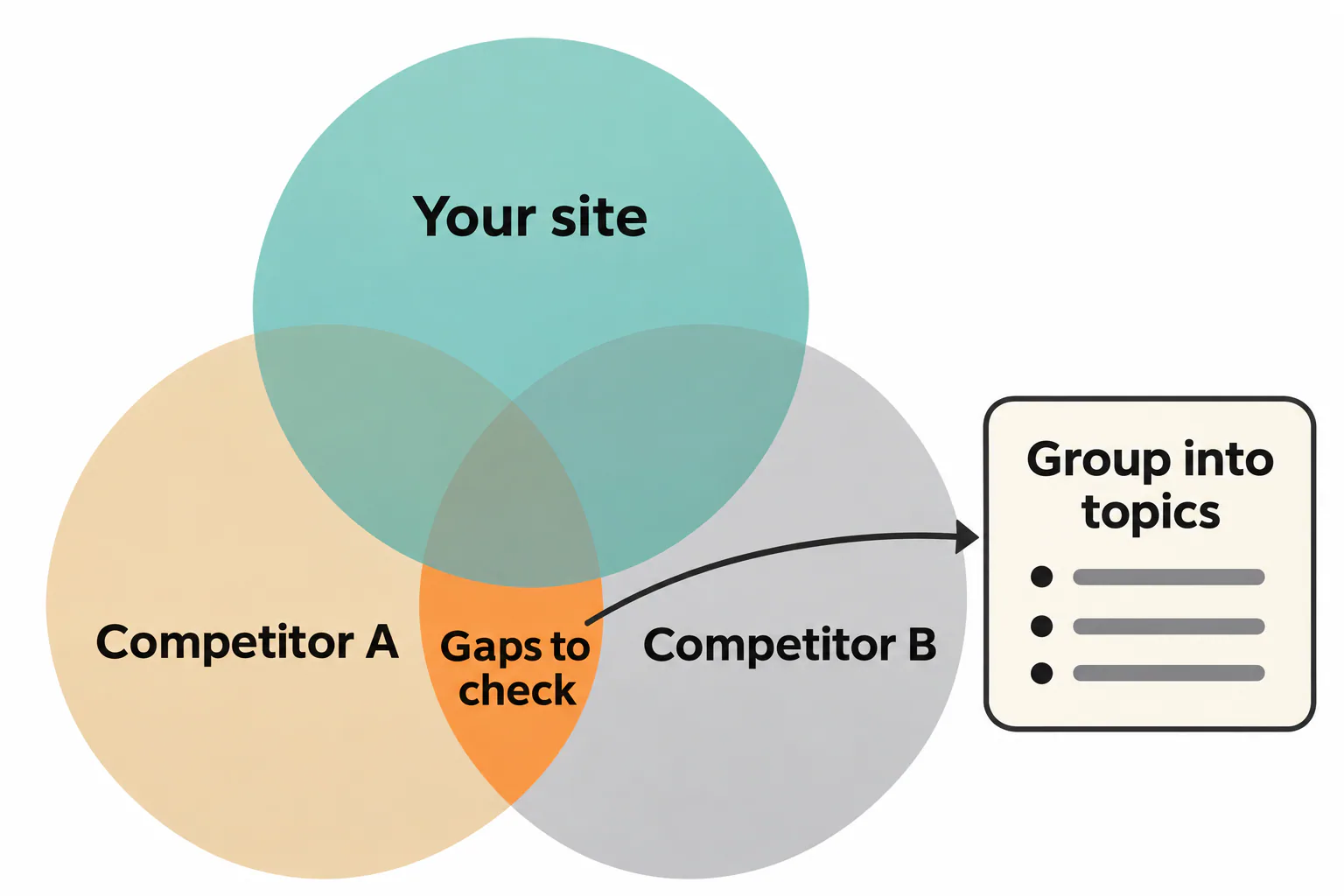
To find topics your competitors cover that you don't, run a content gap tool against two or three sites ranking for your keywords, then read their sitemaps, archives and open questions by hand. The tool shows missing keywords, and the manual pass shows angles no tool sees.
Once you know how to find topics your competitors cover that you don't, both steps take an afternoon per site. Then comes judgment, deciding which gaps are real, which ones rivals skip for good reasons and which earn a slot in this quarter's content plan.
Four ways to find topics your competitors cover that you don't
The first method relies on a paid tool's keyword index, while the other three need only a browser and your own Search Console data. Start with whichever you can run today and add the rest as time allows.
The four methods at a glance
Each method catches something the others miss, so a full competitor content analysis uses all four. Here they are in the order most teams run them:
- Run a gap tool that lists the keywords two or three rivals rank for and your site doesn't.
- Read their sitemaps, blog archives and site: search results to see every page they've published on a theme.
- Find the questions they leave unanswered or explain thinly. Open the top competitor articles for your main keywords and write down what a reader would still ask after finishing each one. A guide on choosing a CRM that never covers migrating old contacts leaves a gap you can fill without a new keyword. Comments under their articles, Reddit threads and Quora answers on the same subject show which of those audience questions real people keep asking. Search each core topic too, note every People Also Ask question and mark the ones no page on your site answers.
- Check video results and AI answers for sources you're missing. Search your ten core keywords and look at the Videos block and the AI overview. When the AI answer cites two rivals and never you, that is a gap even if you rank on page one in the classic results. When rivals have videos on a topic and you have nothing, that absence won't show up in any text audit.
Run a content gap tool against two or three rivals
Enter your domain and two or three competitors in a gap report such as the Ahrefs Content Gap tool or the Semrush Content Gap and Keyword Gap reports. Then filter the results down to something you can use:
- keep keywords where at least two rivals rank in the top ten and you don't rank in the top hundred;
- remove brand names, navigational searches and anything about products you don't offer;
- export the rest and sort it by the page that ranks, not by the keyword.
The two-rival filter matters. A keyword only one site ranks for is often a fluke or a brand term, while two or three sites ranking for it point to real demand. Keep in mind that the volumes in these reports are the vendor's estimates, not measured Google data.
Read competitor sitemaps, blog archives and site search results
Open rival.com/sitemap.xml or /sitemap_index.xml and find the post sitemap. Skimming its slugs takes ten minutes and reveals long-tail themes the tool skipped. Blog category pages show where a rival puts its effort, and a category with forty articles against your three deserves a closer look.
Next, search site:rival.com "onboarding" in Google, then run the same query on your own domain. Comparing the two result lists shows coverage side by side. Recheck sitemaps once a month too. New URLs that don't rank yet reveal where a competitor is heading before any gap report picks them up.
A free route with Search Console and manual SERP checks
Without a paid tool, start in Google Search Console and export the queries you already get impressions for. Then search your top 20 priority keywords by hand and note which topics the ranking pages cover. A topic that appears across competitor pages but never in your query list is one of the competitor topic gaps worth tracking, and these free signals often surface content gaps a paid index misses.
Choosing which competitors and which gap tool to compare against
Compare against the sites that rank for your keywords, not only the companies your sales team names. The two lists overlap less than people expect, and the wrong list produces an empty or misleading report.
Search competitors versus the businesses you sell against
Search your ten most important keywords and note every domain on page one. Any domain that appears for three or more of them is a search competitor, whether it's a rival product, a publisher, a directory or a consultant's blog. Pick three to five competitors that actually appear for your keywords. Picking the right ones is the first step of any useful competitor gap check.
The businesses you sell against still matter, but for market research rather than the gap check, since some of them barely publish. Their pricing pages, reviews and support docs show the pain points your audience brings to the buying decision, and that market research shapes the angle of each article you write.
Gap tools for a small site and for an agency with many rivals
The right setup depends on how many sites and competitors you track.
| Situation | What usually fits | What to watch for |
|---|---|---|
| One small site, tight budget | Free methods (sitemaps, site: searches, Search Console) plus one paid month of a single tool for the gap report | Free tiers cap how many rows you see, so a full gap list needs a paid account |
| One established site | An ongoing account with Ahrefs, Semrush or Moz Pro; SpyFu if paid search competitors matter too | Each tool has its own index, so results differ between them |
| Agency with many clients | A higher tier with saved projects per client, more compared domains and larger exports | Compare against each client's own search competitors, not a shared list |
Whatever you pick, use one tool consistently. Switching between indexes makes month-to-month comparisons meaningless.
Telling a real content gap from a blind spot competitors avoid on purpose
A real content gap is a topic your readers search for that nobody serves well. A blind spot is one that rivals skip because it doesn't pay them, doesn't fit their offer or carries risk. Both look identical in a gap report, so run three tests before you commit a writer to one.
- Do they sell anything related? If not, the missing topic may simply fall outside their business, and possibly outside yours too.
- What ranks now? If the top results are all product listings, a blog post will struggle no matter how well it is written.
- Is it risky? Legal, medical and financial advice is often left alone on purpose.
Depth or breadth
Before writing a brief, check why a rival wins. Sometimes its page is simply more detailed than yours (depth), so the brief is to beat that page on the same query. Sometimes it ranks for a topic you ignore entirely (breadth), so the brief is to open a new page. Knowing how to find topics your competitors cover that you don't pays off for breadth gaps, while depth gaps call for an update brief instead.
A worked example with bought email lists
Take an email marketing SaaS whose rivals never write about buying email lists. That isn't an oversight. Bought lists hurt deliverability and clash with consent rules, so their content strategy steers readers away. A piece on "why bought lists fail" can still work, but it is a different article from the one the keyword suggests.
Blind spots occasionally turn into openings, for example when only forums answer a question competitors could answer but don't. Treat those as a deliberate bet in your content strategy, not as a default gap to fill.
Which topics missing from your blog are worth writing first
Write the ones first that have steady demand, a direct link to what you sell and a current top result you can beat. Everything else waits. Competitor gaps are only one input, so pair them with topic research that finds subjects worth writing about beyond what rivals already publish.
Demand, business fit and the effort to beat the current page
A simple scoring formula keeps this honest. Score = demand + ease + 2 x business fit, with a maximum of 20. Fit counts double because an article that brings traffic but no customers wastes a slot. A new site with few links should use demand + 2 x ease + 2 x business fit instead.
To judge ease, run a quick analysis of the top three results. Thin, outdated or off-intent pages are beatable, while three thorough, recent guides from strong domains are not, at least not this quarter. Sales and support calls are market research you already have, so ask which pain points come up. A gap matching one moves up the list even at modest volume.
Checking a gap against your own Search Console data before you write
Before you brief a writer, open Search Console, go to Performance, filter queries by the gap's main keyword and set the date range to the last three months. Already getting impressions? Note which page earns them and at what position. A page around positions 15 to 40 should be expanded, so the row becomes an update rather than a new article.
This check keeps you from publishing two pages that compete for the same searches, an easy mistake once you start spotting competitor gaps and writing fast. If there are no impressions at all, the gap is real on your side and a new page is justified. Once a gap earns its own page, have the writer research the topic before drafting so the article answers what readers actually need.
Turning the gaps you keep into pillar pages and clusters
Group the content gaps that survive by the results they share. If the same pages rank for two keywords, they belong in one post. After grouping, a long export usually shrinks to a few dozen real candidates.
Look for one broad uncovered topic among them, such as "client onboarding". That becomes the pillar page, and the narrower ones ("onboarding email sequence", "onboarding checklist for agencies") become cluster articles that link back to it. Leftover audience questions too small for their own page go into the pillar's FAQ or into short answer posts.

Repeat the whole check each quarter, because content gaps close as rivals publish and open as your offer changes. That routine turns gap hunting into a steady habit rather than a one-off project. In RankFlow, competitor gaps sit beside keyword research, content plans and Search Console reporting, each number labeled as measured, calculated or estimated.
Frequently Asked Questions
How often should you repeat a competitor content gap check?
How often should you repeat a competitor content gap check?
Run a full gap report once a quarter, timed with your content planning. Between those runs, skim rival sitemaps once a month for new URLs. That catches new themes early without turning the analysis into weekly busywork. Agencies with many clients can stagger the quarterly checks so that each week covers a few sites.
Should you copy a competitor's article structure when you fill a gap?
Should you copy a competitor's article structure when you fill a gap?
No. Note what the ranking pages all cover, because searchers expect those points, then build your own structure around the reader's question. Add what they lack, such as a worked example, your business's own data or a clear recommendation. A copied outline gives search engines no reason to rank you above the original.
What are the five criteria for understanding competitors?
What are the five criteria for understanding competitors?
For content work, look at five things. These are the keywords they rank for, the topics and formats they publish, how often they publish, which of their pages AI answers cite, and which audience and offer their pages target. Together they show where a rival is strong, where it is thin and where it is heading next.
How do you outsmart competitors who publish more often than you?
How do you outsmart competitors who publish more often than you?
Don't try to match their volume. Pick the gaps with the highest business fit, write one page per topic that answers it better, and update existing posts instead of adding near-duplicates. A smaller set of thorough, current pages often outranks a large archive of thin ones on the searches that bring customers.
Is a gap worth filling if no keyword tool shows search volume for it?
Is a gap worth filling if no keyword tool shows search volume for it?
Sometimes. Tools miss new and long-tail searches, so a topic people ask about in sales calls, forums or support tickets can still bring visitors. Check Search Console for impressions first. If the topic matches what you sell and answers a real customer question, a short, focused page is a low-risk bet.