
Yes, you can post to multiple WordPress sites at once, and doing so does not earn a Google penalty on its own. The real risk is quieter: when identical copies sit on different domains, Google shows one and filters the rest, and the copy it picks may not be the one you care about.
That gives you two separate questions. Can you push one article to several sites? Almost always, with Multisite, a plugin, an automation tool or the REST API. Should every site carry the same text? That depends on which copy you want to rank.
The Belief: “Posting the Same Article to Many Sites Gets You Penalized”
The belief is half-right: duplicate content rarely gets a site punished, but it often gets a copy ignored.
Why site owners believe it
The myth grew out of real losses. Networks of near-identical sites built to game rankings, scrapers that copied whole blogs and spun articles with swapped synonyms all lost visibility, some through manual actions. Site owners watched that happen and concluded that any repeated text is dangerous.
The symptom makes it worse. When a cross-posted article vanishes from results, it looks exactly like a penalty, even though Google simply chose another copy.
What Google actually says about duplicate content
Google’s guidance says duplication by itself is not grounds for action. Google groups the duplicates, picks one URL as canonical and shows that one. Action follows only when the duplication is deceptive and falls under its spam policies. The difference looks like this:
- Filtered, not punished: the same announcement on your three brand sites, or a guest post republished on your own blog.
- Risk of action: dozens of thin sites with the same text and swapped city names, or articles auto-copied from sites you do not own.
Even in the safe group, there are costs. Links split between copies, a copy on a newer site can outrank your original, and crawlers waste time on pages that add nothing.
What Is Actually True: Safe Ways to Post to Multiple WordPress Sites at Once
You can post to multiple WordPress sites at once safely when the method fits your setup and you decide in advance which copy is the original.
Multisite, cross-posting plugins or automation: which to pick by number of sites and domains
The table compares the four common routes by fit, domains and trade-off.
| Method | Best fit | Separate domains | Main trade-off |
|---|---|---|---|
| WordPress Multisite | Related sites you own and maintain together | Yes, with domain mapping per subsite, but on one install and one database | A single point of failure; posting to every subsite still needs a plugin |
| Cross-posting plugin (WordPressomatic, CrossPress) | One main site pushing to a few standalone installs | Yes | Every target needs REST API access and an application password |
| Automation (Zapier, Pabbly Connect, webhooks) | Mixed stacks, or a trigger outside WordPress | Yes | Field mapping breaks when a site changes |
| REST API or a publishing platform | Teams publishing to many client sites on a schedule | Yes | One setup per site and someone who owns the credentials |
The rule: choose Multisite for one brand family on hosting you control, and accept that a bad plugin update can take every subsite down together. A plugin suits a few standalone sites with one clear source. Automation fits when the trigger lives outside WordPress. Once several people publish to many domains, move to the REST API. Multisite shares themes, plugins and users, which often pushes you to a VPS. ManageWP and FlyWP handle updates for separate installs, but they do not decide which article goes where. For the updates, backups and logins themselves, it helps to manage all your WordPress sites from one dashboard instead of logging into each install.
Bulk creation inside one site: creating multiple posts and pages at once
Sometimes “at once” means many items on one site. WordPress has no button for this, but there are four reliable ways to create multiple posts at once in WordPress:
- Import a CSV or XML file, mapping columns to title, content, category and status.
- Run
wp post createin a WP-CLI loop. - Send a series of requests to
/wp-json/wp/v2/posts. - Clone a template with a duplicate-post plugin.
To create multiple pages at once in WordPress, use the same tools with the page post type, for example --post_type=page in WP-CLI. WordPress sets no fixed cap on posts or pages; your hosting decides how many stay fast. Create everything as drafts first, so a mapping mistake never goes live a hundred times.
Where the featured-snippet answer fits: the short list of methods
How can you post to multiple WordPress sites at once? Pick one of these methods:
- WordPress Multisite with a broadcast plugin, for related sites.
- A cross-posting plugin that pushes posts from a main site.
- Zapier or Pabbly Connect, triggered by a new post.
- The REST API with an application password on each site.
- A publishing platform connected to all your sites.
How to Syndicate Content Between WordPress Sites Without Hurting SEO
You can syndicate content between WordPress sites safely if every copy tells Google which version is the original, or stays out of the index.
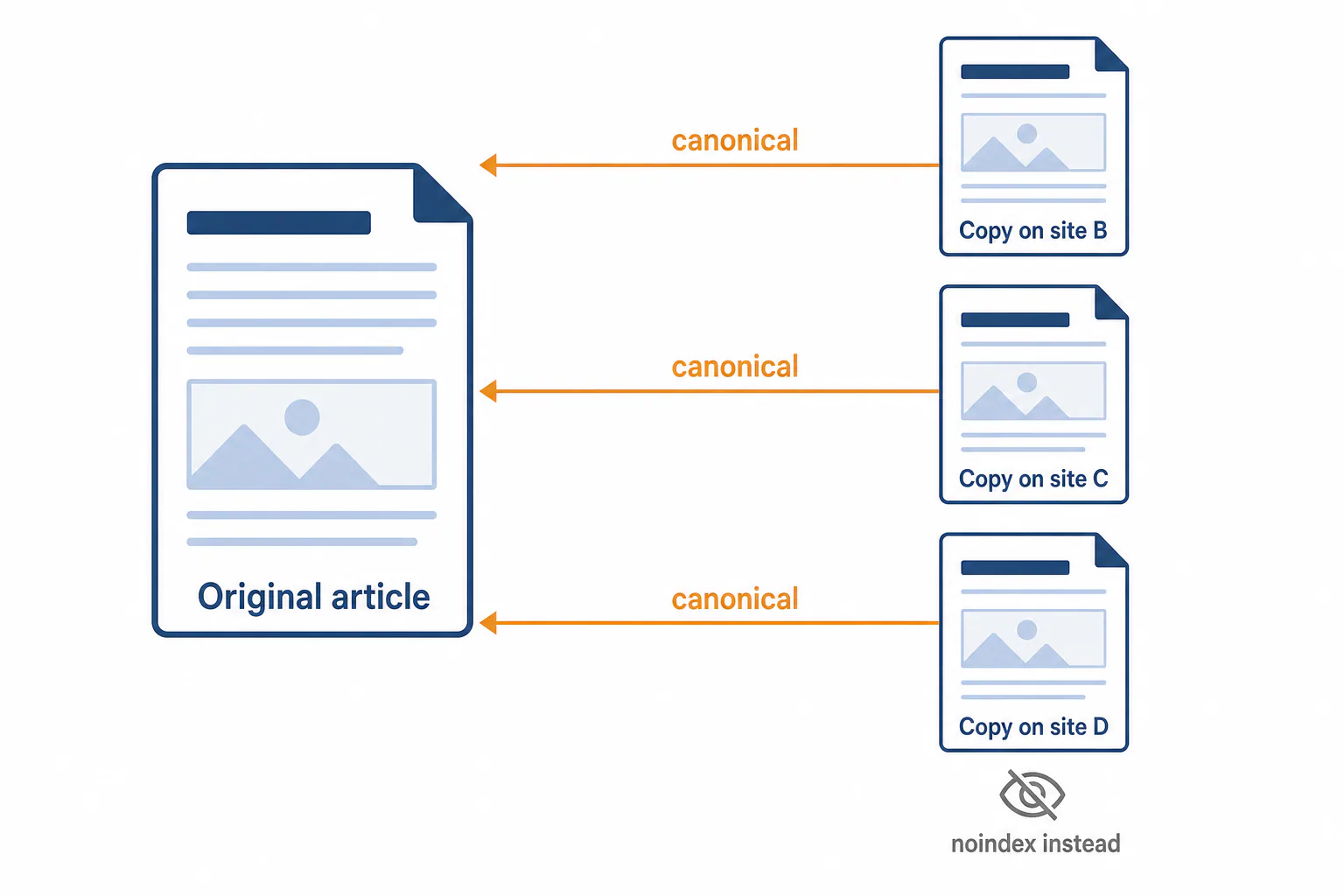
Canonical tags: pointing copies to the original
A canonical tag, <link rel="canonical" href="...">, names the preferred URL. On each copy, point it to the original’s full URL, with the same https and trailing slash the original uses. Yoast, Rank Math, SEOPress and All in One SEO all offer a canonical field in the post’s advanced settings.
Google treats a cross-domain canonical as a strong hint, not an order. The copy will mostly not rank, and that is the point. If each site should earn its own traffic, a canonical is the wrong tool.
Noindex, rewritten versions and delayed publishing
Choose by goal:
- Noindex when readers on the second site need the article but search does not.
- Rewrite when each site should rank. Change the angle, examples and intro, not just synonyms.
- Delay copies by a few days so the original gets indexed first. This is no substitute for a canonical.
A common mistake is setting noindex and a canonical on the same copy. That sends two conflicting signals, so pick one.
Broken images and media on target sites
Many plugins copy the post body but leave image URLs pointing at the source site. The copies look fine until the source renames a file or moves hosts, and then every copy shows empty boxes. Featured images break sooner, because they are stored as a media ID that means nothing on another site. The fix is to upload images to each target’s media library, replace the URLs, set the new featured image ID and recheck the alt text.
Worked Example: One Post to Three Standalone Sites via the REST API
Here, WordPress REST API publishing sends one post from site-a.example, the original, to site-b.example, site-c.example and site-d.example, each running its own install.
Create an application password on each target site
On each target, log in as a dedicated user with the Author or Editor role. Go to Users, then Profile, scroll to Application Passwords, enter a name such as “Cross-post” and click Add New Application Password. Copy the password right away, because WordPress shows it only once. If the section is missing, the site probably is not running over HTTPS.
Send the post and set the canonical URL
Publish the original and copy its URL. For each target, upload images to /wp-json/wp/v2/media and note the returned IDs. Then send a POST request to https://site-b.example/wp-json/wp/v2/posts with Basic authentication (username plus application password) and a JSON body containing the title, the content, status set to draft and featured_media set to the new image ID.
SEO plugins store the canonical as post meta, which the REST API does not always accept by default. Either register that field for the API on the target site, or open the draft and paste the original URL into the canonical box before publishing.
Pushing the same post twice would create a second copy. Store the target post ID after the first push, then update that post on later pushes.
Check the result on every site
- The post has the right author, category and status.
- The page source shows the original URL as canonical, not the copy’s own address.
- Images load from the target’s own domain.
- Body links do not point at site A by accident.
After a week or two, inspect each copy in Search Console. The Google-selected canonical should match the original.
Fixing Failed Publishes: 401 Unauthorized and Permission Errors
A 401 means WordPress rejected who you are. A 403 means it knows you but will not allow the action. Fix the 401 first.
Application password and username mistakes
- You sent the login password instead of the application password.
- A display name was used; copy the username from the profile instead.
- Site B’s password was used on site C. Each one works only on its own site.
- The password was revoked during a migration.
- The server strips the Authorization header, a known issue on some Apache and CGI setups. An .htaccess rule that passes the header through usually fixes it.
To test, request /wp-json/wp/v2/users/me with the same credentials. If your user details come back, authentication works and the problem lies elsewhere.
User role and REST API blocked by a security plugin or host
A Contributor can create drafts but cannot publish or upload media. An Author can publish their own posts. An Editor can manage everyone’s posts.
If the role is right, check security plugins, which may disable the REST API or application passwords as a hardening option. A host firewall or CDN can also block POST requests to /wp-json/ from unfamiliar IP addresses. Allow your sending server, then ask your host for the firewall log entry.

Unique Posts for Each Site: Using AI Without Creating Duplicates
When each site needs to rank on its own, do not post to multiple WordPress sites at once with a copy; give each its own article instead.
How AI blog post generators work and why their output differs from site to site
How do AI blog post generators work? A language model writes text by predicting what comes next from your prompt. If you feed it the same prompt for three sites, you get three near-twin articles. The output only changes in a useful way when the input changes: a different brief, different business facts, a different audience.
How to use AI to write a blog post for each site, step by step
Here is how to use AI to write a blog post for each site without creating duplicates:
- Write a profile per site: audience, voice, products and local details.
- Give each site its own keyword angle.
- Build each brief from what currently ranks for that keyword.
- Generate every draft from that site’s own profile and brief.
- Add facts only that business has.
- Compare the versions and rewrite any paragraphs that match.
What to look for in an AI blog post writer
For multi-site work, the best AI blog post generator is the one that keeps your sites apart. A good tool:
- stores a separate profile and voice for each site;
- builds briefs from live results, not just the model’s memory;
- shows which numbers are measured and which are estimated;
- publishes to your own sites, so your content is never locked in.
Keeping one workspace for many sites in RankFlow
We built RankFlow as one workspace for the whole SEO content workflow, from research to publishing and measurement. Each article is written from the site’s content profile, its authors and what currently ranks, so related sites get different articles. Numbers are labelled as measured, calculated or estimated. Articles publish to WordPress through the RankFlow WP Connector plugin or an Application Password, with SEO fields for Yoast, Rank Math, SEOPress and All in One SEO. If you run several sites and want unique articles instead of syndicated copies, this setup is worth a look.
Frequently Asked Questions
Can I post to multiple WordPress sites at once?
Can I post to multiple WordPress sites at once?
Yes. Multisite with a broadcast plugin, a cross-posting plugin, an automation tool or the REST API with application passwords can all do it. The technical part is the easy part. What matters more is deciding which copy is the original, and whether the other copies get a canonical tag, a noindex tag or rewritten text.
Which plugin can publish one post to multiple WordPress sites?
Which plugin can publish one post to multiple WordPress sites?
WordPressomatic and CrossPress push posts from a main site to standalone installs, and Multisite networks use broadcast-style plugins. Before you commit to one, check that it uploads images to each target, lets you set a canonical per copy and works with application passwords. Test it on a staging site first.
Can I use Zapier or Pabbly Connect to publish to several WordPress sites?
Can I use Zapier or Pabbly Connect to publish to several WordPress sites?
Yes. Both have WordPress actions, so a new post, a sheet row or a form entry can create posts on several sites. Each site connects with a username and an application password. Check how categories, featured images and SEO fields are mapped, and keep in mind that both tools bill by usage.
Can I use WordPress Multisite with different domains?
Can I use WordPress Multisite with different domains?
Yes. Domain mapping lets each subsite use its own domain, so visitors see separate sites. Behind the scenes, though, they share one install, one database, one plugin set and one server. For sites owned by different clients, or sites that need different hosting, separate installs are safer.
Should I enable multisite for this?
Should I enable multisite for this?
Only for related sites you own and maintain together. Multisite saves update work, but it is hard to undo, because moving a subsite out means a full migration. If all you want is to publish one post in several places, a plugin or the REST API does that without restructuring your sites.
What is the downside of using WordPress for many sites?
What is the downside of using WordPress for many sites?
Every install needs its own updates, backups and security checks, so ten sites mean ten plugin sets to keep current. Multisite cuts that work but turns one server or one plugin conflict into a risk for all of them. Dashboards like ManageWP reduce the routine work, but someone still has to review each update.