
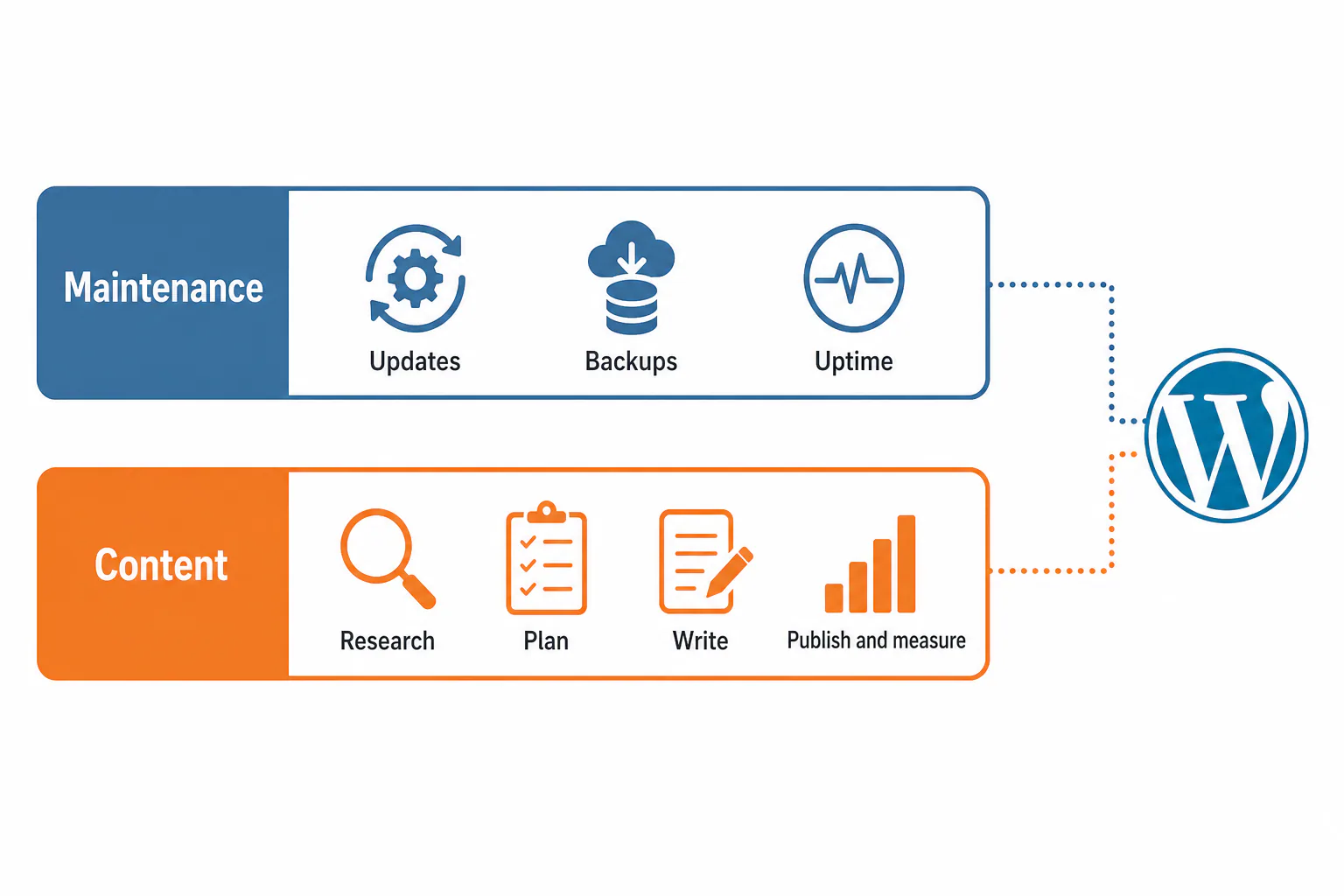
ManageWP is a good tool for keeping many WordPress sites updated, backed up and monitored from one screen, but it does not research keywords, plan articles, write them or report on how they perform in search. If your bottleneck is maintenance, it may be all you need. If your bottleneck is content, you will still need something else beside it.
This review looks at both sides: what the dashboard handles well, how its cost adds up and which tools cover the work it leaves untouched.
The Verdict: What ManageWP Does Well and Where It Stops
ManageWP does the housekeeping of many WordPress sites well and stops right where the editorial work begins. That makes it a strong pick for one kind of reader and an incomplete one for another.
Choose ManageWP if you mainly need maintenance
Pick it if your weekly pain is plugin updates, backups, broken sites after an update and clients asking whether their site is down. You connect each site once, then update themes and plugins in bulk, schedule backups and get alerts from one dashboard. For a freelancer or small agency with maintenance retainers, that alone can save hours each month.
Look elsewhere if you need keyword research and publishing
If your harder problem is deciding what to publish, briefing writers and proving articles earn clicks, ManageWP won’t help much. It has no keyword research, content plan, writing step or per-article Search Console reporting. The real decision is which tool covers the content side, not whether ManageWP replaces it.
What ManageWP Is and How It Works
ManageWP is a hosted dashboard for managing many WordPress sites from one account. You install a small connector plugin on each site, and from then on you can run updates, backups, uptime monitoring and security checks across all of them without logging in to each WordPress admin separately. It is a maintenance tool, not a content tool. Tools are only part of the answer, and a clear routine for managing many WordPress sites at once matters just as much.
Connecting sites to one dashboard
Each site gets the ManageWP Worker plugin, which links it to your account. Once connected, the site appears in your dashboard with its pending updates, plugin list and status. A useful habit for this managewp review: group sites by client or by hosting provider early, because bulk actions are only as tidy as your grouping.
The core jobs: updates, backups, uptime and security checks
The daily work splits into four jobs:
- Updates: core, plugin and theme updates across sites, one at a time or in bulk.
- Backups: scheduled backups and restores, with more frequent options as a paid add-on.
- Uptime: alerts when a site goes down.
- Security checks: scans for malware and blacklisting.
Where it sits next to Multisite and separate installs
WordPress Multisite runs many sites on one installation with shared plugins and users. A dashboard like ManageWP keeps every site as its own install and only centralizes the management. Multisite suits a network you fully own; separate installs plus a dashboard suit client sites that live on different hosts and may leave you one day.
WordPress itself sets no fixed limit on how many pages you can create. The practical ceiling comes from your hosting resources, database size and how well you maintain the site. With Multisite or separate installs, each site has its own pages, so a dashboard like ManageWP does not change that number.
ManageWP Pricing: What the Cost Depends On
ManageWP pricing follows a freemium model: the core dashboard is free, and you pay for add-ons per site. Your bill depends on how many sites you run and which add-ons each one needs, not on a single flat plan.
Free core features versus paid add-ons
The free tier covers connecting sites, bulk updates, basic backups and some monitoring. Paid add-ons extend that: more frequent backups, uptime monitoring, security and performance checks, client reports, white labeling and keyword ranking. Most agencies that use it seriously pay for at least backups and reports.
How cost scales with the number of sites
Because add-ons are charged per site, cost grows with your portfolio. To estimate your figure, list your sites, mark which add-ons each needs, then multiply each add-on’s per-site price by the sites that need it. Bundles and volume tiers can lower the total, so compare the sum of add-ons with the bundle price.
What to check on the current pricing page before you commit
- Which features sit in the free tier today and which moved to add-ons.
- Whether bundle pricing applies per site or per account.
- How volume discounts are calculated as you add sites.
- What happens to backups if you cancel an add-on.
Strengths and Weaknesses for Content Teams
For content teams, ManageWP removes maintenance friction but leaves the editorial workflow exactly where it was. That is a fair trade if maintenance was eating your week, and a disappointment if you hoped one dashboard would run everything.
Where ManageWP saves time
The clearest win is updates. Instead of logging in to twenty admins on a Monday, you review pending updates in one list, back up first and push them in bulk. If an update breaks a site, you can restore from the same screen. Client reports also save time, because they turn the maintenance you already did into something a client can see.
What is missing: keyword research, briefs, writing and Search Console reporting
There is no way to find what a site should rank for, no brief or outline step, no writing or editing workspace and no view of which articles bring clicks and impressions from Search Console. The ranking add-on tracks positions for keywords you choose, but it doesn’t tell you which topics to cover next.
The tool juggling that remains around it
A typical agency still runs a keyword tool, a brief document, a plan spreadsheet, a writing tool, the WordPress editor and Search Console for every client. ManageWP adds a seventh tab rather than closing any of those six. The common mistake is assuming the dashboard will become your content hub; plan for a separate content workflow from day one.
Limitations users report
User reviews describe a slow interface at times and site connections that drop or disappear. Reporting can be hard to make client-friendly, and some users found the SEO feature’s results unreliable. A change of ownership has also raised concerns for some. None of this cancels the time saved on maintenance, but weigh it before moving a large portfolio.
ManageWP Alternatives for Maintenance and for Content
ManageWP alternatives fall into two groups: other maintenance dashboards that do the same job differently, and content platforms that do a different job entirely. Mixing the two up is how teams end up buying a second maintenance tool when they needed a content one.
Maintenance-focused alternatives: WP Umbrella, InfiniteWP and MainWP
WP Umbrella is a hosted dashboard like ManageWP, with simpler per-site pricing aimed at agencies. InfiniteWP and MainWP are self-hosted: the control panel runs on your own server, giving you more control over data but adding upkeep. MainWP is open source and extended through add-ons. None of the three plans or writes content.
WP Remote is another maintenance dashboard, priced as a bundle that includes updates, backups, uptime and security. When you compare a bundle with a per-site model, add up what your sites would cost under each, because a bundle favors larger portfolios and per-site pricing favors a handful of sites.
Content-focused alternatives: an SEO content platform instead of a maintenance dashboard
If what slows you down is research, planning, writing and reporting, look at an SEO content platform. These tools connect to WordPress to publish, not to update plugins. They replace the keyword tool, plan spreadsheet and writing tool rather than ManageWP.
Comparison table: maintenance, content planning, publishing and reporting
The table shows which job each type of tool actually covers.
| Tool | Maintenance (updates, backups) | Content planning | Publishing articles | Search reporting |
|---|---|---|---|---|
| ManageWP | Yes | No | No | Keyword ranking add-on |
| WP Umbrella | Yes | No | No | No |
| InfiniteWP | Yes, self-hosted | No | No | No |
| MainWP | Yes, self-hosted | No | No | Through add-ons |
| RankFlow | No (Site Health checks only) | Yes | Yes, to WordPress | Yes, Search Console |
Running the Content Side of Many Sites in RankFlow
RankFlow covers the part ManageWP leaves out: we built it as one workspace for keyword research, competitor gaps, content plans, AI-assisted writing, publishing to WordPress and Search Console reporting. As an SEO content workflow tool, it runs the whole process from research to publishing and measurement in one place.
Audit, keyword strategy and content brief in one workflow
RankFlow researches keywords and competitors, then plans one big guide per topic with smaller articles around it. Pro plans add an H1 to H3 outline for each article that you approve before writing. On Growth, competitor gaps score each opportunity from 0 to 100. Keyword numbers from Google data are shown as measured, and AI estimates are marked “est.”
AI-assisted writing and direct publishing to WordPress
Each article is written from your content profile, your authors and what currently ranks for its keyword. Approved topics are booked on the calendar and published, and articles scoring below 60 on the quality checks stay as drafts. Publishing to WordPress runs through the RankFlow WP Connector plugin, on a schedule, while people decide what goes live.
Search Console reporting per site
Search Console data sits next to each site’s plan, so you see which articles earn clicks and impressions without exporting reports. Numbers are labeled as measured, calculated or estimated, which keeps client reports honest.
Using RankFlow alongside ManageWP
The two don’t overlap much. Keep ManageWP for updates and backups, and run research, writing and publishing in RankFlow. Our Site Health module runs about 115 checks per scan across security, SEO, performance and more, but it checks sites rather than updating plugins, so it complements a maintenance dashboard instead of replacing it.
Which Setup Fits You: Freelancer, Agency or Network Owner
The right setup depends on what costs you the most hours each week. Answer that first and the tool choice usually follows.
A decision rule based on what slows you down most
- Freelancer with maintenance retainers: ManageWP’s free core plus a backup add-on is often enough. Add a content platform only when clients pay for articles.
- Agency selling SEO content: maintenance is the smaller problem. Put the content workflow first, and keep ManageWP or a self-hosted alternative for updates.
- Network owner with your own sites: consider Multisite if the sites share plugins and design, then add a content platform for planning and publishing across the network.
Questions to ask before you pick a tool
- Where did my last week actually go: updates, or briefs and editing?
- Do I need to show clients maintenance work, search results, or both?
- Will content stay mine if I leave the tool?
- Can I approve every article before it goes live?
If your answers point to the content side, send us your sites and what you publish, and we’ll set up a workspace that sits next to the maintenance tool you already use.
Frequently Asked Questions
Is ManageWP free?
Is ManageWP free?
The core dashboard is free: you can connect sites, run bulk updates and use basic backups without paying. Extra features such as more frequent backups, uptime monitoring, security checks, client reports and white labeling are paid add-ons charged per site, so the total depends on how many sites need each one.
What is the downside of using WordPress for many sites?
What is the downside of using WordPress for many sites?
Every site is its own install with its own plugins, themes and logins, so maintenance multiplies with each new site. A forgotten update on one client site can become a security problem. Dashboards like ManageWP reduce that load, but the content side, from planning to reporting, still multiplies unless you run it from one workspace too.
Should I enable multisite instead of using a dashboard like ManageWP?
Should I enable multisite instead of using a dashboard like ManageWP?
Enable Multisite only if you own all the sites, they share plugins and themes, and you’re comfortable with one installation affecting all of them. For client sites on different hosts, separate installs managed through a dashboard are safer, because each client can leave with their own site and one broken plugin does not take down the rest.
Can ManageWP publish or schedule content across sites?
Can ManageWP publish or schedule content across sites?
No, not in a useful editorial sense. ManageWP manages the sites themselves: updates, backups, monitoring and reports. Writing, scheduling and publishing posts still happens in each WordPress editor or in a content platform that connects to WordPress and books articles on a publishing calendar.
Does ManageWP help with SEO?
Does ManageWP help with SEO?
Only at the edges. Its ranking add-on tracks positions for keywords you enter, and keeping sites fast and updated helps indirectly. It does not research keywords, find content gaps, plan topics, write articles or show Search Console data per article, which is where most SEO results for content sites come from.