
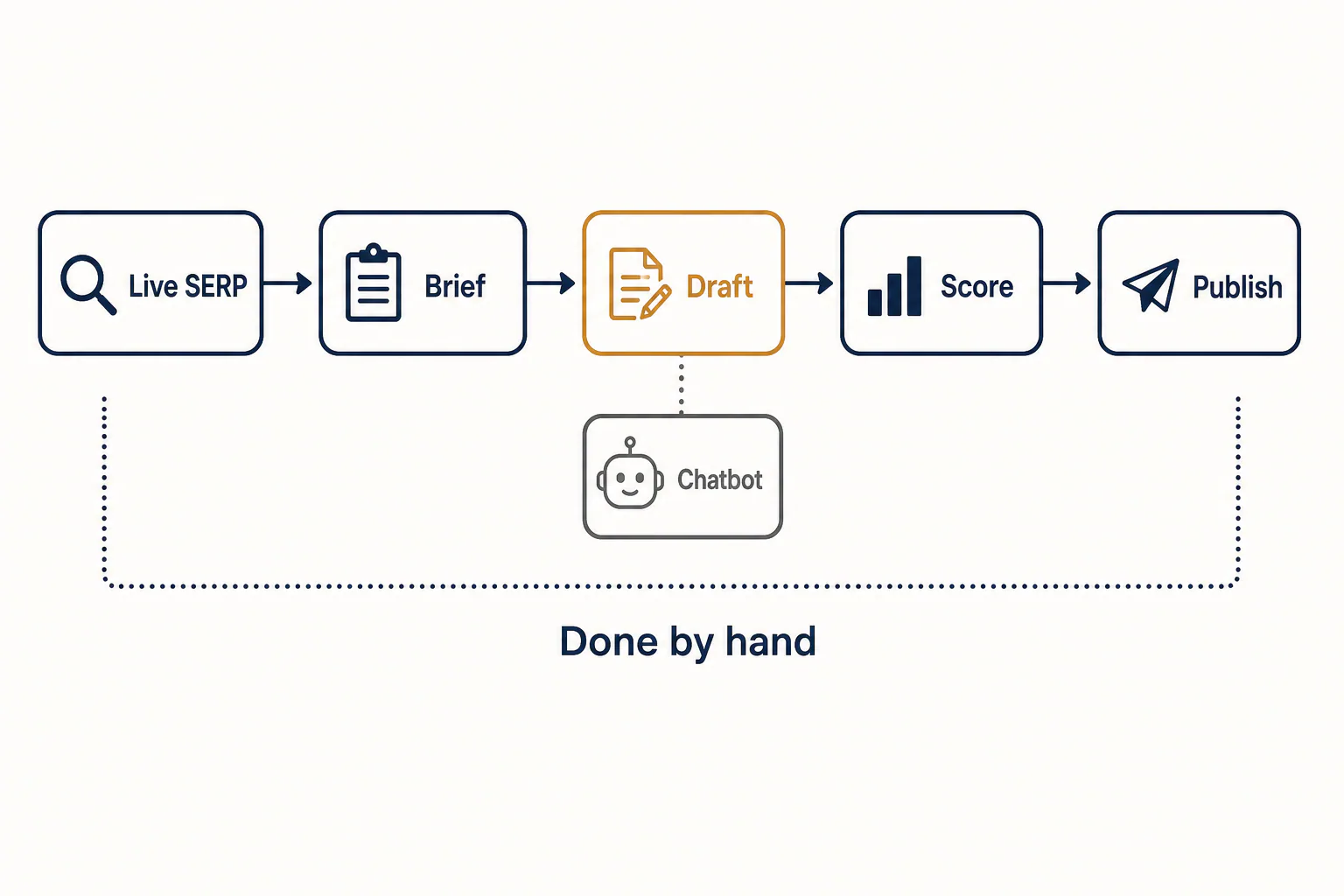
An AI SEO writing tool is worth paying for only if it does the work around the draft: researching what ranks today, building the brief from it, scoring your coverage, keeping facts traceable and publishing without copy and paste. Text generation itself is cheap now, since almost any model produces a long draft in seconds, so a powerful AI SEO writing tool has to earn its price elsewhere.
This checklist is for content leads, agency owners and freelancers who have already sat through a dozen demos and want a way to judge the next one. It covers what a dedicated tool must do that a chatbot cannot, seven tests to run before you pay, what the human edit has to catch, how to read free plans and pricing, and a one-keyword test that settles the choice in an afternoon. We build RankFlow, a platform in this category, so we say where it fits and where something else is the better pick.
What an AI SEO writing tool should do that a general chatbot cannot
A dedicated tool grounds every draft in live search data: what the top results cover, which terms they share, which questions they answer, and how your page measures up against them. A general chatbot writes from its training and whatever you paste in. It has no built-in view of the SERP and no way to measure coverage.
So what is the best AI for SEO optimization? No single product wins for everyone. The best one pulls current SERP and competitor data into the brief, scores your draft for keyword coverage, keeps every figure traceable to a source and fits the way your team publishes. A chatbot writes. A proper SEO platform researches, scores and ships.
SERP data and competitor research behind the draft
The draft is only as good as the research under it. A proper tool reads the pages ranking for your keyword right now and pulls their headings, length, shared terms and the questions they answer, ideally in real time. It then turns that competitor analysis into a brief before any writing starts. That step tells you whether the search wants a list of tools, a how-to or a price breakdown. Get the intent wrong and no amount of polished prose saves the page.
Ask the vendor two things. First, how fresh is the SERP data: pulled when you create the brief, or cached weeks ago? Second, which country and language does it read? A brief built on US results is the wrong brief for a client selling in Germany.
Optimization scoring and keyword coverage
Optimization scoring compares your draft with the ranking pages and turns the gap into a number. That is usually a content score plus a list of terms you use too little or too often. Surfer SEO, Clearscope and MarketMuse made this the standard way to grade a page. If Surfer is already on your shortlist, compare it with the main Surfer SEO alternatives sorted by what each one does best.
Treat the score as a coverage gauge, not a ranking forecast. A page can hit a high rating and still lose because it adds nothing the others lack. Use it to catch missing subtopics and keyword stuffing, and don't chase the last few points by forcing terms into sentences where they don't belong. A good tool updates the score in real time as you edit, so you see the effect of each change instead of re-running a report.
AI SEO writer or SEO content optimizer: the difference
An AI SEO writer generates briefs, outlines and drafts from a keyword. An SEO content optimizer grades a draft that you, a freelancer or another tool wrote. Most products on a shortlist are one of the four types below, or a mix of them.
| Type | What it does | Pros | Cons | Fits |
|---|---|---|---|---|
| General chatbot (ChatGPT, Gemini, Perplexity) | Writes and rewrites from your prompt | Cheap or free, fast, flexible | No SERP data, no score, invents figures | Ideas, rewrites, drafts from a brief you supply |
| AI SEO writer (Writesonic, Scalenut, Frase) | Builds briefs, outlines and drafts from a keyword | Fast draft generation tied to search results | Drafts still need heavy editing; brief quality varies | Teams that need volume |
| SEO content optimizer (Surfer SEO, Clearscope, MarketMuse) | Scores a draft against ranking pages | Clear coverage score, works with any writer | Writing help is secondary; easy to over-optimize | Editors polishing finished drafts |
| All-in-one content platform | Research, plan, write, publish, measure | One workflow, far less copy and paste | More to learn; pays off only if you use most of it | Agencies and multi-site teams |
Is ChatGPT, Gemini or Perplexity enough on its own?
For ideas, rewrites and short pieces, often yes. For pages meant to rank, not on its own.
- ChatGPT and Gemini write fluent drafts, but they don't see your keyword's SERP unless you paste it in. They have no optimization score, and they will produce plausible numbers with no source behind them.
- Perplexity searches the web and cites pages, which helps the research step. It doesn't build a brief, measure coverage or publish.
Teams that use a chatbot well treat it as one powerful stage: they paste in a real brief, the facts and the outline, then verify the output somewhere else. That works, but you become the integration layer, moving data by hand between four browser tabs.
Seven tests to run before you pay for an AI SEO writing tool
Run these seven tests during a trial and mark each one pass, partial or fail. Each check targets a place where the cons of a tool only show up after you have paid: a weak brief, output you can't steer, numbers you can't trace, or a publishing step that still means copy and paste. Treat the results as part of your content strategy, not a side note.
Does it build a brief from the current top-ranking pages?
Pass: it reads the live results for your exact keyword and market, then shows you the competitor outlines, shared terms and common questions as a brief you can edit. Fail: the "brief" is an AI-written list of headings with no visible link to what ranks. Open the brief and compare it with a manual Google search for the same keyword. If the two disagree on intent, stop there. Also test whether the brief groups competitor entities and headings into clusters, and compare that grouping with your own manual review of the top pages; this matters for outranking them.
Can you control the draft with your own outline, tone and sources?
Paste in your own outline and watch whether the tool keeps it word for word or quietly rewrites your headings. Then set a tone or brand profile and upload a page of real facts, such as prices, a case result or a product detail. A tool that passes uses those facts in the text. A tool that fails still writes "many businesses find that..." around them. Control over outlines and sources is what makes powerful content creation possible and stops the output from sounding like every other one.
Does it surface facts you can verify?
Every figure in a draft should either trace to a source you can click or be flagged for you to check. Ask how the tool labels search volumes and difficulty: measured from Google data, calculated from it, or estimated by a model. Third-party keyword numbers from SEMrush, Ahrefs or an AI model are estimates, and a tool that presents them as measured invites bad decisions about which keyword is worth chasing.
Does it connect to Google Search Console and your keyword data?
A Google Search Console integration tells the tool which queries you already appear for, often on page two, where a refresh beats a new page. Confirm that it reads clicks, impressions and position per page, and that its analysis feeds a keyword research tool inside the platform. Check too that it ties that data to the content plan instead of showing a separate dashboard. Without this, keyword research happens in one tool and results in another, and nobody sees which page earned its ranking.
Does it include a seo audit tool or site health checks?
Good writing does not rank on a site that blocks indexing or loads slowly. A built-in seo audit tool catches noindex tags, broken internal links, missing titles and slow templates that undo the work. You don't need separate SEO tools for crawling if the platform covers these basics. You do need one if it doesn't and you have nothing else in your stack.

Can it publish to WordPress without copy and paste?
Copy and paste loses formatting, image alt text, meta fields and schedules. A tool that passes sends the draft to WordPress, or to another CMS through a REST endpoint, with the <title> tag, meta description, category and featured image filled in. That integration should be powerful but controlled: publishing automation is only useful if you approve what goes live, where and when. Ask whether the content stays yours if you cancel, or sits in a format you have to export by hand.
Does it handle several sites, projects and team members?
Agencies and multi-site teams need separate workspaces or projects per site, each with its own tone and authors, so multi-site SEO content management stays in one place. They also need roles that stop a junior writer from publishing, review links for clients without logins, and one powerful overview that shows what is late across every site. Test this with two real sites, not the demo project.
Then add up your marks. A tool that fails the first or third check should go no further, however strong its other features look. Two partials elsewhere are normal, and you can weigh them against the pros you actually need.
| Check | What to verify in the trial | Pass / partial / fail |
|---|---|---|
| Brief from top-ranking pages | Live results, competitor outlines, entity and heading grouping | |
| Control of draft | Your outline, tone and facts kept | |
| Verifiable facts | Sources clickable, data labelled measured or estimated | |
| Search Console connection | Clicks, impressions and position tied to the plan | |
| Audit and site health | Noindex, broken links, titles, speed | |
| WordPress publishing | Meta fields, alt text and schedule arrive intact | |
| Sites and teams | Separate projects, roles, client review links |
Can AI write SEO articles that rank? What the human edit must cover
Yes, AI-assisted articles can rank, but rarely as raw output. What ranks is a draft built on real SERP research, then edited by someone who knows the subject and adds what the model could not: first-hand facts, current numbers and a clear point of view.
Google's stance on unhelpful AI content
Google's published guidance judges content by how helpful it is to people, not by whether a person or a model wrote it. What it acts against is content produced at scale mainly to manipulate search rankings, with little value for the reader. The risk for you is not an "AI" label. It is thinness: dozens of near-identical pages that say what every competitor already says.
That shifts the question from "will Google detect it?" to "would a reader choose this page over the ones it hopes to be outranking?" If the honest answer is no, more volume makes the problem bigger, and outranking those pages stays out of reach.
A fact-check and originality pass before publishing
Run this pass on every draft before it goes live. It takes less time than rewriting a weak page after it fails.
- Highlight every number, date, name and quote. Confirm each one against a source, or cut it.
- Check claims about laws, prices and product features against the official page, not another blog.
- Run a plagiarism scan on the full text. Repeated phrasing from competitor pages slips in more often than people expect.
- Add at least one thing only your business knows: a price, a process, a client result or a local detail.
- Read the intro and the conclusion aloud. If either fits any article on any topic, rewrite it.
We don't treat an AI-detection score as a quality signal. Grammar tools and a fact-check catch real defects; a detector score tells you nothing about whether the page helps anyone. Some vendors promote a pass rate on detectors because it is easy to show and sounds like safety. During a trial, treat that claim as marketing: ignore it, and judge the output by the edit time and the accuracy rating instead.
Where AI drafts usually fail (generic intros, invented stats, thin sections)
These patterns show up in drafts from almost every tool, so build the fix into your edit:
- Generic intros. Openings that restate the question. Fix: answer the search in the first sentence.
- Invented stats. Clean, specific percentages with no source. Fix: source them or delete them; never "round" an unsourced figure.
- Thin sections. A heading followed by three vague sentences. Fix: add a step, an example or a comparison, or merge the section into another.
- Copied structure. The same outline as the pages you want to be outranking. Fix: add a decision rule, a worked example or a table they lack.
- Stale facts. Model knowledge lags behind; real-time features such as web search reduce this but don't remove it. Fix: date-check anything about pricing, tools or rules.
The editor's analysis of these points is where AI content creation becomes publishable content creation, and it lifts quality more than any setting in the tool. Budget for it, because no tool skips this step for you.

Free plans, trials and pricing: what to compare
Compare the cost of one finished, publishable article, not the sticker price. Entry plans in this market commonly start with a 7-day free trial, and Starter tiers are quoted at around $49 a month, or $39 a month billed annually. What you get for that money varies far more than the price does.
Free tier limits that matter (word caps, credits, article counts)
Free plans and trials are built to show the pros and hide the limits until you need more. Before you start a trial, check the limits in the table below. They decide whether you can run a real test at all. Also confirm that the language and market you publish in are included before the trial ends, since tiers are often sold on 20+ or 50+ languages that may not cover yours.
| Limit | What to check | Why it matters |
|---|---|---|
| Word cap | Words per month, and whether edits and regenerations count | One long guide plus two rewrites can use a small cap in a day |
| Credits | What one brief, one draft and one score each cost | Credit systems make the true cost per article hard to see |
| Article or document count | Finished pieces allowed, and whether deleted ones count | Limits how many keywords you can test side by side |
| Brief and SERP lookups | Research runs per month and markets covered | Without them the writer works blind |
| Seats and sites | Users and projects on each plan | Agencies often hit this limit first |
| Features held back | Publishing, Search Console, export on paid plans only | You can't test the workflow you are actually buying |
Free alternatives and what you give up with them
You can assemble a free stack: Google Search Console for your own query data, a manual review of the top results for research, a free chatbot tier for drafting and a word processor for editing. Searchers who look for an "ai seo writing tool github" will also find open-source scripts that call a model through an API. Those trade a subscription for setup time and per-use model costs.
- Pros: no subscription, full control, fine for a few pieces a month.
- Cons: no scoring, no automated briefs, no publishing step, and every competitor check is manual. For a solo blogger that is manageable. For a team publishing weekly across clients, the hours cost more than any of these tools.
Reading monthly versus annual billing
Using the market's Starter rates, monthly billing costs $588 a year and annual billing costs $468, a calculated saving of $120. That is real money, but annual plans lock you in for twelve months. Pay monthly until the tool has passed the one-keyword test below and at least one month of real publishing. Then switch, and check what happens to unused credits and to your content if you cancel. Read the plans page for overage pricing too, because a cheap tier with expensive top-ups can cost more than the next tier up.
What RankFlow offers: the 7-day free trial and Starter plan at $49/month ($39/month billed annually)
Those figures match the entry pricing quoted across this market: a 7-day free trial and a Starter plan at $49 a month, or $39 a month billed annually. The trial week is long enough to run the full test in the next section on one of your own sites.
RankFlow is one workspace for SEO content: keyword research, competitor gaps, content plans, AI-assisted article writing, publishing to WordPress and Search Console reporting. It covers the whole content workflow, from research to publishing and measurement, so the checks above happen in one place instead of four. Articles are written from your content profile, your authors and what currently ranks. Numbers are labelled as measured, calculated or estimated, so you always know which keyword data came from Google and which is a model's guess.
For the audit step, the Site Health module runs about 115 tests per scan across security, privacy, SEO and indexing, performance, accessibility and DNS. The quality score on drafts is computed from eleven checks. None of this guarantees rankings or traffic. It gives your editor a measured starting point and keeps publishing under your control.

Test the tool with one real keyword before you commit
A demo shows a tool at its best on a keyword the vendor picked. One real keyword of yours, run through two tools under the same conditions, shows you the output you will actually be editing for the next year.
Set up the same brief in two tools
Pick a keyword you plan to target this quarter, ideally one where you already have a page on page two in Search Console. Then:
- Write down the intent and the outline you would use without any tool.
- Create the brief in both tools with the same market, language and target length.
- Give both the same three facts from your business and the same tone notes.
- Generate a full draft in each, with no manual edits yet.
- Time the whole setup, from keyword to finished draft, in each platform.
Score the output: structure, accuracy, edits needed
Rate each draft from 1 to 5 on the criteria below. This is our own rubric for the test, not an industry standard. Keep the rating honest by scoring before you look at the tools' own content scores, and add up each tool's rating at the end.
| Criterion | What to check | Rating 1-5 |
|---|---|---|
| Intent match | Does the structure fit what ranks for this keyword? | |
| Outline control | Did it keep your headings? | |
| Accuracy | Unsourced or wrong figures found | |
| Your facts | Did it use the three facts correctly? | |
| Edits needed | Minutes of editing to reach publishable | |
| Publishing | Did it reach WordPress with meta fields intact? |
The edits row usually decides it. A tool that saves ten minutes on generation and costs forty in editing is the slower tool. Write down the time each draft needed rather than estimating it afterward.

A decision rule by team: solo blogger, startup, agency, multi-site team
The best SEO tools for your situation depend less on features than on how many pages you publish and for how many sites. Use this rule as a starting point for your strategy:
- Solo blogger: choose a free chatbot plus Google Search Console and a manual SERP review if you publish a few pieces a month. Add an optimizer such as Surfer SEO once you publish weekly and want a coverage score.
- Startup: choose an AI writer with SERP-based briefs, such as Frase or Scalenut, if one marketer owns content creation and needs speed. If you want to build custom content automation chained across several models, look at a workflow builder such as AirOps.
- Agency: choose an all-in-one platform with roles, client review links and publishing, so research, writing and reporting don't live in separate SEO tools and spreadsheets.
- Multi-site team: choose a workspace with one cross-site overview and a separate content profile per site. That is the case RankFlow is built for.
Whichever type you shortlist, run the one-keyword test on two of them this week, score both outputs with the rubric, and only then pick a plan that fits your strategy. If RankFlow is one of the two, the trial covers the whole test from brief to published page.
Frequently asked questions
Is there a free AI SEO writing tool?
Is there a free AI SEO writing tool?
Several tools have free tiers or trials, but free plans usually cap words, credits or articles, and they often hold back publishing and Search Console features. A free chatbot combined with Google Search Console and a manual review of the top results does the job for low volume. You give up automated briefs and scoring, so the research takes longer per page.
Which AI is better than ChatGPT for writing?
Which AI is better than ChatGPT for writing?
For general prose, ChatGPT, Gemini and Claude-class models are close, and the choice often comes down to taste. For SEO writing, the better option is a tool that adds what ChatGPT lacks: live SERP data, a brief built from ranking pages, coverage scoring and publishing. The model matters less than the research and editing around it.
Can a beginner do SEO with an AI writing tool?
Can a beginner do SEO with an AI writing tool?
Yes, a beginner can publish useful pages with one, as long as they learn the basics alongside it: search intent, how a brief works and how to read Search Console. The tool speeds up research and drafting. It doesn't replace judgment about which keyword to target or whether a draft is accurate, so beginners should keep the fact-check pass strict.
How much do AI SEO writing tools cost?
How much do AI SEO writing tools cost?
Entry plans in this market commonly start with a 7-day free trial, and Starter tiers are quoted at around $49 a month, or $39 a month billed annually. Higher tiers add seats, sites and credits. Compare the cost per publishable article, including editing time and overage charges, rather than the monthly price alone.
Do I need generative engine optimization (GEO) features?
Do I need generative engine optimization (GEO) features?
Generative engine optimization aims to get your pages cited in AI answers from engines such as Google's AI overviews, ChatGPT and Perplexity. Most of what helps there is what helps classic search: clear direct answers, sourced facts, good structure and pages that stay indexable. Dedicated GEO features are useful for monitoring, but they are not a reason to pick a tool that fails the seven checks.