
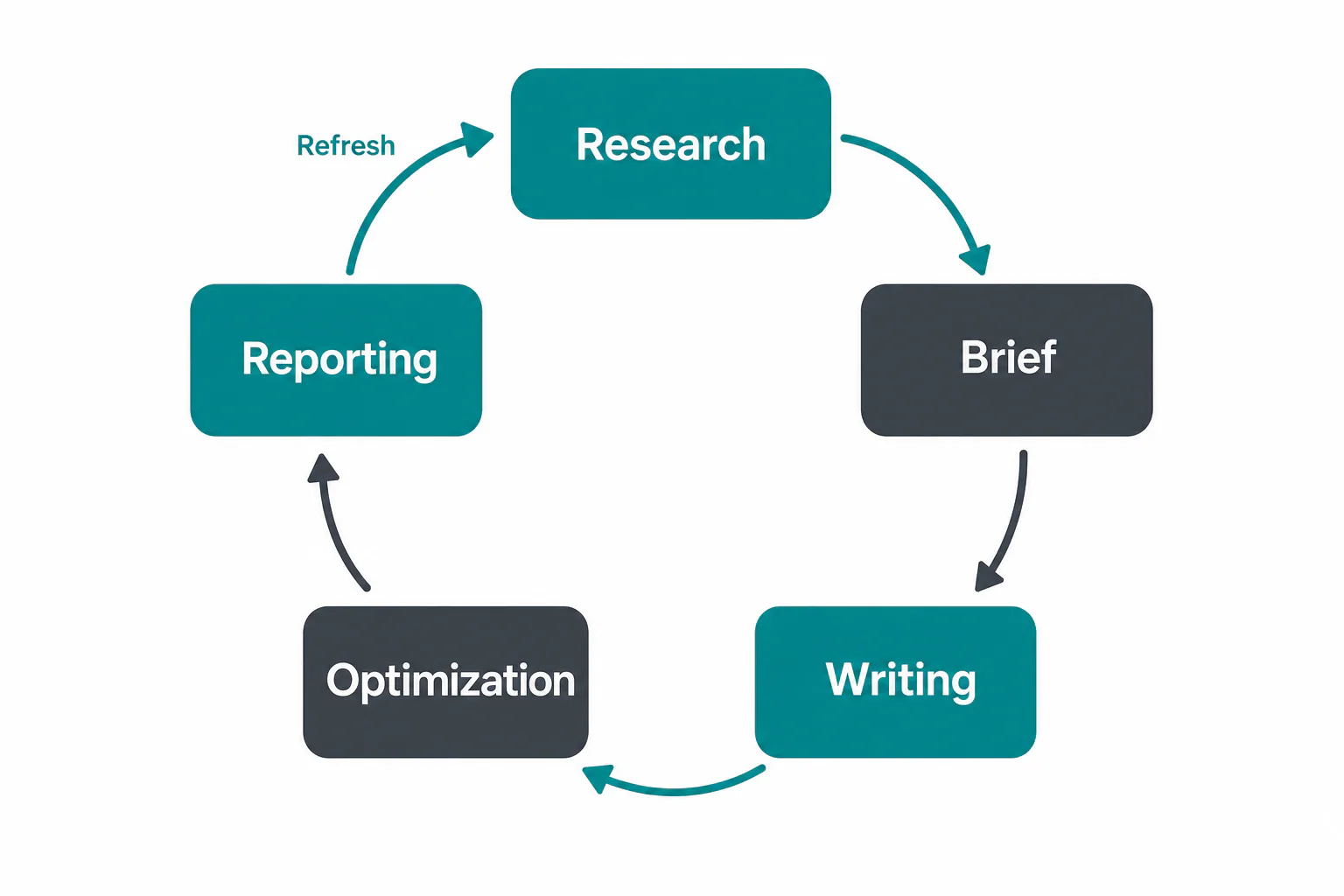
SEO content software covers the work between a keyword and a published, measured page: research, briefs, writing, optimization and reporting. To pick the right one, decide which of those jobs the tool has to own, then compare candidates on how well they fit your workflow and what they cost at your real volume, not on the length of their feature list.
Most “best of” lists put content editors, rank trackers and backlink suites in one ranking, which compares tools that do different jobs. We start by separating them. Then we map tool types to team types, explain what pricing really depends on, follow one article from audit to publication and finish with a two-week trial plan you can run yourself.
What SEO content software does (and what it does not)
SEO content software helps you decide what to publish, write it well and see what it earns in search. It does not build links, fix your hosting or replace a technical crawler, and a good buying decision starts with keeping those jobs apart.
The short definition: research, briefs, writing, optimization, reporting
Each part of the job answers its own question:
- Research: which keywords and topics are worth a page, and which ones you already cover.
- Briefs: what the top results cover, which questions searchers ask, which headings and terms belong in the article.
- Writing: drafting, either by your writers inside an editor or with AI assistance.
- Optimization: checking the draft against what ranks, from term coverage to headings and internal links.
- Reporting: clicks, impressions and positions per page, so you know what to refresh.
An SEO content platform runs all five in one place. A point tool owns one or two, usually briefs and optimization, and expects the rest to happen elsewhere.
Content tools versus general SEO suites
Content tools look at one page at a time; general suites look at the whole domain. Content optimization tools such as Surfer SEO, Clearscope, Frase and MarketMuse compare your draft with the pages that rank and tell you what is missing. Suites such as Semrush, Ahrefs and SE Ranking are built around a keyword database, a site audit, backlink analysis and rank tracking, with content modules added on top.
The rule is simple: if your bottleneck is writing better pages faster, start with content tools. If you also need domain-level technical and authority data, a suite or a workflow platform makes more sense than SEO content software alone.
Where backlink tools and rank trackers fit
Backlink tools and rank trackers measure authority and position; they do not help you write. Backlink analysis explains why a competitor with a weaker article still outranks you. Both belong among your SEO tools, next to your content work. A list that puts a backlink checker beside a content editor compares a thermometer with an oven.
The core features to compare
Six features decide most choices, and for each one the useful question is not “does it have it?” but “how does it work, and where does the data come from?” SEO content software looks similar in a demo; the differences show up in these details.
Keyword research and topic mapping
Good keyword research gives you volume, keyword difficulty and intent, then groups keywords into topic clusters so one page targets one intent. Check where the numbers come from: Google data, clickstream panels or AI estimates. In our own product, numbers are labeled as measured, calculated or estimated. Weak topic mapping shows as two articles competing for the same search.
Content briefs and NLP term suggestions
A content brief turns search results into instructions: shared headings, questions people ask, terms to cover and a target length. NLP suggestions come from the ranking pages, so they are only as good as those pages. Look for an editable brief, the list of source URLs and room for your own facts, which makes content optimization more than vocabulary.
Content scoring and what a score can and cannot promise
A content score measures how closely your draft matches the term coverage and structure of pages already ranking. It cannot measure backlinks, brand authority, accuracy, freshness or whether you answer the search better. Use it as a coverage check, never as a forecast. A page can score high and stall, and a page with a modest score can rank because it answers the question first and its site has authority.
AI-assisted writing and its search-quality risks
AI writing saves drafting time, but generic output carries risk. Google’s spam policies treat mass-produced pages made mainly to manipulate rankings as scaled content abuse, whatever tool produced them. Good SEO content software lets the writer draw on your own facts, authors and voice, and every draft should pass a human edit. Skip “humanizer” and detection-evasion tools; they change how text looks to a detector, not whether it helps a reader.
Publishing, CMS integration and WordPress workflow
Publishing is where many stacks still rely on copy and paste. A WordPress plugin or REST connection should send the article with headings, images, meta title and description intact, as a draft or on a schedule you choose. Check two things: who can press publish, and whether the content lives in your CMS or only inside the vendor’s system. If you cancel, your articles should stay where they are.
Performance tracking with Search Console data
Google Search Console shows clicks, impressions, average position and the queries each page appears for. Performance tracking built on it tells you which articles gain visibility and traffic, which show content decay and which rank on page two and need a refresh. Prefer tools that connect this analysis to the article itself, so a refresh starts from the page that needs it.
AI search visibility tracking is a newer feature to check. It measures whether your brand or page is cited in AI-generated answers, which is a different question from Search Console position data, where you see where a page ranks for a query. Treat it as a supplement and check how the tool collects its samples.
All-in-one platform or separate tools?
One workspace wins when handoffs between tools are your bottleneck; separate tools win when one job needs more depth than any workspace offers. Most groups that replace a patchwork are solving the first problem, so start there with a clear strategy.
What a single workspace saves you
An all in one SEO tool removes the steps between tools: exporting keywords to a spreadsheet, pasting a brief into a document, copying a draft into WordPress and pulling Google data into a report. Every handoff risks the wrong version going live or a client comment getting lost. For agencies, one login per person across every client website also replaces shared passwords. The difference shows most at reporting time.
Where specialist tools still win
Specialists keep the edge where depth matters more than convenience. Large backlink indexes for link building and digital PR, enterprise-scale technical crawls of sites with millions of URLs, and daily rank tracking across thousands of keywords and locations are jobs where dedicated tools usually go further. If link building or deep technical SEO is a core service you sell, keep the specialist for that job and consolidate the rest.
A simple stack cost check for agencies and multi-site teams
You can compare your current stack with a single workspace in half an hour. Work through these steps with your own invoices:
- List every tool in the content workflow: keyword research, briefs, writing, optimization, publishing, reporting.
- For each, write the monthly cost at your real usage: seats times seat price, plus add-ons, plus credits you buy on top.
- Estimate hours per month spent moving data between tools, and multiply by your internal hourly cost.
- Add the cost of each new client site: extra projects, extra seats, extra tracked keywords.
- Price the single-workspace alternative at the same volume, and keep any specialist you would still need.
The handoff hours are the line most teams leave out, and for multi-site agencies they often decide the outcome.

Which type of tool fits which team
The right choice depends less on the tool than on how many sites you run and how many people touch each article. Use the rule in each subsection, then shortlist two or three tools.
Solo writers and freelancers
Choose a single scoring and brief tool, plus free Google data. You write the article yourself, so you need fast SERP analysis and term coverage, not approval flows. Keep the monthly bill low, avoid annual contracts until the tool has earned its place, and lean on Search Console for performance data instead of a paid tracker.
In-house content teams
Choose a tool with shared briefs, editing roles and a clear approval step. An in-house team usually runs one brand on one site, so voice and accuracy matter more than raw volume. Look for a way to store brand facts and author details once, so every brief and draft uses them, and for a content plan everyone can see.
Agencies and multi-site operators
Choose a workspace with per-client separation, roles, client review links and a cross-site view of what is late or waiting, the core of multi-site SEO content management. Your strategy fails less often on research than on coordination: ten clients, ten schedules, ten approval habits. Check how pricing scales per site, because a tool that is cheap for one site can double with the fifth.
Enterprise teams
Choose for governance and scale: single sign-on, API access, audit logs and inventory-level analysis of thousands of URLs. Enterprise teams often pair a content intelligence tool with a suite and their own BI dashboards. Search visibility across markets and languages, plus security review, will shape the shortlist more than any single feature.
SEO content tools by use case
Group the candidates by the job they do best, and the shortlist sorts itself. Every SEO content software option below is real and widely used; we describe what each is built for, not test results, and plans change often, so check current terms with each provider.
Scoring and optimization specialists (Surfer SEO, Clearscope, Frase, MarketMuse)
These are content optimization tools first. Surfer SEO pairs a content editor with a live score, NLP terms, AI drafting and audits against ranking competitors. Clearscope offers clean term reports and letter grades, with Google Docs and WordPress integrations. Frase builds briefs quickly at a lower entry point. MarketMuse models whole topics and inventories, which suits planning at scale. Shared cons: limited keyword data, no publishing workflow, and scores that are easy to over-trust.
Broad SEO suites with content modules (Semrush, Ahrefs, SE Ranking)
Suites start from keyword databases, site audit, backlink analysis and rank tracking. Semrush adds a writing assistant and AI drafting. Ahrefs is best known for its backlink index and keyword explorer. SE Ranking covers rank tracking, audits and backlink checks with a content add-on. Their cons for editors: content features are secondary, seats and add-ons raise the bill, and writing often still happens elsewhere.
AI-first content generators such as Writesonic and Scalenut own the drafting job: they produce first drafts and content quickly from a prompt or outline. Check how they handle your own facts, whether a separate step covers content optimization against ranking pages, and whether a human edit is built into the process.
Workflow platforms that cover audit to publishing (RankFlow)
This group connects the steps rather than going deepest on one. RankFlow is our product, so read this part knowing that. It is one workspace for SEO content: keyword research, competitor gaps, content plans, AI-assisted article writing, publishing to WordPress and Search Console reporting. The idea is to run the whole SEO content workflow from research to publishing and measurement in one place.
Articles are written from your content profile, your authors and what currently ranks, our answer to generic AI text, and this is how we approach SEO content software. Numbers are labeled as measured, calculated or estimated. Site Health runs about 115 checks per scan across security, privacy, SEO and indexing, performance, accessibility and DNS. Articles publish to your own WordPress, REST endpoint or hosting. The cons: our backlink analysis is not where a dedicated link index is, so link-building agencies will keep a specialist.
Free and budget starting points
You can start with almost no budget. Google Search Console gives real clicks, impressions and queries; Google Keyword Planner gives volume ranges; the free Yoast SEO plugin checks titles, meta descriptions and readability. These SEO tools suffice to test briefs on a few articles. What free setups lack is the connection between steps.
SEO software comparison: criteria and a scoring table
A fair SEO software comparison states its criteria and its limits before it compares anything. Here are ours, followed by a table you can adjust to your own priorities.
How we judge tools, and what we did not test
We did not run hands-on tests of competitor products for this guide, and we publish no performance scores for them. The comparison draws on what each provider documents about its features and on how the tools are positioned in the market. Judge every candidate on these criteria, scoring each 1 to 5 during your trial:
- Workflow coverage: how many of the five jobs it handles without exports.
- Data transparency: whether keyword and traffic figures are labeled by source.
- Brief and draft quality: whether output uses your facts, not only competitor terms.
- Publishing and ownership: whether articles land in your website’s CMS and stay there.
- Multi-site handling: separation, roles and client review.
- Pricing at your real volume, not the entry plan.
Double the score of the two criteria that hurt most in your current setup. For a marketing agency that is usually multi-site handling and pricing; for a solo writer, brief quality.
A comparison table by feature, team fit and limits
The table sums up each tool’s main strength, the team it fits best and its main cons, based on documented features:
| Tool | Main strength | Best fit | Main cons |
|---|---|---|---|
| Surfer SEO | Live content score, NLP terms, AI drafts | Freelancers, content teams | Credit limits on drafts and audits; scores easy to over-trust |
| Clearscope | Clean term reports and grades, Docs integration | In-house editorial teams | Little keyword or technical data |
| Frase | Fast SERP-based briefs, budget entry | Solo writers, small teams | Shallower data than suites |
| MarketMuse | Topic and inventory modeling | Large content programs | Steeper learning curve |
| Semrush | Keyword database, site audit, writing assistant | Marketing teams needing breadth | Seats and add-ons raise cost |
| Ahrefs | Backlink index, keyword explorer | Link-focused SEOs | Content features secondary |
| SE Ranking | Rank tracking, audits, value for money | Small agencies | Content module is an add-on |
| RankFlow | Audit to publishing in one workspace | Agencies, multi-site operators | Lighter backlink analysis than link specialists |
What SEO content platform pricing really depends on
SEO content platform pricing depends on four meters: seats, credits, sites and article limits. The price on the pricing page is the cost of the smallest plan, and almost no team stays on it, so model the meters before you compare SEO content software by numbers.
Seats, credits, sites and article limits
Seats decide who can log in; an agency with writers, editors and a client contact can outgrow a seat limit in a week. Credits meter actions such as audits, AI drafts or briefs, and one article can use several. Site limits cap domains, keyword limits cap reports, and article limits cap monthly drafts. Ask which you would hit first.
Plan tiers and price jumps to watch for
Price jumps arrive at predictable points: from a solo plan to a team plan, when API access or white-label reports enter, and per-site fees past a set number of client sites. Annual billing lowers the monthly figure but locks you in. Watch for features that need a paid add-on, such as deeper site audits or competitor tracking.
What to ask in a quote or trial
Send the same questions to every provider, so answers are comparable:
- What does one article cost in credits, from brief to final optimization?
- What happens when we run out of credits mid-month?
- How is each extra client site priced?
- Can clients review drafts without a paid seat?
- Which numbers are measured and which are estimated?
- If we cancel, what stays in our CMS and what can we export?
A worked example: from audit to published article
Here is how one article moves through a connected workflow. The client is illustrative: an online shop selling standing desks, run by an agency that manages several other sites. The steps follow how we run them in RankFlow.
Start with the audit and a keyword target
The agency starts with a site audit. Site Health runs about 115 checks per scan across security, privacy, SEO and indexing, performance, accessibility and DNS, and flags two unindexed product guides and a slow category page. Those fixes go to the developer first, because a new article on a site with indexing problems starts behind. Next comes keyword research: the agency picks a question about desk height, checks keyword difficulty and confirms which figures are measured or estimated.
Build the brief and write the draft
The brief comes from the pages that currently rank: headings, questions and shared terms. Add the shop’s own facts, such as desk models and height ranges in centimeters, because articles are written from your content profile, your authors and what currently ranks. The draft then says something competing pages cannot, and the audit to content brief workflow stays connected.
Check an AI-written article before publishing
An editor reads the draft against a short list: does it answer the question in the first two sentences, is every figure traceable to the client, does it sound like the shop, and is anything promised that the shop does not offer? The quality score comes from eleven checks and catches structural gaps; the human pass catches wrong facts and tone. The client approves one change via a review link.
Publish and measure the result
The article goes to the client’s WordPress as a scheduled post, with title, meta description and images in place. A few weeks later, Search Console data shows the queries it appears for and its average position. If it sits on page two, the next step is a refresh, not a new article.

Mistakes to avoid when choosing a platform
Most bad choices come from three habits, and each has a simple fix you can apply during the trial.
Buying for the feature list instead of the workflow
A long list of features looks like value, but you pay for every feature you never open. Map your real workflow first, step by step, from keyword to report, and mark where work stalls today. Then test only whether the tool removes those stalls. A team whose problem is client approvals gains nothing from a fourth rank tracking view.
Treating a content score as a ranking guarantee
A high score means your draft covers what ranking pages cover; it says nothing about links, authority or how well you answer the search. Teams that chase a perfect score often stuff terms and make the article worse. Set a reasonable target, then judge success by ranking and clicks in Search Console, not by the score.
Ignoring the cost at real usage
The entry plan rarely survives the first month of real work. Count articles, sites, seats and tracked keywords at your current volume, then add the growth you expect this year. Include tracking and reporting add-ons in that count. If the cost doubles with your next two clients, you want to know that before signing an annual contract.
Chasing AI visibility claims
If your goal is organic rankings, do not let AI search visibility claims drive the purchase. Judge tracking features by the jobs you need done, not by the newest label.
How to run a two-week trial
Two weeks is enough to test a tool on real work if you plan the trial before it starts. Pick one live client site and three articles: one new, one refresh and one that needs a technical fix.

The test checklist
Work through this list with the same three articles in every tool you trial:
- Connect Google Search Console and check that clicks and impressions match what Google shows directly.
- Run a technical audit and see whether its findings are clear enough to hand to a developer.
- Research one keyword and check which figures are labeled measured and which estimated.
- Generate a brief and see whether you can add the client’s own facts.
- Write or generate a draft and count how many sentences you had to rewrite for voice and accuracy.
- Check what backlink and competitor data you get, and whether you still need a separate tool for it.
- Publish to WordPress as a draft and inspect headings, images and meta fields.
- Send a client review link and see how comments come back.
- Pull a traffic report for one page and time how long it takes.
- Note every credit used, so you can price a full month.
Deciding with a simple rule
Choose the tool that removed the most handoffs from your checklist at a monthly cost you could still afford with twice your current number of sites. If two tools tie, pick the one whose drafts needed fewer rewrites, because editing time is the cost that never shows on an invoice. If you want to run that trial with RankFlow, the next block shows how to get started.
Frequently asked questions
What are SEO optimization tools?
What are SEO optimization tools?
SEO optimization tools are software that help a website rank better in search engines. They research keywords, audit technical issues, compare your content with pages that already rank, suggest terms and headings, track positions and report traffic. Some cover one job, such as content scoring or backlink analysis, while broader tools combine several in one workspace.
Which platform is best for SEO?
Which platform is best for SEO?
No single tool is best for every team. Solo writers usually do well with one scoring and brief tool plus free Google data. Link-focused SEOs lean toward suites with large backlink indexes. Agencies running several client sites gain most from a workspace that connects research, writing, publishing and reporting. Decide which job causes the most friction, then compare tools on that job.
Which SEO content tool is cheapest?
Which SEO content tool is cheapest?
The cheapest setup is free: Google Search Console, Google Keyword Planner and the free Yoast SEO plugin. Among paid tools, entry plans change often and differ in what they meter, so compare the cost of producing your real number of articles per month, including credits and seats. A low entry price with tight credit limits can end up costing more than a higher plan.
Is Surfer SEO better than Clearscope?
Is Surfer SEO better than Clearscope?
They suit different teams more than one beats the other. Surfer SEO adds AI drafting, page audits and a live score in one editor, which suits writers who want speed. Clearscope keeps its focus on clear term reports and grades inside Google Docs, which suits editorial teams with established writers. Trial both on the same article and compare how much editing each one leaves you.
Can AI tools write SEO content that ranks?
Can AI tools write SEO content that ranks?
AI-assisted articles can rank when they are accurate, answer the search well and carry facts readers cannot find elsewhere. What fails is mass-produced text with generic advice and no editing; Google’s spam policies target scaled content made mainly to manipulate rankings. Use AI for the draft, feed it your own facts and voice, and keep a human edit before every publish.
What is the 80/20 rule in SEO?
What is the 80/20 rule in SEO?
The 80/20 rule, or Pareto principle, says a small share of effort produces most of the results. In SEO it usually means a few pages and keywords bring most of your traffic, so refreshing and strengthening those pays off before producing new articles. Treat it as a rule of thumb for setting priorities; your Search Console data shows where the split really falls for your site.