
OpenAI Ads Manager is OpenAI's self-serve platform for creating, launching and managing ad campaigns inside ChatGPT. You sign up, verify as an advertiser and add billing. Then you build campaigns through a guided flow or a bulk upload, bid on a CPC or CPM basis, and your ads reach people based on the context of their conversation rather than on static keywords alone.
The platform is new, and parts of it are still labeled beta. That makes it worth knowing which features you can plan a budget around today and which ones you should test on a small scale first. Below, we mark the difference wherever it matters, since a first ChatGPT campaign is judged on very little data.
What ChatGPT ads are and how they differ from keyword ads
ChatGPT ads appear while a person researches or decides something in a conversation, and the OpenAI Ads platform matches them using context signals from that conversation. On Google Ads, you bid on keywords a person types. In ChatGPT, the question is often longer and spread over several messages, so the system reads what the person is trying to do, not only the words they used.
For someone who runs SEO content, this feels familiar. Picture a person asking ChatGPT to compare project tools for a five-person team. They are in the same spot as a searcher typing "best project tool for small teams." The difference is that you don't get a keyword list to bid against. Your ad copy and landing page have to match the intent clearly enough for the system to place them.
Here is how the confirmed parts and the beta parts split, as OpenAI and its help pages present them:
- Confirmed and available to self-serve advertisers: sign-up with advertiser verification, billing setup, the guided campaign flow, CPC and CPM bidding, conversion-optimized campaigns, product feeds, bulk CSV upload, reporting, team permissions, API keys and change logs.
- Still beta or only announced: multi-image ads, the Ads Manager Beta interface itself, and the automatic landing page enhancements OpenAI has announced.
OpenAI keeps changing how ChatGPT itself is packaged, as our piece on the merged chat and work modes under a shared token budget shows, so check the help center before you rely on a beta feature.
How to sign up, verify and add billing
Sign-up happens at ads.openai.com, and it has three required parts in this order. You create the account, pass advertiser verification, then set up billing. You can't launch anything until all three are done, and verification is where most new advertisers stall.
Verification asks you to prove who the business is. Have the legal company name, the website you will advertise and the person responsible for the account ready before you start. An agency signing up on behalf of a client should decide first whose name the account sits under, because that decision follows the account into billing and permissions later.
Billing comes next. Use a payment method the business owns, not a team member's personal card, so access doesn't break when someone leaves. Once the account exists, the OpenAI Ads Manager login runs through your OpenAI account, so the same rule applies there. Use a shared business identity with named users added under it, not one person's private login passed around the team.
Budget rules and country availability
Budgets are set per campaign, not per account. Each campaign has a daily minimum, and that minimum varies with the currency you are billed in, so check the figure the form shows for your currency before you plan a test. Self-serve has no minimum lifetime spend, which means you can stop a campaign after a few days without owing anything beyond what it spent.
Whether you can buy through self-serve at all depends on the country of the billing entity, not on where your customers are. An agency billing from one country for a client registered in another should confirm availability for the entity that actually pays before verification starts.
How do I set up an OpenAI Ads Manager campaign?
A first campaign is fastest through the guided onboarding flow, which can draft ads straight from your website URL. Every build follows the same hierarchy. The account holds billing and users, a campaign holds the objective and budget, an ad group holds the bid and targeting, and each ad sits inside an ad group. The whole route looks like this:
- Log in at ads.openai.com and finish advertiser verification and billing.
- Start the guided flow and enter the URL of the page you want to promote.
- Review the ads drafted from that page and rewrite anything that sounds generic or misstates your offer.
- Choose the campaign objective (Reach, Clicks or Conversions), which sets whether you bid CPM, CPC or oCPC.
- Set the daily budget and the run dates.
- Set the max bid for the ad group, using the bid guidance the form shows.
- Connect tracking (GA4, HubSpot or the Conversions API) if you plan to optimize for conversions.
- Submit the ads for review and wait for approval before they go live.
Step three deserves real time. Drafts built from a URL pick up whatever the page says, so a vague homepage produces vague ads. Point the flow at a specific product or service page with clear facts on it, not your homepage.
Review is a normal step, not a sign that something is wrong. Plan your launch date with a buffer of a day or two, especially if the campaign is tied to a sale or an event.
Guided flow or Ads Manager Beta first
Start with the guided flow if this is your first ChatGPT campaign. Move to the OpenAI Ads Manager Beta interface once you know what you want to control by hand. The guided flow makes most decisions for you and drafts the ads. The Beta interface exposes more settings. That helps when you run several campaigns side by side and want to compare them.
Most of those extra settings sit at the ad group level. In the Beta interface you can add context hints, short descriptions of the kinds of conversations where your ad should appear, and adjust audience settings that narrow who sees it. The guided flow fills these in for you from your page, so a manual campaign is mainly a chance to write them yourself and see whether sharper hints change the results.
A sensible test is one small campaign built through the guided flow, left running long enough to collect clicks, then a second campaign built in the Beta interface for the same page. Compare how much work each took and whether the manual settings changed anything you can measure. The Beta interface is the wrong place to start if nobody on the team has time to watch it daily, because beta features can change while your campaign runs.
CPC or CPM for your first ChatGPT campaign
Choose CPC if you want visits and sign-ups, and CPM if you want as many people as possible to see your brand. With CPC you pay when someone clicks. With CPM, which the campaign form lists as the Reach objective, you pay per thousand impressions, whether or not anyone clicks. Either way, the amount you enter is a max bid per click or per thousand impressions, and the form shows bid guidance next to it.
For most first campaigns, CPC is the safer pick. You pay only for people who showed enough interest to leave ChatGPT and land on your page, and that keeps the cost tied to something you can see in GA4 or your CRM. It suits a SaaS trial page, a lead form or a product page.
CPM suits a different case. A brand that launches a new product and wants to be present in conversations where buyers compare options may care more about being seen than about the click itself. CPM is the wrong choice when the budget is small and you have no way yet to measure brand lift, because you will pay for exposure you cannot connect to any result.
The practical sequence for a cautious team is CPC first, for two to four weeks, until you know your click-through rate and what a click turns into. Only then test a CPM campaign next to it, on the same landing page, so the comparison is fair.
There is also a third model, oCPC, behind the Conversions objective. You still pay per click, but the system optimizes delivery toward people likely to convert. It only works once conversion tracking is recording events through the OpenAI pixel, GA4 or the Conversions API, so treat it as the step after a CPC campaign, not the starting point.
Ad formats and their status
OpenAI Ads Manager offers three main ways to build ads, and one of them is still in beta. The table shows what each one fits and how far along it is.
| Format | Best for | Status | What to watch |
|---|---|---|---|
| Conversion-optimized campaigns | Sign-ups, purchases, leads | Available | Needs working conversion tracking to optimize toward |
| Product feed campaigns | Stores with many products | Available | Not supported by bulk CSV upload |
| Multi-image ads | Visual products, several variants | Beta | Behavior and reporting may change during the test |
A conversion-optimized campaign without tracking is just guessing. If neither GA4 nor the Conversions API is connected yet, start with a plain click campaign and switch once conversions are being recorded.
Bulk CSV upload and product catalogs
Bulk CSV upload lets you create many standard campaigns at once, but it does not support product-feed campaigns. That limit changes how a larger catalog should be set up, and it is easy to miss until you try.
A store with hundreds of products should split the work in two. Product listings go in through a product feed, connected from Shopify or your feed tool, so prices and stock stay in sync. Category campaigns, brand campaigns and campaigns for individual landing pages go in through the CSV, where you can build dozens of rows in a spreadsheet and upload them together.
A common mistake is preparing one giant CSV with every product as its own row. It will either fail or create standard ads that don't update when a product goes out of stock. Keep the CSV for campaigns that don't depend on live product data.
Tracking, integrations and reporting delays
OpenAI Ads Manager connects to GA4, HubSpot, the Conversions API and Shopify, and there is a ChatGPT Ads Manager plugin for product data. The OpenAI pixel is the self-serve conversion tag you place on your site to record conversions directly. GA4 shows what ad visitors do on your site. HubSpot ties clicks to leads and deals. The Conversions API sends conversion events from your server, and Shopify supplies the product feed.
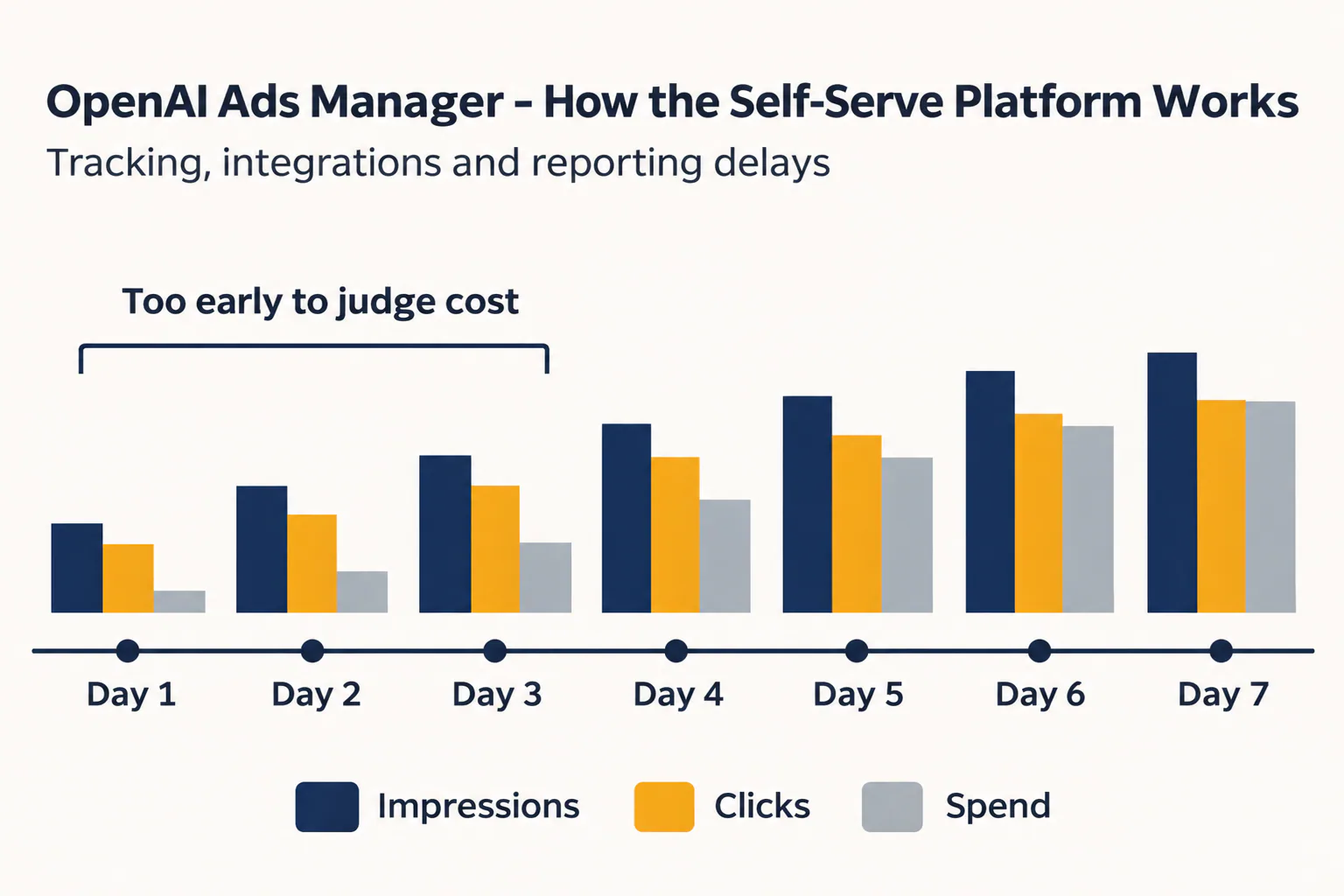
Spend data appears later than impressions and clicks, and that is the main trap in the first week. On day two you may see plenty of clicks and a spend figure that looks too low, so the cost per click seems excellent. A day or two later spend catches up, and the same campaign looks very different.
We handle numbers like this the way we label them in RankFlow, where each figure is marked as measured, calculated or estimated. Sort your first-week ChatGPT figures the same way:
- Measured: impressions and clicks, which refresh quickly and you can trust early.
- Calculated: cost per click and cost per conversion, which are only as current as the spend behind them.
- Estimated: anything projected from a few days of partial spend, such as expected monthly cost.
Don't base budget decisions on calculated figures until spend has settled. If you keep an AI ads tracker sheet for clients, add a column that marks each number's type and the date it was pulled. A running AI ads index across clients, one row per campaign with its model, format and status, also makes it obvious which results came from beta features.
Running the account in-house or through an agency
An in-house team gives you the tightest control, and an agency gives you more hands and experience across several advertisers. The OpenAI Ads platform supports both through team permissions, API keys, billing settings and change logs.
| Point | In-house | Through an agency |
|---|---|---|
| Account ownership | Your business owns account and billing | Agree in writing whose name the account is under |
| Access | Your own staff with roles you assign | Agency users added with limited permissions |
| Automation | OpenAI Ads Manager API keys held by your team | Agency tools connect through API keys you can revoke |
| Accountability | Change logs show who on staff edited what | Change logs show each agency edit, useful at reporting time |
In-house suits a business that already runs paid search and has someone who can watch campaigns daily. An agency is the wrong fit if you can't get access to the account yourself. Keep ownership of the account and billing whatever you decide, and give an agency its own users rather than a shared login.

What to check before you spend
Ads wait for review before going live, and OpenAI has announced automatic landing page enhancements, so the page a visitor sees may not be exactly the page you built. Before your first OpenAI ChatGPT self-serve ads campaign, check these points:
- Verification and billing sit under the business, not one person.
- The landing page states the facts your ad promises, in plain words.
- At least one test conversion is recorded in GA4, HubSpot or through the Conversions API.
- You know whether landing page enhancements are switched on for your account.
- Your report separates measured clicks from calculated costs.
Once the click arrives, the landing page determines the result, and it is usually an SEO page someone on your team already wrote. If those pages need tightening before you send paid traffic to them, a single workspace for planning, writing and publishing them helps keep that work in one place.
Frequently asked questions
Is ChatGPT advertising the same as Google Ads?
Is ChatGPT advertising the same as Google Ads?
No. Google Ads matches ads mainly to keywords a person types into search. ChatGPT ads use context signals from the conversation, so the ad responds to what the person is trying to do across several messages. Both let you bid on CPC or CPM, but in ChatGPT you don't manage a keyword list, so ad copy and landing page clarity carry more weight.
Does OpenAI Ads Manager work with Shopify and GA4?
Does OpenAI Ads Manager work with Shopify and GA4?
Yes. Shopify can supply product data for product-feed campaigns, and GA4 tracks what ad visitors do on your site. HubSpot and the Conversions API are also supported, along with the ChatGPT Ads Manager plugin. Connect tracking before you launch a conversion-optimized campaign, since it needs conversion events to optimize toward.
Can I upload ChatGPT ad campaigns in bulk with a CSV file?
Can I upload ChatGPT ad campaigns in bulk with a CSV file?
Yes, for standard campaigns. Bulk CSV upload does not currently support product-feed campaigns, so a store should run product listings through a feed and use the CSV for category, brand or landing page campaigns. Check the help center before a big upload, since the supported fields may change.
How long does it take for ChatGPT ad spend data to appear?
How long does it take for ChatGPT ad spend data to appear?
Spend updates more slowly than impressions and clicks, so it trails them during the first days of a campaign. OpenAI doesn't promise a fixed delay in the material we reviewed. Treat cost per click and cost per conversion as provisional for the first few days, and judge them once spend has caught up.
Who can use OpenAI Ads Manager?
Who can use OpenAI Ads Manager?
Businesses that pass advertiser verification and set up billing can run campaigns on their own, since it is a self-serve platform. Agencies can manage accounts through team permissions and API keys. Some features, such as multi-image ads and the beta interface, are still in testing and may not behave the same for every account.