
An AI visibility tracker measures where AI assistants mention your website by sending a fixed set of prompts to ChatGPT, Google AI Overviews, Perplexity and other answer engines on a schedule, then recording whether each answer names your brand, links your pages and names your competitors. Those measurements are samples of answers that change from run to run, so read them as trends over weeks, not as exact percentages.
Your rank tracker and Search Console still tell you where you sit on Google. They can't tell you whether a buyer who asks ChatGPT for "the best project management tool for small agencies" ever hears your name. That gap is what this kind of tracking fills, and what you do with the numbers matters more than which dashboard shows them.
What an AI visibility tracker is and what it measures
An AI visibility tracker is a tool that measures how often, how prominently and in what context AI answer engines mention your brand or link to your site when people ask questions about your category. It runs the same prompts repeatedly, stores every answer and turns them into metrics you can follow over time and compare against competitors. Put simply, it is the measurement layer for your AI search visibility.
Most tools report the same core set of metrics, though they name them differently. Mentions and citations come first, share of voice second, and sentiment third.
Brand mentions and linked citations
A mention is your brand name appearing in the text of an answer. A citation is a link to one of your pages in the answer's source list or inline references. The two behave differently. ChatGPT may recommend your product by name without linking anything, while Google AI Overviews may link a blog post of yours as a source without naming the brand in the summary at all.
Track both, and track them per URL where the tool allows it. Knowing that your pricing page gets cited while your comparison guides never do is far more useful than one blended "visibility" number.
Share of voice against named competitors
Share of voice is the proportion of tracked answers that mention you, set against the same proportion for each competitor on the same prompts. On its own, "mentioned in 1 of 4 answers" means little. Next to a rival mentioned in 3 of 4, it tells you exactly where you stand.
Context is the third layer, and the one most dashboards flatten. Sentiment analysis labels a mention as positive, neutral or negative, but read the actual sentences too. Being listed fifth as "a cheaper option with fewer features" is a mention that can still cost you buyers. Check where you appear, what claim is attached to your name and whether it is correct. Outdated descriptions point straight to pages you need to update.
Which AI engines your tracking should cover
AI visibility trackers typically monitor ChatGPT, Google AI Overviews, Google Gemini, Perplexity, Claude and Microsoft Copilot, though coverage varies a lot between tools and plans. The cheapest plans often include only two or three engines by default, usually ChatGPT and Google AI Overviews, with the rest in higher tiers or as add-ons. Start with the engines your audience actually uses, then add the rest when the budget allows. Engine coverage is usually the first filter worth applying when you compare tools.
The engines differ in how they show sources, which changes what you can measure in each:
| Engine | How it shows sources | What you can track well |
|---|---|---|
| ChatGPT | Links appear mainly when it searches the web | Brand mentions, recommendations, wording about you |
| Google AI Overviews | Source links beside or under the summary | Citations per URL, overlap with your Google rankings |
| Google AI Mode | Source links beside a longer conversational answer | Citations per URL, which can differ from AI Overviews |
| Gemini | Sources shown for some answers | Mentions, occasional citations |
| Perplexity | Numbered sources on nearly every answer | Citations, which competitor pages get used |
| Claude and Copilot | Varies with web search use | Mentions, description accuracy |
ChatGPT, Claude and Copilot
Chat assistants are where ChatGPT visibility matters most, because people ask them open questions like "which tool should I use for X" and act on the shortlist. Links appear only when the assistant searches the web, so a tracker records a mix of both kinds of answers. Treat mentions as the main signal and citations as a bonus. Copilot matters more for companies on Microsoft 365, Claude for technical and developer audiences.
Google AI Overviews and Gemini
If your traffic depends on Google, the ability to track AI Overviews citations is the most important coverage you can buy. AI Overviews sit above the organic results for many informational searches. The pages they link are often, though not always, pages that already rank well. Google AI Mode needs its own tracking too, because the same prompt can show different sources there than in AI Overviews. Gemini is different. Its answers draw on the same search index but appear in a separate product, so track it separately.
Perplexity and other answer engines that show their sources deserve a place even with a smaller audience. Because Perplexity lists numbered sources on almost every answer, it shows you plainly which competitor pages the engines trust for a prompt. That makes it a research tool as much as a channel.
How AI visibility tracking differs from a Google rank tracker
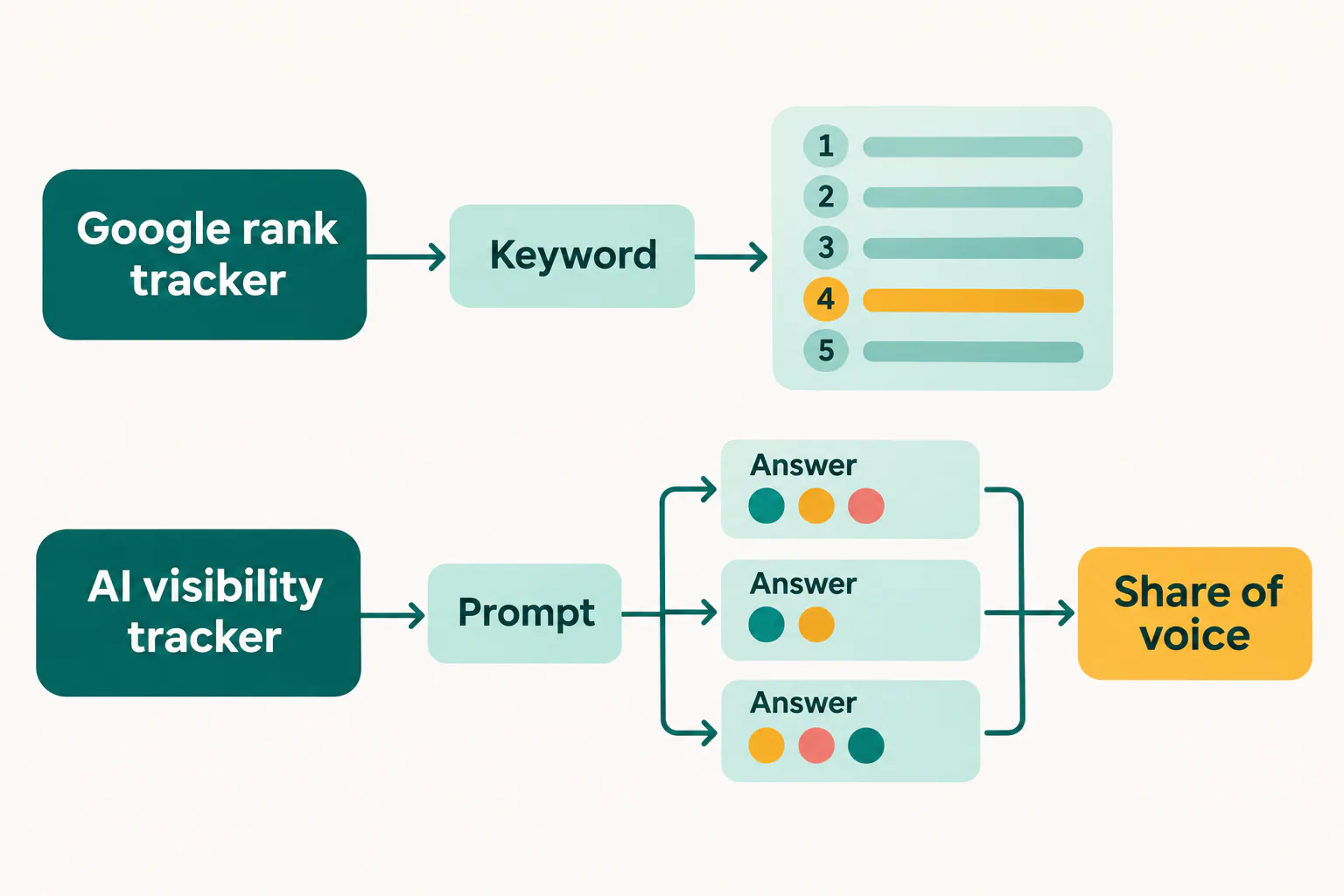
A Google rank tracker records which position your URL holds for a keyword on a results page, while an AI visibility tracker records whether your brand or URL appears inside a generated answer to a prompt. Rank tracking measures a list of ten links. AI tracking measures a paragraph that may name three brands, link two sources, or neither.
Positions on a results page versus mentions in an answer
Take one query, "best CRM for a small agency". Your rank tracker shows your comparison article at position 4 on Google, steady for a month. An AI tracker running it ten times each in ChatGPT and Perplexity finds your brand in a minority of ChatGPT answers and your article cited in some Perplexity answers, while a competitor appears in nearly all. Both readings are true and describe different exposure.
The units differ too. A keyword has one position per check; a prompt produces a different answer each time. Keywords are short, typed phrases; prompts are full questions, often with constraints such as team size, budget or location. And the result of a rank check is a number, while the result of an AI check is text that someone should read now and then.
Where generative engine optimization fits in
Generative engine optimization (GEO) is the work of making your content more likely to be used and cited by AI answer engines. Answer engine optimization (AEO) is an older, overlapping term that grew from featured snippets and voice answers. Both sit on top of SEO, not instead of it. Pages that AI engines cite still need to be crawlable, indexed and trusted.
An AI visibility tracker is the feedback loop for GEO. Without it, you change pages and guess whether answers changed. With it, you see which prompts moved after an update, the same way a rank tracker shows the effect of an on-page fix. Keep both tools running, and don't let a good AI week distract you from a ranking drop on Google.
How accurate AI visibility tracker results are
AI visibility tracker results are accurate as records of the answers the tool actually collected, but they are only samples of what real users see, because the same prompt can produce a different answer each time. One reading is anecdote. A trend across repeated runs over several weeks is evidence.
The answer is clear labeling. We label every number in our own reports as measured, calculated or estimated, and the same habit works for AI visibility data. Here is how the common figures sort:
- Measured means the tool ran the prompt and stored the answer, so "your brand appeared in 6 of 20 runs" is a measured count for those runs.
- Calculated means the figure is derived from measured counts, such as share of voice or an average position inside the answer.
- Estimated means the figure involves modeling, such as "AI search volume" for a prompt, projected impressions or a visibility score built from weighted factors the vendor doesn't fully disclose.
When a dashboard mixes the three without labels, add the labels yourself before the numbers reach a client or a manager. An estimated prompt volume presented as fact is how teams end up chasing prompts nobody asks.
Why the same prompt gets a different answer
Answer engines generate text with built-in randomness, so wording and the brands chosen shift between runs. Other factors change the answer as well: whether the engine searched the web, the model version, the user's location and language, and any memory or personalization in a logged-in account. Trackers usually query from clean sessions, which means their answers can differ from what a logged-in customer sees. That's a known limit, not a flaw you can fix.
Sample size, repeated runs and reading trends
Run each important prompt several times per check, not once. Five runs per prompt per engine is a reasonable floor for prompts you report on; ten is better for the few tied to revenue. Compare weekly or two-week averages, and call something a change only when it holds for two or three checks in a row. A drop from 6 of 10 runs to 4 of 10 in one week is noise until the next check confirms it.
Building your first prompt set and competitor list
A first prompt set for an AI visibility tracker should hold roughly 30 to 50 prompts, split between branded questions about your company and unbranded questions about your category, written the way buyers actually ask. Every number the tracker produces depends on these prompts, so build them before you compare tools.
Here is a practical order for a team starting out:
- Pull real questions from Search Console queries phrased as questions, sales call notes, support tickets and "People also ask" boxes.
- Rewrite each as a full prompt with the context a buyer adds, such as team size, budget level, industry or location.
- Sort them by funnel stage, from "what is" to "which tool should I pick" to "X vs Y".
- Mark the 10 to 15 prompts closest to a purchase as your core set and run them most often.
- Freeze the wording and keep a dated changelog, because editing a prompt resets its trend.
Branded prompts about your site and products
Branded prompts check what engines say about you. For a project management SaaS, examples would be "What is [brand] and who is it for?", "Is [brand] good for agencies?", "[brand] vs [competitor] for client work" and "What do users complain about with [brand]?". These show whether descriptions are accurate and current, and whether a comparison answer favors you or the rival.
Unbranded prompts for your category
Unbranded prompts are where new buyers find you or don't. For the same SaaS, think "best project management tool for a 10-person agency", "how to track client approvals without spreadsheets" or "project tool with client review links". Keep the majority of your set unbranded, roughly two out of three prompts, since that's where share of voice is won.
Pick the competitors to benchmark against from two sources. The first is the rivals you lose deals to. The second is the brands that keep appearing in the answers to your unbranded prompts after the first run, which often include review sites, marketplaces or a tool you never considered a competitor. Benchmark four to six names. More than that makes share of voice hard to read.
Free AI visibility checkers compared with paid trackers
Yes, free AI visibility checkers exist, from free checks in SEO suites such as Ahrefs to the free tiers some trackers offer. They give a snapshot rather than a measurement over time. Paid AI visibility tools cost more, but they run many prompts, many times, across several engines on a schedule, and they store the history. What you pay for an AI visibility tracker depends mostly on the prompts tracked, how often they run, the engines covered and the sites or seats you need.
Several free options are worth a first look. The Ahrefs AI Visibility Checker shows whether AI answers mention your brand for a small set of prompts. The HubSpot AI Search Grader scores how AI engines describe your brand, including sentiment, next to competitors. Google Search Console counts clicks from AI Overviews and AI Mode inside normal web search data. Bing Webmaster Tools shows how your pages perform in Bing, the index behind many Copilot answers.
The trade-offs line up like this:
| Point | Free checker | Paid tracker |
|---|---|---|
| Prompts | A few, often chosen by the tool | Your own set, often dozens to hundreds |
| Runs per prompt | Usually one | Repeated runs per check |
| Engines | One or two | Several, chosen per plan |
| History | None or short | Weeks to months of trends |
| Competitors | Limited or none | Named rivals with share of voice |
| Sites | One at a time | Several, with exports and reports |
To compare paid quotes fairly, ask each vendor for the same scenario: the number of prompts, the number of runs per prompt, the engines, the check frequency and the number of sites. Then ask which of their numbers are measured from stored answers and which are estimated.
What a free check leaves out
A single free run tells you whether you appeared once, in one engine, for prompts you may not have chosen. It can't show variance, so a lucky or unlucky answer looks like a fact. It usually skips competitor share of voice and per-URL citations, and it keeps no history, so you can't tell whether last month's page update did anything.
Signs your team has outgrown free checks
You've outgrown free checks once any of these is true. You report AI visibility to a manager or client. Your recent page changes need proof of their effect. More than one site is on your list. You want to know which competitor pages get cited for your core prompts. A free checker remains a good first look, but it's the wrong choice once someone needs to trust the trend.
Choosing among AI visibility tools by team size
The right AI visibility tool depends mostly on how many sites you track, how many prompts you need, and whether you report to clients. A solo marketer needs a small prompt set on two or three engines; an in-house team needs depth on one brand; an agency needs many sites, client-ready reports and exports.
| Team | Prompts and engines | Must have | Can skip |
|---|---|---|---|
| Solo marketer or freelance SEO | 20 to 50 prompts, 2 to 3 engines | History, competitor share of voice | Seats, white-label reports |
| In-house content or SEO team | 50 to 200 prompts, most engines | Per-URL citations, sentiment, exports | Multi-client management |
| Agency with many client sites | Separate sets per client | Projects per client, roles, scheduled reports | Very deep single-brand analysis |
A solo marketer or freelance SEO
Pick an AI visibility tracker with a modest plan that lets you write your own prompts and keeps history. Otterly.AI is a typical low-cost starting point at this size. Coverage of ChatGPT and Google AI Overviews comes first, then Perplexity. Check once a week, and spend the saved time reading answers rather than buying more engines. An enterprise suite with sentiment dashboards for dozens of markets doesn't suit you, and you'll pay for features you never open.
An in-house content or SEO team
An in-house team owns one brand and can go deep. Look for per-URL citation reports so you can tie answers to specific pages, sentiment with the quoted sentence attached, and CSV or API export so the data can sit next to Search Console. Separate prompt groups by product line or market if you sell in several countries.
An agency tracking many client sites needs different things again. Each client should get its own project, prompt set and competitor list, with roles so a client sees only their own data. Scheduled reports matter more than a pretty dashboard. Before signing, check how prompts are counted across clients, because many plans pool them, and one large client can eat the allowance for everyone else.
Peec AI is a common pick for mid-market teams and agencies that need projects per client and competitor benchmarks. Large brands that need multi-brand and multi-market reporting often choose Profound. If your team already works in an SEO suite, check its AI module first, such as the Semrush AI Visibility Toolkit or Ahrefs Brand Radar, since the data then sits next to your rankings. Whichever you shortlist, run your own prompt set through a trial before signing.

Connecting AI mentions to referral traffic and Search Console data
AI mentions turn into business results only when you can see them as visits, so connect your AI visibility tracker to two other sources: AI referral traffic in your analytics and clicks in Search Console. Visibility without visits is reputation; visits without visibility data leave you guessing why they changed.
Finding AI chatbot referrals in your analytics
In Google Analytics 4, open the traffic acquisition report, switch the dimension to session source, and filter for AI referrers such as chatgpt.com, perplexity.ai, gemini.google.com, copilot.microsoft.com and claude.ai. Save it as a custom channel group named "AI assistants" so it appears in every report. Then look at landing pages for that channel. They show which pages AI answers actually send people to, which often differs from the pages the tracker reports as cited.
Expect undercounting. Some assistant apps strip the referrer, so part of this traffic lands in "direct". Treat the AI channel as a floor, not a total.
Reading AI visibility next to Search Console clicks
Google AI Overviews traffic doesn't get its own line in Search Console; clicks from those links are counted inside normal web search data. So read the two side by side by page. Export your tracker's citations per URL, export Search Console clicks and impressions for the same URLs and period, and line them up in one sheet.
A few patterns are worth watching. If impressions hold while clicks fall and the tracker shows the page cited in AI Overviews, the answer is likely satisfying searchers on the results page. If a page gains citations in ChatGPT while its AI referrals rise, the change worked. Keep the labels as you combine sources. Search Console clicks are measured by Google, citation counts are measured from the tracker's samples, and AI impressions are estimated.
How to improve AI visibility with content and page changes
To improve how often AI assistants mention and link to your site, start with the prompts where rivals show up and you are missing. Study the pages those answers cite. Then give engines a clear, quotable, current page that answers the same question better. Most gains come from content and page changes rather than technical tricks.
Closing these gaps is the highest-value work your AI visibility tracker points to. Filter for prompts where a benchmark competitor shows up in most runs and you show up in few or none. For each one, ask whether you have a page that answers that exact question. Often you don't, as with "project tool for agencies with client approvals" when your features page lists approvals in one bullet.
Learning from the pages AI answers already cite
Open the cited sources for your gap prompts and note what they share. In most categories you'll find some of the same traits:
- A direct answer to the question in the first sentences of the page or section.
- Specific facts such as named features, limits, conditions and dates, rather than general praise.
- Comparison tables that set several options side by side on the same points.
- A visible update date and content that matches the current product.
- Strong Google rankings for the related keyword, especially for AI Overviews.
Don't copy those pages. Answer the same question with facts only your business has, which is also what makes a page worth citing over theirs.
Fixing pages that get mentioned but never linked
When engines name your brand but cite someone else's page, they know you exist but lack a page of yours that answers the prompt cleanly. Check whether the cited page is a review site, a listicle or a competitor comparison. Then give that prompt its own section or page, with the question as a heading and the answer right under it. Fix wrong descriptions at the source too by updating outdated feature pages, keeping pricing and plan pages current and stating plainly who you serve. Recheck the prompt for three or four weeks before judging the change.

From AI visibility gaps to planned, written and published articles
A list of gap prompts only pays off once it becomes a schedule of articles, and that step is where most teams stall, with the tracker in one tab and the content plan in another. RankFlow is one workspace for SEO content, covering keyword research, competitor gaps, content plans, AI-assisted article writing, publishing to WordPress and Search Console reporting. It runs the workflow from research to publishing and measurement in one place.
The way we'd use it with AI visibility data is straightforward. Each gap prompt that names a competitor but not you becomes an entry in your content plan, grouped into guides and smaller articles by topic. Articles are written from your content profile, your authors and what currently ranks, so answer engines get pages with your business facts. You decide what gets published and when, and the articles go to your own WordPress, not a closed platform.
After publishing, Search Console reporting in the same workspace shows clicks and impressions for the new pages, which you can read next to your tracker's citations for the matching prompts. Numbers stay labeled as measured, calculated or estimated, so a client report never presents an AI estimate as Google data. If you're juggling several sites, that path from gap to published page is the part worth setting up first.
Frequently asked questions
Does Google have its own AI visibility tracker?
Does Google have its own AI visibility tracker?
No. Google doesn't offer a dedicated AI visibility tracker. Clicks from links in AI Overviews are counted within normal web search data in Search Console, with no separate AI Overviews filter. To see whether AI Overviews cite your pages, you need a third-party tracker that runs your prompts and records the cited sources, then read that next to your Search Console clicks for the same pages.
How much do AI visibility tools cost?
How much do AI visibility tools cost?
The cost depends on how many prompts you track, how many times each runs, how many engines are covered, how often checks happen and how many sites or users you need. Free checkers give a one-off snapshot. To compare paid tools, send every vendor the same scenario and ask for a quote, plus a list of which reported numbers are measured and which are estimated.
How often should you check your AI visibility?
How often should you check your AI visibility?
Weekly checks suit most teams, with several runs per prompt each time. Your core buying prompts can run more often, and broad informational prompts every two weeks. Daily single runs mostly add noise. Judge changes on two or three consecutive checks, and allow three to four weeks after a page update before deciding whether it worked.
Can a small site show up in AI answers?
Can a small site show up in AI answers?
Yes. Answer engines cite pages, not brand size, and a small site with a clear, specific page on a narrow question can be cited ahead of large ones. Focus on unbranded prompts with tight context, such as a particular team size, industry or region, where big sites only have general pages. Strong Google rankings for the related keyword help a lot with AI Overviews.
Does showing up in AI answers help your Google rankings?
Does showing up in AI answers help your Google rankings?
There's no confirmed direct link between being mentioned in AI answers and ranking higher on Google. The relationship mostly runs the other way, since pages that rank well are more likely to be cited, especially in AI Overviews. Indirect effects are possible, as AI mentions can bring visitors and branded searches. Keep your rank tracking and Search Console reporting running alongside AI tracking rather than replacing them.