
To track your brand in AI answers, build one fixed list of 30 to 50 prompts from buyer questions and your own search data, sort them into category, comparison and brand prompts, and run that exact wording on the same engines on a set schedule. That keeps the numbers comparable month to month.
Most teams new to AI prompt tracking do the opposite. They type whatever comes to mind into ChatGPT, rephrase it days later, and end up with screenshots instead of a trend. The steps below fix that before you pay for a tracker, and the prompt set carries over to any tool you pick later.
What AI prompt tracking is and why the prompt set stays fixed
AI prompt tracking is the practice of sending a fixed list of questions to AI assistants such as ChatGPT, Perplexity, Gemini, Claude and Google AI Overviews on a schedule, then recording whether each answer mentions your brand, links to your site and names competitors. It works like a rank tracker for generated answers.
The difference from SEO tracking is in what you read. A Google rank tracker reports one position per keyword per day. An AI answer has no positions, changes from run to run, and can mention you without linking or link to you without naming you. So you report rates across many runs rather than a single rank.
Prompt management tools versus AI visibility trackers
The tools sold as "prompt tracking" fall into two groups, and the right one depends on what you need to measure. Developer prompt management tools such as PromptLayer version, test and log the prompts inside your own AI application. AI visibility trackers such as Otterly.ai send search-style questions to public AI engines and record which brands and sources appear.
This table shows which group fits which job.
| What you need to measure | Tool group | Suits |
|---|---|---|
| How your own app's prompts perform across model versions | Developer prompt management | Engineering and product teams |
| Whether ChatGPT or Perplexity names your brand for buyer questions | AI visibility tracker | SEO leads, agencies, marketing teams |
| A first look at a handful of prompts before buying anything | A spreadsheet and manual runs | Freelancers and small brands |
If you track Google rankings for clients, a developer prompt tool is the wrong purchase, since it never tells you whether an assistant recommends your client. Which visibility tracker is best comes down to engine coverage, the locations it runs from and runs per prompt, and you can judge those only once you know your own prompt set.
Why rotating questions makes your results unreadable
A prompt set has to stay fixed because AI answers already vary on their own, and changing the questions adds a second source of change you cannot separate from the first. If your mention rate drops in March, you need to know whether the engine changed or your wording did.
Take "best project tracking app for small agencies" and "what tool should a 5-person agency use to track projects". The two look close, yet they can return different shortlists. Swap one for the other halfway through a quarter and any shift you see is noise you created yourself.
What to gather before you write a single prompt
Before you write prompts, collect the raw material that shows what buyers really ask, so the set reflects demand and not your guesses. An hour of gathering saves you from tracking 100 invented prompts that nobody types.
These are the inputs worth having open in one folder:
- A Search Console export of queries for the last three months, with impressions and clicks.
- Your target keyword list, including the ones you do not rank for yet.
- A competitor gap list, the keywords competitors rank for and you do not.
- Questions from sales calls, support tickets and demo requests, copied word for word.
- Three to six competitor names buyers actually compare you with.
- The engines you will check and the country or city you will check from.
- Your product or service categories in the words customers use, not the internal names.
The competitor list matters more than it looks. You cannot calculate share of voice later without knowing whose names to count, and adding competitors after a month of runs means re-reading every stored answer.
Write down the location and language too. An agency in Chicago checking a client that sells only in Germany would get answers for the wrong market, and nothing in the output would warn you.
Turning buyer questions and search data into prompts
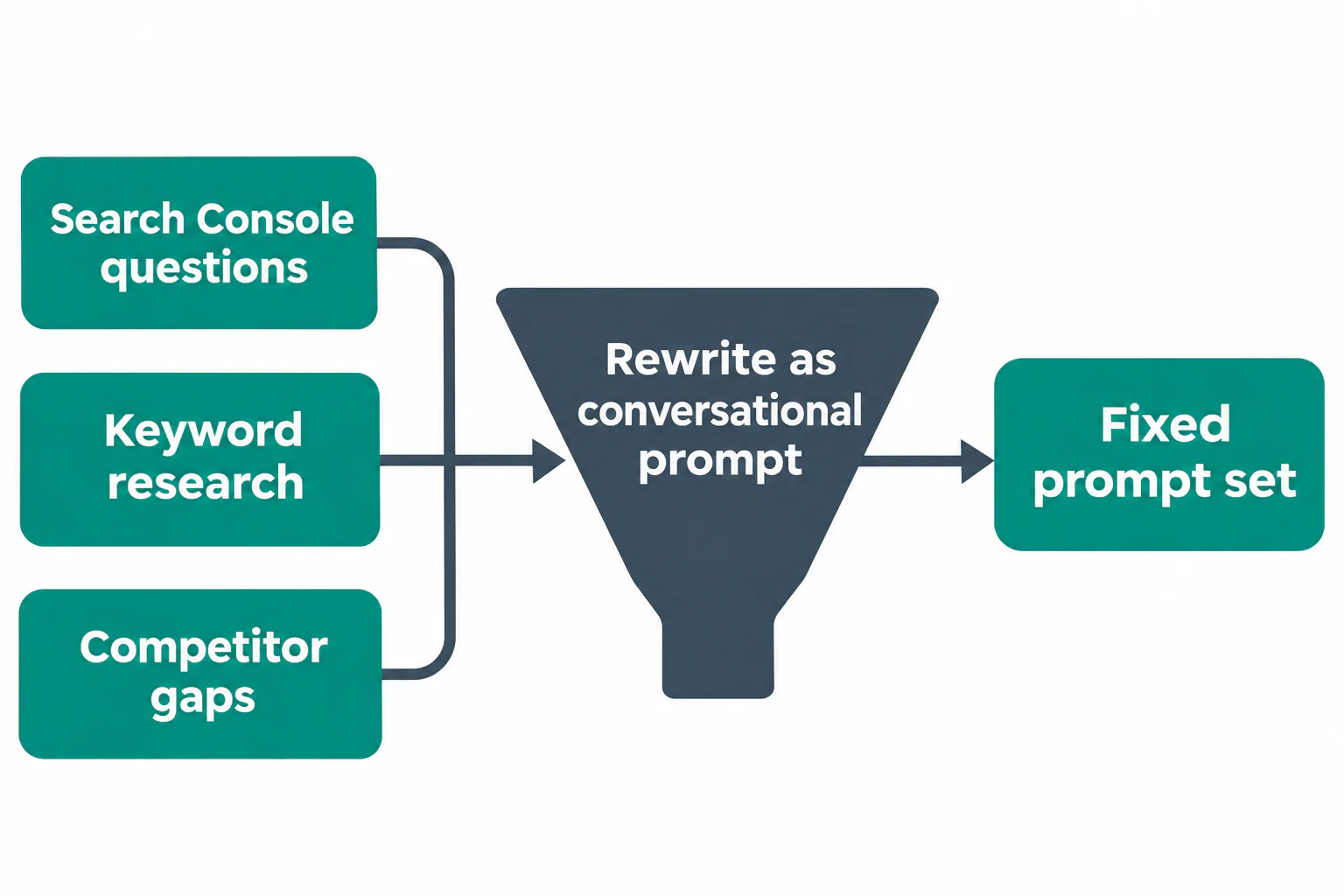
You can find prompts worth tracking for free by turning the question-style queries your site already gets in Search Console, and the keywords from your research and competitor gap lists, into the full sentences people type into an AI assistant. Both sources are measured demand, which a list brainstormed in a meeting is not.
Pull question-style queries from Search Console
Search Console already holds the longer, conversational queries that look most like AI prompts. In the Performance report, add a query filter with a custom regex such as ^(how|what|which|why|best|is|can|should|vs)\b or one that matches " vs " and "alternative", then sort by impressions.
- Set the date range to the last three months so seasonal noise evens out.
- Apply the question regex and export the results.
- Delete queries about your own login, pricing page or support issues.
- Keep queries with at least a few impressions a month, then group near-duplicates.
- Pick the clearest phrasing from each group as the seed for one prompt.
Long queries of eight words or more are the best seeds. People who search that way tend to ask assistants the same way. Some trackers also show the query fan-out behind an answer, the searches an assistant runs while composing it, and since those exact strings change between runs, review them for new seeds rather than tracking them.
Rewrite target keywords as questions people ask an AI assistant
Keywords from your research and competitor gap lists become prompts once you add the context a person gives an assistant, such as who they are, what they need and what limits them. "crm for real estate" turns into "What CRM should a small real estate team with three agents use?"
Competitor gap keywords deserve a place because they show where rivals already win attention. If a competitor ranks for "invoice software for freelancers" and you do not, the matching prompt tells you whether that gap also exists in AI answers. Add context but no brand names to these seeds, otherwise you lead the engine toward an answer.
Sorting and weighting the prompts in your set
Start with 30 to 50 prompts, sorted into category, comparison and brand groups and weighted by business value. That is enough to see patterns and small enough to read the answers yourself in the first month, which is how you learn what the engines actually say.
Category, comparison and brand prompts
Each group answers a different question about your visibility. A balance of roughly half category prompts, a third comparison prompts and the rest brand prompts suits most sites.
- Category prompts ask for options without naming anyone ("best accounting software for a small café"). They show whether you get discovered.
- Comparison prompts name you or a rival ("Xero vs QuickBooks for a two-person shop", "alternatives to [competitor]"). They show how you hold up when a buyer is already choosing.
- Brand prompts ask about you directly ("Is [brand] reliable?", "What does [brand] cost?"). They show what the engine says once someone has heard of you.
Tag every prompt with its group, its funnel stage, the persona asking it (for example an office manager or a finance lead) and the page on your site that should answer it. The page tag pays off later, when a missing citation points straight to the page that needs work.
A few rows from a working sheet show how this looks. A prompt with no page to cite goes to the writing list, not the tracking sheet.
| Prompt | Group | Persona | Page to be cited |
|---|---|---|---|
| Best accounting software for a small café | Category | Café owner | Small business accounting guide |
| Xero vs QuickBooks for a two-person shop | Comparison | Bookkeeper | Comparison page |
| Is [brand] reliable? | Brand | Finance lead | Reviews and security page |
| What CRM should a small real estate team with three agents use? | Category | Team lead | None yet, goes to the writing list |
Estimating importance without reliable prompt volume data
No AI engine publishes how often a prompt is asked, so any prompt volume data a tool shows is an estimate, not a measurement. Weight prompts instead by measured Search Console impressions for the source query and by the known revenue or lead value of the matching product. Label a tool's prompt volume figure as estimated in your reports.
A simple score of 1 to 3 for each prompt works well. Give a 3 to prompts tied to your main offer with strong impressions, a 2 to supporting topics, and a 1 to prompts you track only to watch competitors. Multiply mention results by this weight when you report, so one high-value prompt is not drowned out by ten minor ones.
Prompt templates to copy into your tracker
Templates give you consistent wording across the set, which keeps results comparable when you add prompts later. Replace the parts in braces and keep the rest word for word.
Brand and reputation checks come first, because they show what an engine says about you once a buyer knows your name:
- "What is {brand} and who is it for?"
- "Is {brand} a good choice for {audience}? What are the downsides?"
- "What do customers say about {brand}'s {product or service}?"
- "Is {brand} legit?"
Templates for category and discovery questions
Discovery prompts should sound like a buyer who has not chosen yet and gives one or two real constraints.
- "What is the best {category} for {audience} in {country}?"
- "I run a {business type} with {team size} people. Which {category} should I use?"
- "How do I {job to be done} without {common pain}?"
- "Which {category} works well with {tool they already use}?"
Templates for comparisons and alternatives
Comparison prompts catch the moment a buyer weighs you against someone else.
- "{brand} vs {competitor} for {use case}, which is better?"
- "What are the best alternatives to {competitor}?"
- "Why do people switch from {competitor} to something else?"
- "Compare {competitor A}, {competitor B} and {brand} on {deciding factor}."

Running the set and reading mention and citation rates
To track brand mentions in ChatGPT, Perplexity and Claude, run every prompt in your set on each engine several times per cycle, store the full answers, and count brand mentions, site citations and competitor appearances. Measuring LLM visibility means reporting those counts as rates across runs, never as the result of one answer.
Three numbers carry most of the report:
- Mention rate is the share of runs where your brand is named in the answer.
- Citation rate is the share of runs where a link or source points to your domain.
- Share of voice is your mentions divided by all brand mentions you count, yours plus competitors'.
Answers change from run to run even with identical wording, so run each prompt three times per engine per cycle and record a mention as "mentioned in two of three runs". Report a prompt that flips between yes and no every cycle separately as unstable. Act on a citation shift only when it holds for two or three cycles in a row.
Keeping wording, engines and locations the same between runs
Comparable runs need identical conditions every time. Keep these fixed for the life of the set:
- The exact prompt text, including punctuation.
- The engine and, where you can choose, the model.
- The country or city the run comes from.
- A logged-out session or a clean account with no chat history or memory.
Personal history is the one most people miss. An account that has discussed your brand for months will mention it more often than a stranger's would, so manual checks belong in a fresh session.
How often to re-run each prompt
Re-run your high-weight prompts weekly and the rest every two to four weeks. Weekly runs on core prompts catch model updates fast, while the longer cycle keeps manual work or tracker costs in check. Avoid daily runs at the start, because daily variation is mostly noise that evens out within a week.
Signing off the set and recording a baseline
Before the first tracked cycle, have someone from sales or support read the set and confirm each prompt sounds like a real customer, not like your marketing team. Fix the wording they flag, then freeze the set in writing as v1 with the date, engines and locations. The first 2 to 4 weeks of runs form your baseline. Every later change in mention rate, citation rate or share of voice is read against that baseline, which is why no prompt changes while it is being recorded.

Common mistakes and when to update the prompt set
The most common mistake is changing prompts too often, and the second is never changing them at all. A good set stays frozen for a quarter, then gets a planned review.
Other mistakes we see in AI prompt tracking setups:
- Generating 100 prompts with an AI tool before any research, then tracking questions no buyer asks.
- Putting your brand name into category prompts, which forces a mention and inflates the rate.
- Reading one run as a result and reporting a drop that was only normal variation.
- Treating AI visibility as a Google ranking and expecting a position to report.
- Tracking only ChatGPT when your buyers also use Google AI Overviews or Perplexity.
Update the set once a quarter, or sooner when you launch a product, enter a new market or a new competitor shows up in answers. Version it like a document (v1, v2), keep at least two thirds of the prompts unchanged so the trend line survives, and retire prompts that never surface any brand.
Feeding your prompt set from keyword research and Search Console in one workspace
A prompt set is easiest to maintain when its sources live with the rest of your SEO work. RankFlow is one workspace for keyword research, competitor gaps, content plans, AI-assisted writing, publishing to WordPress and Search Console reporting, so question-style queries and gap keywords sit side by side, ready to become prompt seeds.
The same workspace covers the step after tracking, which is answer engine optimization in practice. When a prompt shows no mention or citation for your site, the gap goes into the content plan, then gets written from your content profile, your authors and what currently ranks, and published. Numbers stay labeled as measured, calculated or estimated, so a Search Console impression count is never mixed up with an estimated prompt volume.
If you want to see how your own keyword and Search Console data would turn into a first prompt set, the block below shows how to get started.
Frequently asked questions
How is AI visibility tracking different from SEO rank tracking?
How is AI visibility tracking different from SEO rank tracking?
SEO rank tracking records one position for a keyword on a results page that stays fairly stable for a day. AI visibility tracking reads generated answers that have no positions and change from run to run, so it reports how often your brand is mentioned or cited across many runs. One checks where you rank, the other checks whether you are named at all.
How do I track brand mentions in ChatGPT, Perplexity and Claude?
How do I track brand mentions in ChatGPT, Perplexity and Claude?
Run the same fixed prompts in each assistant from a logged-out or fresh session, several times per cycle, and save every full answer. Mark whether your brand appears, whether your site is linked and which competitors show up. A spreadsheet works for 20 to 30 prompts. Beyond that, a visibility tracker saves the repetitive copying.
Which AI prompt tracking software is best?
Which AI prompt tracking software is best?
The best tool depends on what you measure. Developer tools such as PromptLayer suit teams testing prompts inside their own app. Visibility trackers such as Otterly.ai suit SEO and marketing teams checking brand mentions in public engines. Compare trackers on engine coverage, location settings, runs per prompt and export options, and test them with your own prompt set.
How do I measure LLM visibility?
How do I measure LLM visibility?
Measure LLM visibility with three rates calculated over repeated runs, namely mention rate, citation rate and share of voice against named competitors. Weight each prompt by business value so important questions count more. Report the trend over several cycles rather than single results, and keep any estimated prompt volume clearly separate from measured search data.
Should competitor brand names go into my tracked prompts?
Should competitor brand names go into my tracked prompts?
Yes, but only in comparison and alternative prompts, such as "alternatives to {competitor}" or "{brand} vs {competitor}". Keep category prompts free of any brand name so the engine chooses on its own, which is what a new buyer sees. Track competitor mentions in every answer regardless, because share of voice needs them.