
An SEO content plan is a prioritized, dated list of posts. Each row ties a keyword group to an intent, audience, content type, publish date and metric. Keyword research alone is not a plan: it shows what people type, not what to publish first.
This guide takes you from that spreadsheet to a full quarter of posts. It covers goals, keyword grouping, a scoring rule, a calendar and a template with example rows, then shows how to review your SEO content plan and where AI helps.
What an SEO content plan is and what it contains
An SEO content plan sits between your marketing strategy and the daily writing work. It decides which posts get made this quarter, in what order, and which audience each one serves, keeping the work tied to business needs and to what your customers ask.
The plan in one paragraph
An SEO content plan is a working document that turns keyword research into a schedule of posts. Each row names the keyword group, intent, reader, content type, publish date, owner and the metric that shows performance. It usually covers one quarter.
If any of those fields is empty, the row is still an idea, not a planned post, and nobody can judge its engagement later.
How a plan differs from a strategy, a calendar and a keyword list
These four documents get mixed up because they share data, but each one answers a different question:
| Document | Question it answers | Time span | Usual owner |
|---|---|---|---|
| SEO content strategy | Which audiences, topics and business goals should search serve? | A year or more | Marketing lead or agency strategist |
| Content plan | Which articles do we make, why, and in what order? | One quarter | Content lead |
| Content calendar | What is due on which day, and who does it? | Weeks | Editor or project manager |
| Keyword list | What does each user search, and how often? | Ongoing | SEO specialist |
The plan is the bridge between them. A strategy without one stays a slide deck, and a calendar without one fills up with last week’s requests. A good SEO content plan makes every slot earn its place against your goals and your wider marketing.
What a finished plan includes
A plan is ready to hand to writers when it holds these parts, with the tools for tracking each one named:
- Two or three goals, each with its metric and baseline.
- The personas the content serves, with the problems each one searches for.
- A topic list where each row is one article and one keyword group.
- A priority score per topic and the rule behind it.
- The buyer stage, the content type and the pillar each post links to.
- Publish dates, owners and review dates.
Set goals and know who the content is for
Goals decide which topics win a slot in the SEO content plan, and the audience decides how each topic is written. Both come before the keyword spreadsheet, whatever platforms you publish on.
Goals and success metrics you can measure
Take your goals from the marketing strategy and write them in SMART form. “Get more traffic” fails; “grow organic clicks to the product guides above last quarter’s Search Console level by quarter end” passes, and you can track it.
Tie each goal to one metric you can track without debate:
- Visibility goals: impressions and average position in Search Console.
- Traffic goals: organic clicks to the planned pages.
- Lead or sales goals: sign-ups, demo requests or purchases that start there, taken from your analytics.
- Engagement goals: scroll depth or time spent reading, only when they matter to the business.
Write each baseline down today. You cannot track progress against a number nobody recorded.
Keep social media goals out of this document. Social posts can amplify a post, but if likes become a target, topic choice drifts toward what performs in a feed instead of what people search. Track that engagement in a separate social media report.
Audience and personas that decide topic choice
A useful persona tells you which searches to target and which to skip for your audience. “Small business owners” is too broad to do either.
Compare that with “an office manager at a firm of about 20 people who buys supplies and has never compared vendors before.” This audience searches for checklists and price comparisons. It uses plain words rather than jargon, and it needs approval from someone else before buying.
For each persona, write down three things about their needs:
- the problems they search for;
- the words they use for those problems;
- what stops them from becoming customers.
Pull these from sales calls, support tickets and the queries already in Search Console rather than from guesswork. When a keyword matches no one in your audience, it stays out of the plan, however big its volume looks.
Turn keyword research into a topic list
A keyword to article plan comes from three moves: collect the keywords, read what each search wants, and group the ones a single post can answer.
Collect keywords and read the search intent
Start from the research you already have, then add Search Console queries, customer words from sales calls and Google’s “People also ask” box. Tools such as Keyword Planner, Semrush and Ahrefs give estimates; Search Console is measured by Google, and search engines show what they reward.
You read user intent from the results, not from the keyword. Search the term and look at the competition; the user wants what those results deliver:
- guides at the top mean informational intent;
- product and category listings mean transactional intent;
- comparisons and “best” lists mean the reader is choosing.
If the top results are all product listings, search engines have decided what the query means, and a blog post will struggle no matter how well it is written.
Group keywords into one article each
The test for grouping is simple: if the same results rank for two keywords, they belong in one post. “Repot a monstera” and “when to repot monstera” become one how-to, while “monstera vs philodendron” has a different intent and gets its own row.
After grouping, each row has a primary keyword, a few secondary ones and the intent. A list of several hundred keywords often shrinks to a few dozen real article candidates, and that is a far easier set to prioritize and optimize.
Add competitor gaps and proven topics
Competitor analysis shows the topics your rivals rank for and you do not. Pick three to five competitors that actually appear for your target searches, not just the companies sales considers rivals, and export the keywords they rank for.
Then filter for terms where rivals sit in the top ten and you are absent. These are proven topics: demand exists and a result can rank there. Mark these rows “gap”; a gap with low business fit can be ignored.
Prioritize topics with a simple scoring rule
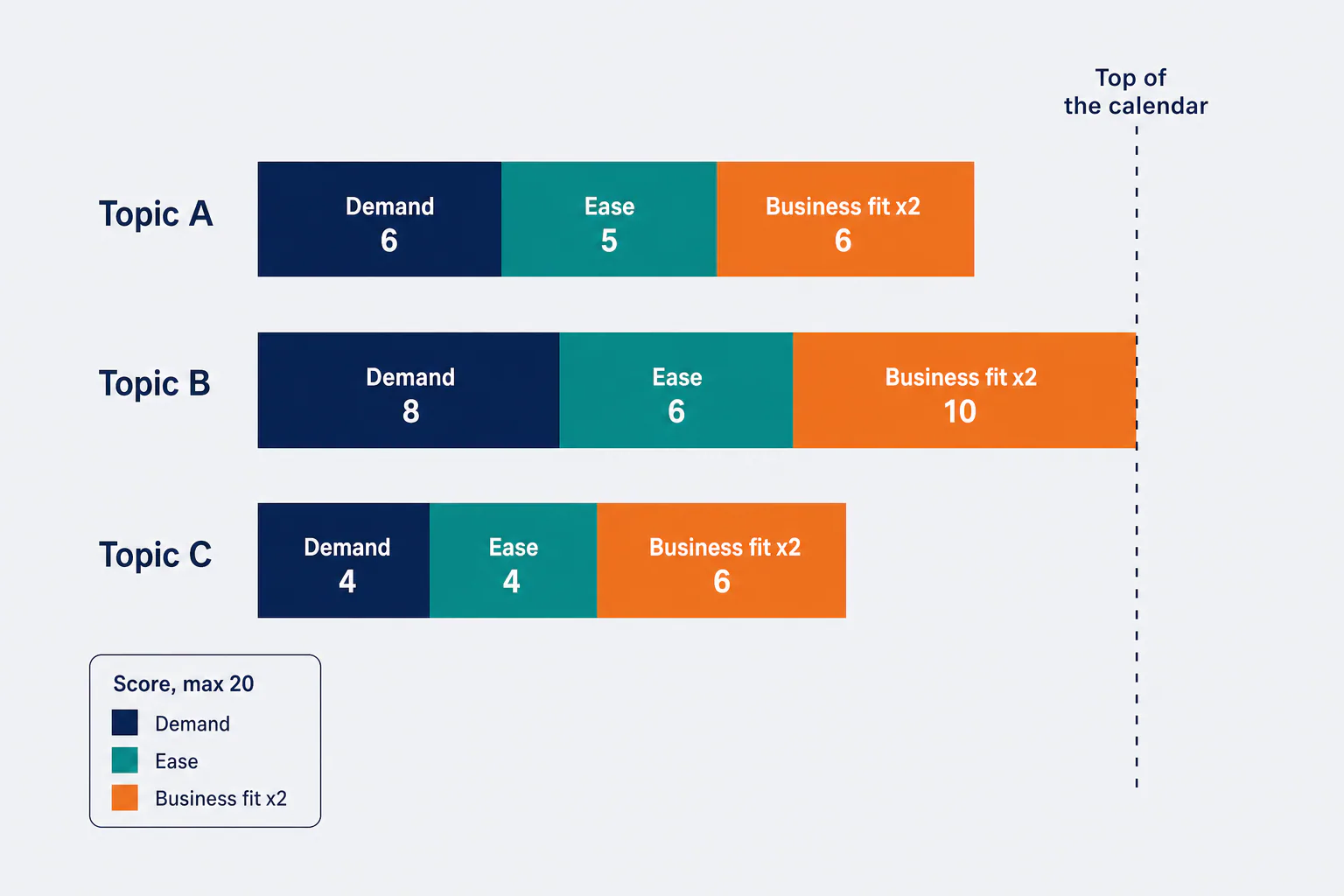
Score every topic from 1 to 5 on demand, ease and business fit. Add the numbers with business fit counted twice, then fill the calendar from the top down.
Score each topic on demand, difficulty and business fit
Use one scale for the whole list so that scores stay comparable:
| Criterion | 1 means | 5 means | Where the data comes from |
|---|---|---|---|
| Demand | Little or no search volume for the whole keyword group | One of the biggest groups on your list | Keyword tool (estimated) or Search Console (measured) |
| Ease | Strong competition from specialist pages | Thin or outdated pages rank | Keyword difficulty plus a look at the results page |
| Business fit | Interesting to the audience but unrelated to what you sell | Readers of this page are close to buying from you | Your judgment, sales input and the client |
The formula is score = demand + ease + 2 x business fit, with a maximum of 20. Business fit counts double because an article that brings traffic but no customers wastes a slot. Ease is keyword difficulty turned around, so a hard keyword scores low.
Weighting the score for a new site versus an established one
Adjust the formula to the site’s position:
- New site: a site with few links will not win hard searches this quarter, so weight ease more: demand + 2 x ease + 2 x business fit.
- Established site: a site that already holds strong rankings can chase demand: 2 x demand + ease + 2 x business fit.
In both cases, check whether an existing URL already targets the topic. If one does, the row becomes an update, not a new article, and your content strategy stays focused on one page per topic.
Where the 80/20 rule helps
The 80/20 rule in SEO is the observation that a small share of pages and topics brings most of the organic results. Use it twice in planning.
First, put your highest scores in the first weeks of the quarter, where they have the most time to grow. Second, at review time, start with the few posts carrying most organic clicks; lifting one stuck on page two can beat a new article.
Map topics to the buyer journey and pick formats
Each topic belongs to one stage of the buyer journey, the path customers take before buying. That stage, together with what already ranks, decides the format.
Awareness, consideration and decision topics
Each stage serves a reader at a different point:
- Awareness topics answer a problem before the reader knows a solution exists: “why are my monstera leaves turning yellow.”
- Consideration posts compare approaches: “self-watering pots vs regular pots.”
- Decision posts help someone pick a product or provider, such as a cost page or “where to buy large indoor plants online.”
A quarter of pure awareness brings visitors and few sales; pure decision topics bring small volume and no new readers. Tag every row with its stage and check the mix before you lock the calendar, keeping decision pieces few but strong.
Choosing the format and channel for each topic
Search engines have already voted on format. If the top results for a query are numbered lists, a long essay will struggle. Use the results page to choose between these types:
- Guide: broad topics where the reader needs the full picture.
- How-to: a task done in steps.
- Comparison or best list: the reader is choosing.
- Cost page: price questions.
- Short answer: one narrow question.
The channel follows the audience. The blog is the home for search, while video and social media are for reuse across platforms such as YouTube and LinkedIn. Your analytics platforms and tools show where visitors come from, and which platforms deserve more effort.
Pillars, clusters and internal links planned up front
Group related topics into a cluster: one pillar guide that covers the subject broadly, plus supporting articles that each go deep on one part. Give every supporting row a “links to” field naming its pillar and anchor phrase, and give the pillar a list of links back.
Planning internal links at this stage means nobody hunts for link targets after publishing, and traffic flows between related pages. Topics added later also slot into an existing cluster instead of floating alone.
Build the blog content plan and calendar
The calendar is your scored topic list, cut to the number of articles you can actually produce, put in a sensible order and given dates.
How many articles fit in a quarter
Count capacity before topics. A quarter has 13 weeks: multiply the articles your team finishes in a normal week, including review and publishing, by 13. A team that reliably ships two a week has about 26 slots, not 40.
Then hold some slots back for updating existing pages, for client feedback rounds and for topics that turn up mid-quarter. Mix guides and smaller articles. A long pillar can take the effort of several short blog posts, so count it as more than one slot, and plan it around the user question it answers.
Sequencing: which topics go first
Order the rows with these rules, applied in this order:
- Seasonal topics go early enough to be indexed before the season starts.
- Pillars go before their supporting articles, so the cluster links work from day one.
- Among the remaining rows, higher scores go earlier.
- Rows that wait on a client, an expert or data go later, with a deadline for that input.
An SEO editorial plan that skips rule 4 is how calendars slip: the piece was ready to write, but the facts were not.
What each calendar row should hold
Every row should carry enough for anyone on the team to pick it up:
- publish date, working title and primary keyword;
- status and owner;
- brief due date, draft due date and reviewer;
- links to add;
- the date of the first performance check.
Keep status values short and fixed (idea, brief, draft, review, scheduled, live) so you can filter the SEO content plan and see what is late. Keep this one sheet as the single source of truth for performance checks too, with analytics exports pasted in beside it.
SEO content plan template with example rows
The template below is the SEO content plan layout we recommend copying into a spreadsheet: one row per article, with the columns in the order you fill them.
The columns to fill in
Each column has one job. Drop what you will not use, but keep the first eight:
| Column | What goes in it |
|---|---|
| Topic ID | A short code so the row can be referenced in briefs and chats |
| Primary keyword | The main term of the group |
| Secondary keywords | Two to six terms the same article answers |
| Intent and stage | Informational, commercial or transactional; awareness, consideration or decision |
| Persona | Who the article serves |
| Format | Guide, how-to, comparison, cost page or short answer |
| Score | Demand, ease, fit and the total |
| Pillar and links | Which pillar it links to and what links to it |
| Publish date and owner | The calendar slot and the person responsible |
| Data label | Whether volume and difficulty are measured, calculated or estimated |
| Goal metric | What you will track, and when |
| Reuse | Social media posts, video or other media planned from it |
The data label column matters more than it looks. When a client asks why a topic was chosen, you can say whether the number behind it came from Google or from a tool’s estimate, and the strategy stays easy to defend.
Three filled example rows
Here is how three rows look for an illustrative client, an online store that sells indoor plants and pots. The scores show the method; they are not real data.
| ID | Primary keyword | Stage and format | Score (D + E + 2F) | Pillar | Slot | Goal metric |
|---|---|---|---|---|---|---|
| P01 | indoor plant pots guide | Awareness, guide (pillar) | 4 + 2 + 2 x 4 = 14 | Is the pillar | Week 2 | Impressions for the whole cluster |
| P07 | how to repot a monstera | Awareness, how-to | 3 + 4 + 2 x 3 = 13 | Indoor plant pots guide | Week 3 | Organic clicks and engagement on the page |
| P12 | self-watering pots vs regular pots | Consideration, comparison | 3 + 4 + 2 x 5 = 17 | Indoor plant pots guide | Week 4 | Clicks and product views from the page |
The pillar scores lower than the comparison but still goes first. The sequencing rule puts pillars before their clusters, and the score orders everything else.

Worked example: one topic from keyword to calendar slot to metric
Here is row P12 followed through the whole plan. It is an illustrative example, not a client case.
- Keyword: the keyword research export contains “self-watering pots vs regular pots,” “are self-watering pots good” and “self-watering pot pros and cons.” The results pages for all three overlap, so they become one article.
- Intent: the top results are comparisons and pros-and-cons lists, so the reader is choosing. The format is a comparison with a table.
- Score: demand 3 (a mid-sized group), ease 4 (forum threads and thin posts rank), fit 5 (the store sells both kinds of pot). The total is 17, the highest in the cluster.
- Slot: week 4, two weeks after the pillar goes live, with a link to the pillar and one back from it.
- Metric at four weeks: check impressions and the queries it appears for in Search Console.
- Metric at eight weeks: check clicks, average position, and how many visitors move from the comparison to the self-watering pot product listings in analytics.
- Decision: impressions with few clicks means rewriting the title. No impressions means checking indexing and intent. Clicks without product views means improving the links to products.
Measure results and review the plan
Measure each article against the metric in its row, on the dates in its row, and use what you find to optimize the next quarter across the platforms you publish on.
What to check in Google Search Console
Open the Performance report, filter by page and compare the last 28 days with the period before. Read the numbers in this order:
- Impressions: the first sign that search engines have indexed the page and show it for something.
- Queries: the searches it appears for. Unplanned queries are free research for new topics.
- Average position: where it sits for the target keyword group.
- Clicks and CTR: whether the title and description win the click once the result is visible.
These numbers are measured by Google. Conversions and user behavior on the page come from your analytics platforms, where you can track performance beyond clicks. Track both side by side in one review sheet instead of switching between tabs.
How often to review, and what to update or cut
Do a short monthly check of new articles against their goal metric. At the end of each quarter, run a full review before you plan the next one. In that review, every live post gets one of four decisions:
- Keep: it meets its goal, so leave it alone.
- Update: it ranks on page two or has impressions but few clicks. Expand the content or optimize the title and description to optimize engagement.
- Merge: two posts compete for the same queries. Combine them and redirect one.
- Cut or rethink: no impressions after a full quarter. Check indexing and whether the intent was misread. Before rewriting anything, turn each update or merge decision into a writer-ready brief with a workflow from audit findings to briefs.
How much time a small team needs for the plan
The first plan takes the longest, because you build the template, the personas and the scoring scale from nothing. Later quarters reuse all three, so the work shrinks to adding new keywords, rescoring and reading the review data.
For a team of one to three people, split the work into separate sessions:
- collect and group keywords;
- score and sequence the topics;
- set the calendar and owners;
- check Search Console in a recurring monthly slot.
Short, focused sessions stop planning from eating the writing time it protects. If the work still needs more time, look at where it goes: often it is copying data between tools rather than making decisions, so a simpler sheet may help.
Where AI helps in planning and where it falls short
AI speeds up the mechanical parts of planning, such as grouping keywords and drafting briefs. Many tools and platforms now offer it for marketing teams. It cannot decide what your business should rank for, and it cannot supply facts it does not have.
Is SEO dead now with AI?
No, but it has changed. Google already shows an AI overview for searches like this one, drawing on published pages. Search still sends people to sites offering what a summary cannot: specific prices, real examples, a template or a business that can do the work.
What loses ground is generic content that repeats every other page. A plan built on audience needs, your customers’ questions and your own facts is the answer to AI search, not its victim, and it supports a lasting organic strategy and a steady strategy for growth.
Tasks to automate and decisions to keep human
This split works for most content teams:
| Let AI do or assist | Keep with people |
|---|---|
| Clustering keywords by shared results | Setting goals and the metric for each |
| Summarizing what ranks for a query | Scoring business fit |
| First drafts of briefs and outlines | Deciding what gets published and when |
| Drafts of meta titles and descriptions | Adding the business’s facts, prices and examples |
| Spotting overlap between planned rows | Approving marketing claims and anything a client signs off |
The pattern is simple. AI reads and sorts at scale, and people own judgment, facts and accountability, whichever AI tools your team uses.

Checking AI-assisted drafts before they go live
Run every AI-assisted draft through a short check before it is scheduled:
- Every figure has a source, and estimates are labeled as estimates.
- The draft contains facts that belong to this business, not advice any site could give.
- It answers the intent you planned, in the format the results page rewards.
- The voice matches the brand, and the planned internal links are in place.
- Nothing is promised that you cannot keep, such as rankings or a set amount of traffic.
A draft that fails on facts goes back for input, not for another round of rewriting. Low engagement on pages that read like everyone else’s will show up in your next review anyway.
Run the plan from one workspace in RankFlow
RankFlow keeps the steps in this guide in one workspace, so the plan, the drafts and the results stop living in five separate tools.
From keyword research and gaps to a content plan
In RankFlow you run keyword research, find competitor gaps and turn them into a content plan in the same workspace. Numbers are labeled as measured, calculated or estimated, so you always know whether a score rests on Google data or on an estimate.
From plan to WordPress draft and Search Console reporting
Articles are written from your content profile, your authors and what currently ranks. They publish to your own WordPress, a REST endpoint or your hosting, so nothing is locked in. Search Console reporting sits in the same place. We promise no rankings or traffic.
Planning across several sites
Agencies get a cross-site overview, team roles and client review links, so late articles or client waits show without opening each site. To see your keyword spreadsheet turned into an SEO content plan for a quarter, the next step is right below.
Frequently asked questions
What is an SEO content plan template?
What is an SEO content plan template?
It is a spreadsheet or board view with one row per planned article and fixed columns. At minimum these are topic ID, primary and secondary keywords, intent and stage, persona, format, score, pillar links, publish date, owner and goal metric. A data label column, which marks numbers as measured or estimated, makes the choices easy to explain to a client.
What is an SEO content plan example?
What is an SEO content plan example?
An example is a set of filled rows showing real decisions, such as the three plant-store rows above. Each one shows the keyword group, the stage and format, how the score was calculated, which pillar it supports, its calendar week and the metric to check. A good example also shows why a lower-scoring pillar can go before a higher-scoring article.
How do I create a content plan for SEO?
How do I create a content plan for SEO?
Set two or three measurable goals and define your personas first. Then collect keywords, read the intent on the results page and group keywords that share results into one article each. Add competitor gaps, score every topic on demand, ease and business fit, and tag its buyer stage and format. Finally, fit the rows to your weekly capacity, date them and set the review points.
What are the 5 components of SEO?
What are the 5 components of SEO?
There is no official list, but a common split is keyword research, on-page optimization, content, technical SEO and off-page work such as earning links. A content plan draws mainly on the first three. It decides which keywords get pages, what those pages contain and how they link to each other. Technical and link work support whether those pages can rank.
What is SEO content meaning?
What is SEO content meaning?
SEO content is any page written to answer what people search for, in a form search engines can find, understand and rank. It still has to serve the reader first: a clear answer, real facts and a structure that matches the intent. Content that only repeats keywords tends to lose to pages that actually help the person searching.