
An audit to content brief workflow turns each row of your content audit into the first draft of a brief. Every page gets scores, one action and the fields a writer needs to start. Most audits end in a spreadsheet nobody opens again, because the findings stay as numbers and never become instructions.
Turning a content audit into a content brief takes five moves:
- Set audit goals and build an inventory of the URLs in scope.
- Score each page on outcome metrics and a qualitative review.
- Assign one action per page: refresh, repurpose, merge or retire.
- Map audit columns to brief fields: target query, intent, outline, word count, internal links.
- Hand the brief to a writer or an AI draft, publish, and feed the results into the next audit.
Below, each step says what its output must contain for the next one. After the steps, one underperforming URL is followed from its audit row to a finished brief.
What the audit must hand over to the brief
For each page, the audit must hand the brief a decision and the evidence behind it: what the page should rank for, how its performance looks, what is wrong with it and what happens next. An SEO audit is a structured review of a site’s performance on Google, covering technical health, content and links. Many readers search for it as “what is an SEO audit”. Only content-level findings carry forward.
Audit goals that decide which findings matter
Write one or two goals at the top of the sheet before you pull any data. The goals decide which columns carry weight in your audit to content brief workflow. If the goal is more demo requests from organic traffic, conversion and revenue columns drive the ranking of pages. If it is winning back clicks lost to content decay, the click trend matters most. A team that skips this step weighs everything equally and briefs the wrong pages.
The columns a brief-ready audit needs
Every column should either feed a decision or feed brief creation. This is the set we recommend:
- URL and page title
- Top query by clicks and its average position
- Performance: clicks and impressions for the current and previous period
- Conversions, and revenue where your CRM can attribute it
- Intent match, quality and on-page SEO scores
- Funnel stage and format
- Action, priority and a free-text note for the writer
If a column never shows up in a decision or a brief, drop it. Fewer columns get filled in more honestly.
What is a content audit, and how is it different from a site audit?
A content audit reviews each piece of content for quality and decides what happens to it. A site audit checks the technical layer: crawlability, indexing, speed, redirects and broken links. They overlap at the edges, such as a strong article blocked by an accidental noindex directive that costs organic traffic, but technical findings become developer tickets, while content findings become briefs and updates.
Step 1: Build the inventory and set the scope
Start the content audit with a full crawl of the site, then cut the list down to pages that could realistically earn a brief. The inventory has one row per page address, and every later rating hangs off that row. A clean list saves hours of fixing broken joins later, and it keeps the whole process repeatable.
Which URLs to include and which to skip
Include indexable pages that exist to attract or convert visitors from Google: blog posts, guides, landing pages, and category or product pages with real copy. Skip tag and author archives, paginated pages, thank-you pages, legal pages and internal results pages. On a large site, audit one section at a time. Thousands of pages tend to stall before anyone rates a single row.
Clear technical health before any content decision. Crawlability, indexing and robots or noindex conflicts come first, and pages with conflicting signals (sitemap, canonical, noindex) go to a technical review rather than into a content action.
Choosing a timeframe for the data
Compare the last 12 months with the 12 months before. A full year on each side evens out seasonality and shows direction. Use the same window for clicks, positions and engagement so every column describes the same months and the audit to content brief workflow starts from consistent data. Pages published under six months ago get a “too new” tag instead of a rating. Their content updates wait until they have data.
Free and paid data sources: Search Console, GA4, crawlers, spreadsheets
You can build the whole inventory with free tools and a spreadsheet:
- Google Search Console (free): clicks, impressions, average position and queries per page.
- Google Analytics 4 (GA4) (free): GA4 data on engagement rate, average engagement time and key events, pulled by landing page.
- Crawlers: Screaming Frog has a free version with a crawl limit, and Sitebulb or a paid Screaming Frog license handles bigger sites.
- CRM: leads or deals by first landing page, if your analytics tracking passes that through.
- Spreadsheet: Google Sheets or Excel, joining every export on the page address.
Normalize URLs before joining (same protocol, same trailing slash, no parameters), or rows from the different exports and your GA4 data will fail to match. Content creation tools come later. This step only collects data for the content creation that follows.
Step 2: Score each page on metrics tied to outcomes
Each page gets two kinds of rating: metrics that show what it earns, and a human review that explains why. The numbers tell you which pages need attention, and the review tells the brief what to fix about their performance. This scoring framework keeps every page judged the same way.
Quantitative signals: clicks, impressions, conversions, not traffic alone
Rate clicks trend, impressions trend, average position and conversions on a 0 to 3 scale each. Traffic on its own misleads. A post can pull plenty of organic traffic from a loosely related query and send no leads, while a modest comparison page produces most demo requests. Weight metrics by your goals: a revenue goal doubles conversions, a visibility goal doubles impressions. Rising impressions with flat clicks usually mean a weak title, a cheap refresh. Check the performance trend of each page against the same period last year before you rate it.
Qualitative review: intent match, depth, on-page SEO, cannibalization
The qualitative analysis needs a person. They open the page next to the live results for its top query and rate four things, again from 0 to 3:
- Intent match: does the format match what ranks? A how-to query answered with an opinion piece scores low.
- Quality: accuracy, outdated facts or screenshots, depth, and whether the page says anything specific to your business.
- On-page SEO: title, H1, headings, meta description, and internal links in and out.
- Cannibalization: in Search Console, check whether two of your URLs swap places for the same query.
Write one line of notes per page. That line becomes the “what to fix” part of the brief. Keep each note short enough to scan in one pass of the analysis.
Tag funnel stage and format
Tag every page as top, middle or bottom of funnel, and by format: guide, how-to, comparison, landing page or case study. Then pivot the sheet, because this tagging makes the audit to content brief workflow reveal gaps. Twenty awareness guides and no comparison page for the questions your ideal customer profile asks right before buying is a gap that needs a new brief, not a refresh.
Step 3: Assign an action with a clear decision rule
Every page leaves the content audit with exactly one action, chosen by a decision framework the team agrees on before looking at individual pages. Rules written in advance, as part of the audit to content brief workflow, end the “but I like that post” debates, and two people reviewing the same row reach the same call.
Refresh, repurpose, merge or retire: thresholds a team can apply the same way every time
The table shows an example rule set. Its numbers are a starting point, not a standard: tune them to your site once, then apply them without exceptions.
| Action | Example rule | What goes to the brief |
|---|---|---|
| Refresh | Clicks down sharply year over year, intent still matches, average position between 4 and 20 | Section updates, outdated facts to replace, new subtopics |
| Repurpose | Good quality and engagement time, but little query demand or a different ranking format | New format, new target query, parts to reuse |
| Merge | Two or more URLs rank for the same query and split the clicks | Surviving URL, sections to fold in, redirects |
| Retire | No organic traffic for 12 months, no conversions, no backlinks, topic outdated | No brief; redirect or remove |
| Leave | Performance meets the goal, no quality flags | No brief this cycle |
Repurposing is the action teams forget. A webinar recap with strong engagement but no query demand can become a how-to aimed at a question people actually type.
Add competitor comparison where a topic looks under-covered
For pages that rate low on depth, open the top three ranking competitors for the page’s top query and list the subtopics they cover that you do not. Those gaps go straight into the brief outline as content opportunities. The same analysis catches topics where you have no page at all, and those become new briefs. Do it by hand for a few dozen pages, and use gap tools for hundreds.
Priority matrix: impact against effort
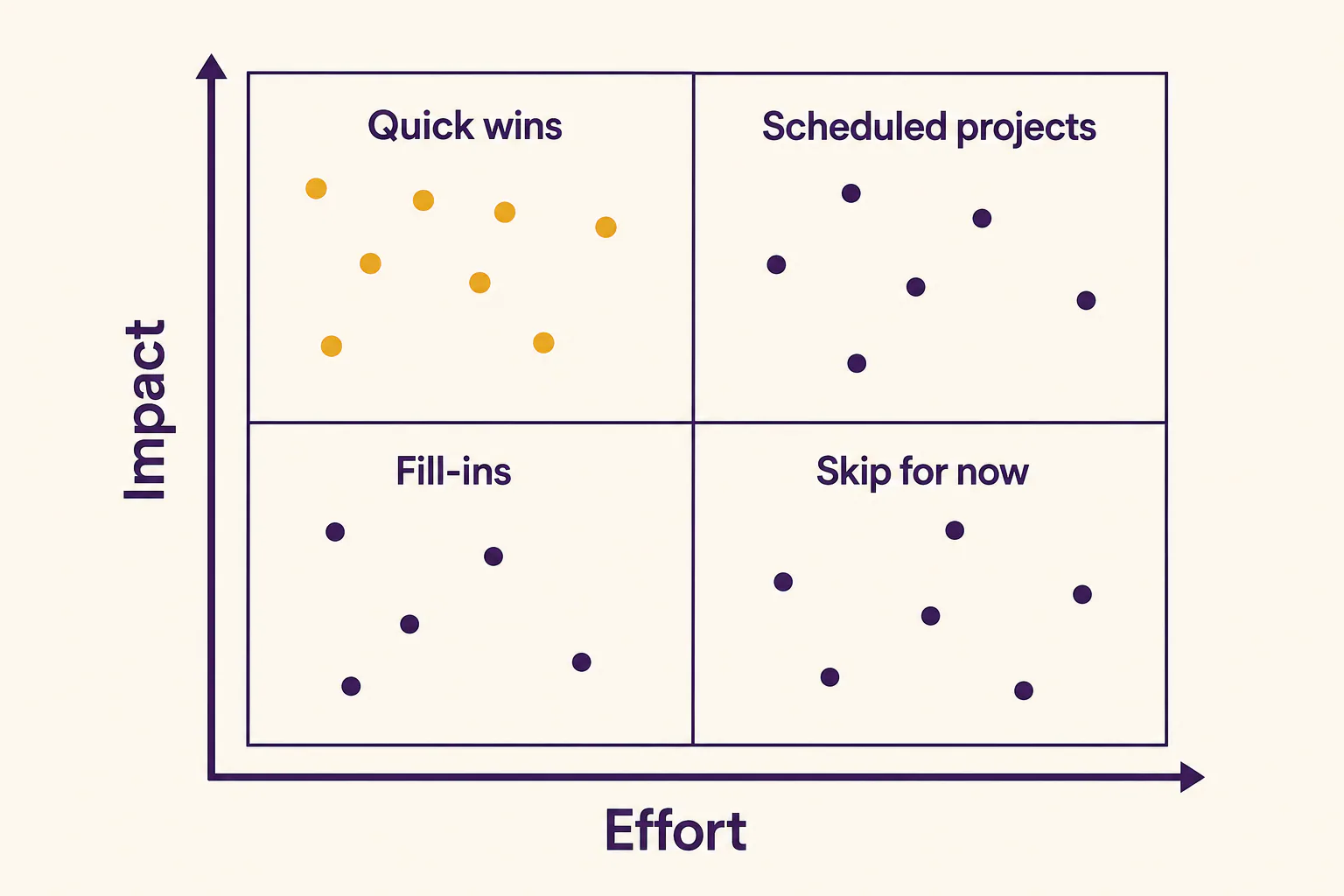
Rate impact (impressions available, plus closeness to revenue) and effort (hours of writing, design and review) from 1 to 3. High-impact, low-effort pages go first, usually refreshes of pages ranking just off page one, your biggest quick opportunities. High-impact, high-effort work such as merges goes into the content plan as scheduled projects. Low-impact, high-effort rows wait. New briefs from gap findings work best inside a quarterly SEO content plan built from your keyword research.
Step 4: Map audit columns to brief fields in the audit to content brief workflow
Each brief field should be filled from a named audit column, so brief creation becomes copying rather than re-research. This handoff is the core of the audit to content brief workflow, and it is the step most audit templates leave out.
What is an SEO content brief and which fields it needs
An SEO content brief tells a writer what to write and why. It covers the target keyword, search intent, reader, outline, length, internal links, facts and the desired action. For a refresh, it also lists what to keep, what to cut and which updates the current results call for. Think of it as a framework the writer fills in.
Mapping table: audit column, brief field, example value
This is how each audit column carries over into the brief:
| Audit column | Brief field | Example value |
|---|---|---|
| Top query by clicks (Search Console) | Target keyword | “client onboarding guide” |
| Other queries with impressions | Secondary keywords | “onboarding template”, “new client onboarding steps” |
| Intent match score and notes | Intent and format | Ready-to-copy list with a downloadable template |
| Quality notes and competitor gaps | Outline | Add a kickoff call agenda, replace old screenshots |
| Competitor analysis: length range | Word count | 1,600-2,000 |
| Internal links in and out (crawl) | Internal links | From the pricing FAQ, out to the contract template guide |
| Conversions and revenue | Goal and call to action | Trial signups from the template download |
| Action and cannibalizing URL | Brief type and redirect note | Refresh plus merge; 301 the second URL |
Target query, search intent, outline, word count and internal links from audit data
Pick the main query by clicks, then check impressions. A query with many impressions at positions 5 to 15 is often a bigger opportunity than the one already bringing traffic. Take intent from the live results. Base the word count on the range of ranking pages. Use the Search Console performance numbers to confirm the choice. For internal links, the crawl shows which strong pages could link here and do not yet; list them by page name. This keeps the process quick.
Template and spreadsheet setup you can copy
The whole audit to content brief workflow fits in one workbook with two tabs. The Audit tab holds one row per page with the columns above. In the Briefs tab, each page whose action is refresh, repurpose, merge or new gets a row that pulls shared fields with XLOOKUP, so an audit change flows into the brief. Add outline, facts and notes by hand. Each brief row exports to PDF or a document.
Worked example: one underperforming URL, from audit row to finished brief
The page below is an illustrative example, not a client case, but every number in it follows the rules above.
The audit row and its scores
The page is /blog/client-onboarding-process on a project management SaaS site. Over the last 12 months it earned 1,020 organic clicks, against 1,840 the year before, so its organic performance and traffic nearly halved. Impressions held steady, and the average position for its top keyword, “client onboarding guide”, slipped from 4.1 to 8.7. Conversions fell from six trial signups to two.
The review gave intent match a 1, because the results now show ready-made lists with templates while the page is a 2,400-word essay. Quality also scored 1 (screenshots of an interface that no longer exists), and on-page SEO scored 2. The row also carries a cannibalization flag: /blog/onboarding-new-clients ranks for the same query in alternate weeks.

The decision and why
Clicks fell sharply, the position sits between 4 and 20, and the topic still fits the business, so the rule says refresh. The cannibalization flag adds a merge. The original page has more backlinks, so it survives, and the other page’s kickoff call agenda folds into it. Impact is high and effort medium, so it sits near the top of the queue.
The finished brief
This is the brief the writer receives:
- Type: refresh plus merge; 301 /blog/onboarding-new-clients to this URL after publishing.
- Primary keyword: client onboarding checklist. Secondary: onboarding template, new client onboarding steps.
- Intent: a reader who wants a ready list now, with steps to copy.
- Outline: what onboarding covers; the steps grouped by week; kickoff call agenda (from the merged page); downloadable template; common onboarding mistakes; FAQ.
- Word count: 1,600-2,000, down from 2,400.
- Keep and cut: keep the section on setting expectations, which still earns engagement; cut the old interface screenshots.
- Internal links: from the pricing FAQ and the contract template guide.
- Tracking: position and organic clicks for the main query, plus template downloads, checked after eight weeks.
Every line traces back to a column in the audit row, which is the point of the audit to content brief workflow. The writer gets the updates and the opportunities without opening a spreadsheet.
Using the brief: from brief to published article
A brief is finished when a writer can start without opening the audit. Writing an SEO article from a brief then means following its order: confirm the intent, build the outline, fill it with the listed facts, and add links and the call to action before publishing.
Handing the brief to a writer or an AI draft
Run a short check before creation starts:
- The main keyword and the intent each fit on one line.
- The outline names every H2 and what it must contain.
- Any refresh has “keep” and “cut” lists.
- Business facts, examples and figures are attached with their sources.
- Internal links are listed by URL.
For an AI draft, the facts matter most. A model given only a keyword and an outline writes the same safe text every other site already has. Give it your audit notes and business facts and it has something specific to say. Either way, an editor checks the draft against the brief, line by line.
Where AI-assisted audits help and where they need a human check
AI handles bulk work well: clustering thousands of queries, flagging pages with outdated years or prices, spotting pairs that share queries and drafting one-line notes. It is weaker at the judgments behind the brief. A model can misread intent, invent a figure, or suggest retiring a page that converts quietly. Keep a person on every retire or merge call, and label any AI number as estimated.

Keeping the loop running across several sites
Run the same audit to content brief workflow on every site, a habit of multi-site SEO content management: the same columns, thresholds and brief template, as one shared framework. Add a published date to each row, then check performance at about 30 days, again at about 90 days, and review updated pages against the baseline each quarter.
If moving exports between tools is the slow part for your team, RankFlow keeps keyword research, competitor gaps, content plans, AI-assisted writing, WordPress publishing and Search Console reporting in one workspace. Every number in it is labeled as measured, calculated or estimated.
Frequently asked questions
Which pages should you include in a content audit?
Which pages should you include in a content audit?
Include every indexable page meant to attract or convert visitors from Google: blog posts, guides, landing pages, and product or category pages with real copy. Leave out archives, paginated pages, thank-you pages, legal pages and on-site results pages. On a big site, audit one folder or your highest-impression pages first, then widen the scope in the next cycle.
What timeframe should a content audit measure?
What timeframe should a content audit measure?
Twelve months compared with the previous twelve works for most sites. It covers every season on both sides and shows the direction of change. Fast-moving news or ecommerce sites can use shorter windows, compared year over year. Pages younger than about six months should be tagged as too new rather than scored.
Quantitative or qualitative analysis: which matters more?
Quantitative or qualitative analysis: which matters more?
Neither works alone. The numbers decide which pages need attention, and the qualitative review explains why they underperform and what the brief should fix. A page with falling clicks and a perfect intent match needs a different brief from one whose format no longer matches the results. Use the numbers to sort and a person to diagnose.
Which tools do you need to run a content audit?
Which tools do you need to run a content audit?
The free minimum is Google Search Console, Google Analytics 4, the free version of a crawler and a spreadsheet. Add a paid crawler for large sites, your CRM if you want revenue by page, and a keyword research tool for competitor gaps. Platforms that combine these sources save export work, but they are a convenience, not a requirement.
Is there an audit to content brief workflow template in Excel or PDF?
Is there an audit to content brief workflow template in Excel or PDF?
You can build one from the mapping table above. Create an Audit tab with one row per URL and a Briefs tab that pulls the shared fields by URL with XLOOKUP, which works in both Excel and Google Sheets. When a brief is ready for a writer, export its row to PDF or a document.