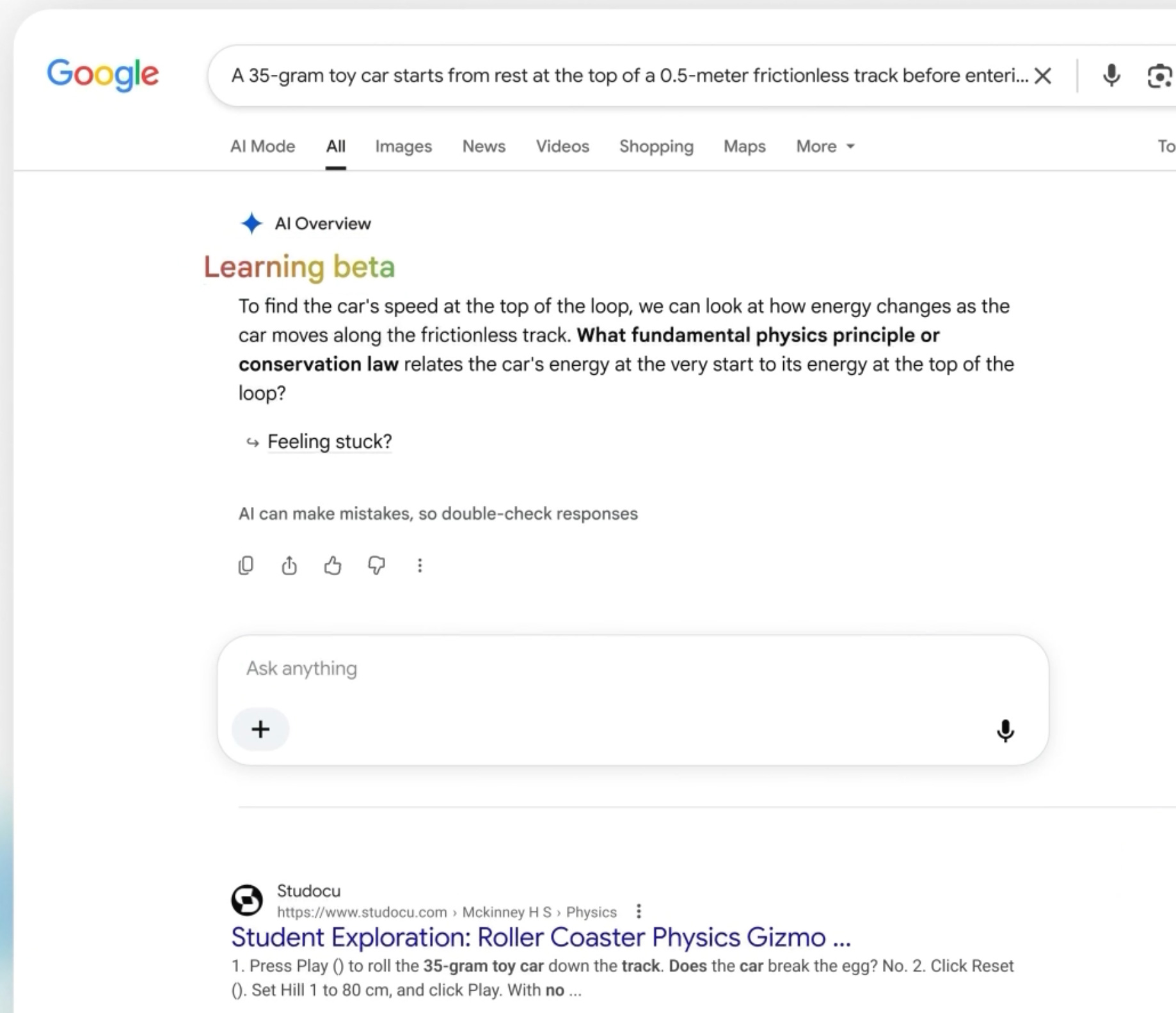
Google will turn off Google Search for K-12 student accounts until school administrators explicitly enable it, the company announced on Tuesday, 3 November 2026. Gemini, Gemini Notebook and Gemini in Classroom are covered by the same change, and Guided Learning launches in Classroom the same day.
- Google Search, Gemini, Gemini Notebook and Gemini in Classroom will be off for K-12 students until administrators turn them on.
- The change takes effect next year, per TechCrunch. Google says only that schools will get specifics over the next few months.
- Schools that block AI altogether may also cut students off from Search, Google’s Chris Phillips told The New York Times.
- Guided Learning in Search pilots in select U.S. schools later this month. It walks students through homework step by step.
- Administrators have been asking since at least October 2026 for a way to disable AI Overviews for students.
Google makes Search and Gemini opt-in for K-12 student accounts
Four products switch off by default for students in K-12 schools: Gemini, Gemini Notebook, Gemini in Classroom and Google Search. Access comes back only once a school administrator explicitly turns each one on, according to Search Engine Roundtable, TechCrunch and Google. All three reported the announcement of 3 November 2026.

According to Google, the change follows its conversations with schools, teachers, leading researchers and policymakers. The company presents the move as a response to what those groups told it, not as a reaction to a single complaint or event.
The announcement was made alongside the launch of Guided Learning in schools. TechCrunch says Guided Learning was unveiled earlier this year, so the November launch is an expansion of an existing feature into school settings rather than a new product.
Google also published a 29-page PDF on AI in Education, as Search Engine Roundtable notes. The sources quoted here do not summarize its contents, so what the document recommends or commits Google to remains outside this report.
In practical terms, the default flips. For school-managed student accounts, a product that is off needs a deliberate administrator decision before students can use it. Search is on that list, which is what makes the announcement unusual: Search is a basic tool, and it now sits in the same opt-in group as AI products.
Why blocking AI can also mean blocking Search
The change carries a trade-off that Google’s own executive spelled out. Chris Phillips, Google’s VP and General Manager of Education, told The New York Times that “Search and AI are deeply integrated.” If a school restricts AI altogether, he said, students “will not have access to Search.” Instead, they will see a message from their school saying it is not available, as TechCrunch reports.
TechCrunch’s own analysis goes one step further: schools that want students to keep access to Google Search will have to accept its AI features. No source describes a setting that keeps Search while removing AI from it.
Chalkbeat and other outlets report that Guided Learning will take the place of AI Overviews for students who search while signed in to school accounts. If that holds, a school that enables Search would not simply hand students the standard AI summaries, which changes the trade-off described above and bears directly on the dilemma teachers face.
What AI Overviews are
AI Overviews are AI-generated summaries shown at the top of Google Search results. They sit above the usual list of links, which is why they matter in a school setting, since a student can read the summary and never open a source.
AI Mode is a separate feature. It opens as its own tab in Search and answers questions in a chat-style exchange, while AI Overviews appear at the top of an ordinary results page. Common Sense Media, the children’s advocacy group, has labeled both AI Overviews and AI Mode an unacceptable risk for students, while acknowledging that schools are unlikely to avoid Google Search altogether. As the group and other observers note, school settings do not cover every route to these features. Students still see AI Overviews on personal devices and can reach other chatbots, whatever a school administrator decides.
The dilemma for teachers
TechCrunch points to a split inside classrooms. Teachers may not want students using AI Overviews for research, yet they still want Search available to find sources and learning materials. The two goals pull in different directions, and a single on-off decision for Search does not separate them.
For a school that blocks AI altogether, the student-facing result is a message from the school stating that Search is not available. For a school that enables Search, the AI features come with it. The sources describe these as the two outcomes on offer.
Google has not said whether a narrower control will exist when the change takes effect. The sources do not describe a middle setting, and nothing in the announcement material quoted here promises one.
How Guided Learning works in Search, Gemini and Classroom
Guided Learning is a Gemini and Search feature that coaches students step by step with prompts and questions rather than giving direct final answers. The same idea shows up in three places, each with a different role.

Google says its research shows Guided Learning leads to measurable learning gains for students. The sources do not include the research itself, its sample or its method, so the claim rests on Google’s statement alone.
Search
Google is bringing Guided Learning capabilities into Search for student accounts. Instead of going directly to the answer, Search walks students through homework step by step. This is the piece that starts as a pilot in select U.S. schools later in November 2026 and expands to other school districts in the months that follow, per Search Engine Roundtable and Google.
Gemini
In Gemini, Guided Learning is an interactive study tool. It coaches students through problem solving using open-ended questions and step-by-step breakdowns.
Classroom
In Google Classroom, Guided Learning is a 1-1 study tool anchored in class material when a teacher assigns it. It also gives teachers real-time insight into where the class needs support. Before launch, Google worked with schools and educators to test the Classroom version and incorporate their feedback.
The three versions side by side
| Where | What it does | Availability |
|---|---|---|
| Google Search (student accounts) | Walks students through homework step by step instead of going straight to the answer | Pilot in select U.S. schools later in November 2026, then other districts in the coming months |
| Gemini | Interactive study tool with open-ended questions and step-by-step breakdowns | Not specified in the sources |
| Google Classroom | 1-1 study tool anchored in class material when a teacher assigns it; gives teachers real-time insight into where the class needs support | Globally available from 3 November 2026 |
Only the Classroom version is described as live worldwide on the announcement date. The Search version is the narrowest in reach, limited at first to a pilot.
What administrators and students need to know
Google names Gemini Notebook among the affected products. It sits on the same list as Gemini, Gemini in Classroom and Search, so all four products are covered by the off-until-enabled default. Some outlets name the product NotebookLM alongside Gemini and Search, while the sources given here use Gemini Notebook. The sources give no further description of Gemini Notebook.
TechCrunch notes that Google’s suite of apps is dominant in classrooms and that Chromebooks are widely used, underscoring Google’s influence over education. That reach explains why a default change at one company touches a large number of schools at once.
The timing also matters. TechCrunch says the launch comes amid concerns that AI chatbots undermine learning because they give direct answers. Guided Learning is the product-side answer to that concern, with tools that ask questions and break problems into steps. The off-by-default change is the policy-side answer, putting the decision with school administrators.
For administrators, the outcome is a set of choices that Google has not yet fully described. The company says it will share specifics with schools before the changes roll out, which leaves open how and where the settings will appear.
A note on K12 logins
Some readers searching for K12 logins, WV Virtual Academy, Kansas City schools or the K12 app may reach this story. The facts reported here concern Google accounts issued by schools, not K12-branded services. Sign-in help for those services comes from the school or district that provides them.
Administrators had been asking for a control like this
The announcement follows a thread on the Google for Education Community forum. Since at least October 2026, school technology administrators there have been asking for an admin control to disable AI Overviews in Search for student accounts. They said Google Workspace for Education had no such setting, according to the forum thread. SafeSearch, by contrast, is already on by default for Workspace for Education users under 18, a sign that Google already tailors Search for schools.
Workarounds that forum users described
Forum users said the udm=14 URL parameter suppresses AI Overviews in Google Search but does not remove the AI Mode tab. A URL parameter is an extra piece of text added to a web address that changes how a page loads, and udm=14 is described this way only by the forum users, not by Google.
One user said blocking udm=50 removes the AI Mode tab, though an AI Overview may flash briefly before disappearing. Both reports are community accounts. The sources do not show Google endorsing either method.
Harder measures under discussion
Some administrators were weighing more drastic steps. One forum user said a district was considering switching students to DuckDuckGo. Another said their district was on the verge of blocking www.google.com for K-8 students.
The thread shows demand for a setting narrower than the one Google has now described. The original request was to disable AI Overviews specifically, which is different from turning Search itself off. Whether the opt-in change satisfies that request is not settled by the sources, since TechCrunch’s analysis is that Search and its AI features come as a package.
How districts already restrict AI
The forum thread is not the only sign of pressure. Several large districts had already set their own limits before Google’s announcement, according to reports from outlets including Chalkbeat. New York City limits AI use for students through 8th grade. Los Angeles Unified blocks generative AI on student devices and asked Google to switch off AI Overviews. Madison, Wisconsin, blocks Gemini on student computers, and Fairfax County built a browser plug-in that strips AI results from search pages.
These policies show how far districts have gone on their own, and also where they stopped. Blocking a chatbot app is straightforward, but AI Overviews arrive inside Google Search for K-12 students. Short of a tool like Fairfax County’s, these restrictions did not reach AI Overviews. That gap is the one the forum administrators wanted Google to close, and it is the context for an opt-in default that now covers Search itself.
Timeline and unanswered questions
| Date | What happens |
|---|---|
| 3 November 2026 | Change announced; Guided Learning globally available in Google Classroom |
| Later in November 2026 | Guided Learning pilot in Search begins in select U.S. schools |
| Coming months | Google shares specifics with schools; Guided Learning in Search expands to other districts |
| Next year | Search and AI control changes roll out, per TechCrunch |
Where the sources differ
TechCrunch says the change takes effect next year. Google’s blog gives no year, and Google’s page says only that the specifics will arrive over the next few months. The year therefore rests on TechCrunch’s reporting.
Still unknown
- The exact date the defaults switch for student accounts.
- Whether administrators will get any setting that keeps Search while limiting AI Overviews.
- Which districts join the Search pilot, and which follow it.
- What the 29-page PDF on AI in Education commits Google to.
Sources
Photo via Search Engine Roundtable
Frequently asked questions
When will Google Search be turned off for K-12 student accounts?
When will Google Search be turned off for K-12 student accounts?
Google says the change takes effect next year and that it will share specifics with schools in the coming months. Google’s blog gives no year; TechCrunch says next year.
Which Google products are affected by the change?
Which Google products are affected by the change?
Gemini, Gemini Notebook, Gemini in Classroom and Google Search. All four will be off for K-12 student accounts until administrators turn them on.
Can schools keep Search but turn off AI?
Can schools keep Search but turn off AI?
It’s unclear. Google’s Chris Phillips said Search and AI are deeply integrated, and TechCrunch’s analysis is that schools wanting Search must accept its AI features.
What is Guided Learning and where is it available?
What is Guided Learning and where is it available?
It is a feature that coaches students with prompts and questions instead of giving final answers. It is globally available in Google Classroom since November 3, 2026, works as a study tool in Gemini, and reaches Search through a pilot in select U.S. schools later this month.
How can administrators hide AI Overviews today?
How can administrators hide AI Overviews today?
Google Workspace for Education has no such setting, according to forum administrators. Users there said the udm=14 URL parameter suppresses AI Overviews but leaves the AI Mode tab, and that blocking udm=50 removes that tab.
Does this affect K12 login or the K12 app?
Does this affect K12 login or the K12 app?
The change concerns Google accounts issued by schools, not K12-branded services. Sign-in help for those comes from the school or district.