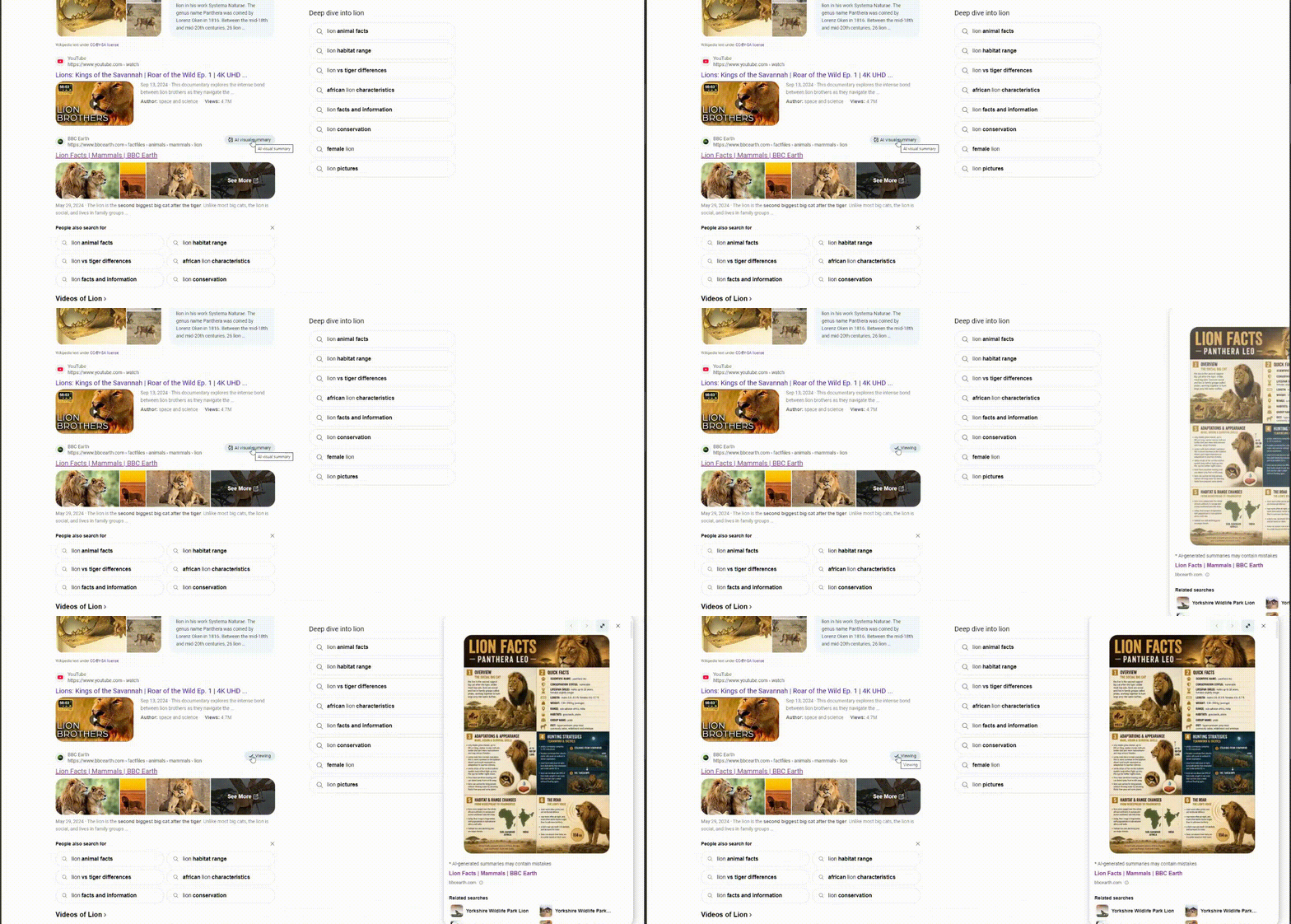
The Bing AI visual summary is a new button on individual Microsoft Bing search snippets. Clicking it loads an AI-generated graphic that summarizes the linked page’s content, and the image was reported publicly on 6 November 2026.
- Bing now shows an “AI visual summary” button on individual search snippets.
- Clicking it loads an AI-generated, infographic-style image on the right side of the results page.
- Khushal Bherwani spotted the feature and shared a GIF of it on X.
- The Search Engine Roundtable author called the graphic “AI-slop.”
- It follows Bing generative search, previewed in July 2024, which raised publisher traffic concerns.
Bing AI visual summary adds a graphic to individual search results
Microsoft Bing has added a feature named “AI visual summary” to its search results. The button is attached to an individual snippet in the organic search results, so it sits beside one specific result and not at the top of the page or next to the whole list.
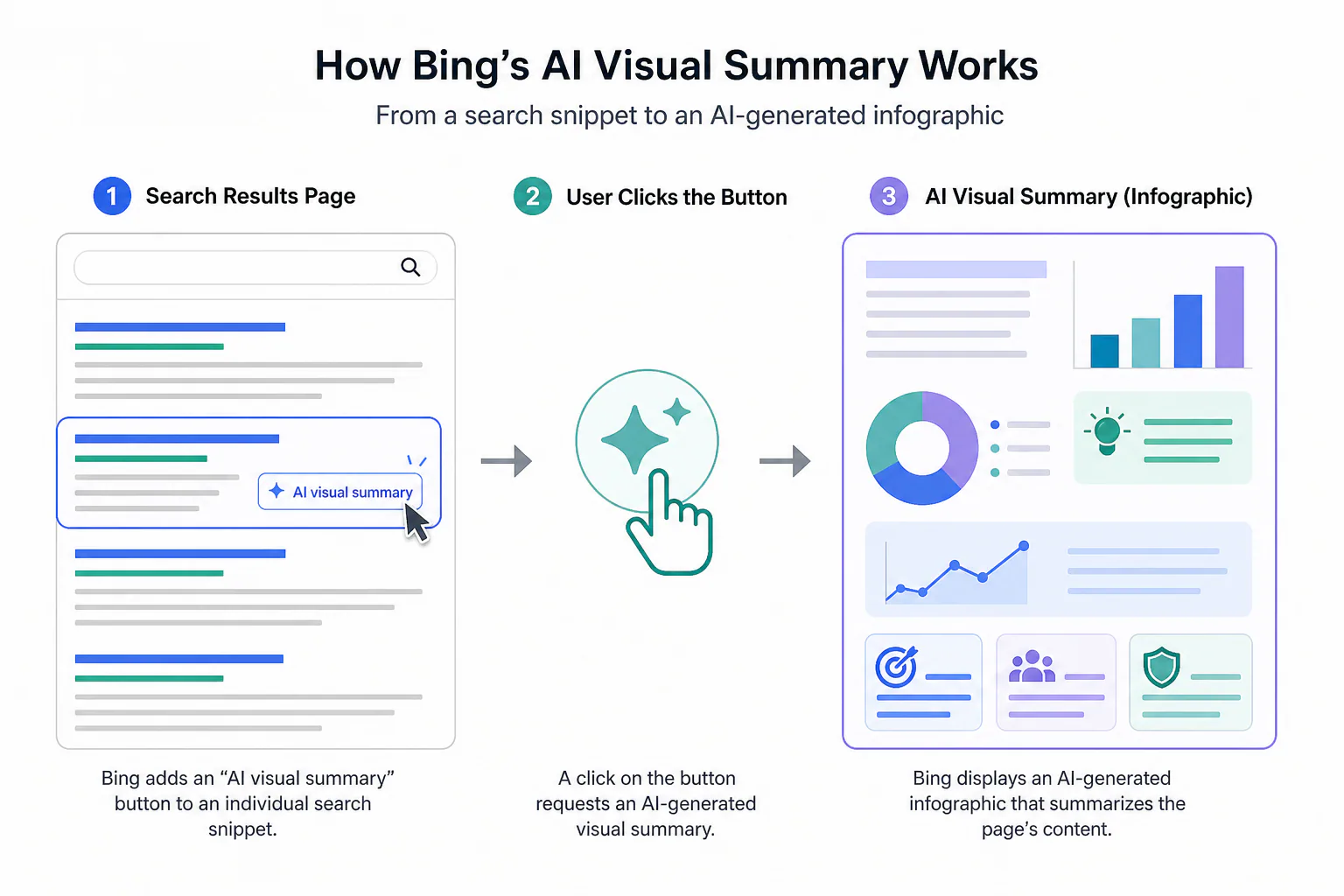
A click on the button brings up an AI-generated graphic that summarizes the page’s content. The resulting Bing AI infographic appears in the right-hand column of the search page, next to the list of results.
The image is described as a larger visual summary of the content. Its stated purpose is to let users explore the information in a more visual format than the short text preview under the link allows.
For anyone who publishes content for search, the change matters in a plain way: a summary of a page is now produced and shown inside the search engine itself, in image form. The searcher sees a condensed version of the page before deciding whether to open it, and that condensed version is made by Bing’s AI, not by the publisher.
The details published so far cover the button, the click behavior and the placement of the image. They say nothing about which pages get the button, what the graphics contain beyond their infographic style, or whether publishers can influence the output.
How the button and the snippet work together
A search snippet is the short preview of a web page shown under its link in search results. It is the text a searcher reads to judge whether a result is worth a click, and it has long been the main place where a publisher’s page is represented inside the results list. It differs from a featured snippet, the larger answer box Bing sometimes places above the results, which some reports say now carries AI-written summaries.
The new button changes that representation. Because it is attached to a single snippet, the graphic is tied to one linked page. It is not a summary of the whole query, and it does not combine several results into one overview. Each press of the button concerns the content of exactly one page.
That per-result design has a practical consequence. Every result on a page could, in principle, carry its own button, which would make the visual summary a feature of individual listings and not of the query. Whether the button appears on every result is not stated in the available facts.
A graphic, not a text answer
The output is an image. That sets it apart from text-based AI answers, which present written summaries, and it means the summary is read by looking at a layout of visual elements rather than a paragraph of prose.
Not the same as Bing AI Image Generator
The phrase “AI-generated” can invite confusion with another Microsoft product. Bing AI Image Generator is a separate tool, similar to OpenAI’s DALL-E, built into Bing Chat and Microsoft Designer, as a review on edimakor.hitpaw.com describes. Users of that tool write prompts and receive images.
Bing AI visual summary works differently. It starts from an existing web page that appears in the results and produces a graphic about that page. Bing Visual Search is a third, separate feature, which lets users search with a picture instead of typed words. Nothing in the available information suggests these features share technology, so no connection between them is assumed.
Who found it and how it has been received
The feature was spotted by Khushal Bherwani, who posted about it on Search Engine Watch and on X. On X he shared a GIF of the feature in action, which gives a moving record of the button being used and the image appearing on the results page.
The Search Engine Roundtable article about the discovery was published on 2026-11-06 at 12:21 UTC. That timestamp is the earliest dated report in the available material, so it also serves as the practical start date for public discussion of the feature.
The author of that article was critical of the result. They said the graphic looks like what you get when you ask AI to make a graphic of a web page, and called it “AI-slop”. The wording describes a visual impression: the graphic reads as generic output instead of something designed for the page it represents.
That judgment is one writer’s opinion. It is not a measured result, and it is not a finding from testing across many pages. No usage figures, user feedback data or reactions from other observers are included in the facts.
Microsoft’s own position is also absent from the material. No statement from the company about the button, its purpose or its availability appears in the facts, so everything known about the feature comes from what was observed on the results page.
How this builds on Bing generative search
The Bing AI visual summary is the latest in a line of visual and AI features in Bing’s results. The first step came in March 2021, when Bing upgraded its results with infographic-inspired panels that presented information in a more visual layout, the closest predecessor to a graphic summary. In July 2024, Microsoft previewed Bing generative search, its answer to Google’s AI-powered search experiences, as Yahoo Finance reported. At that stage it was available to only a “small percentage” of users.
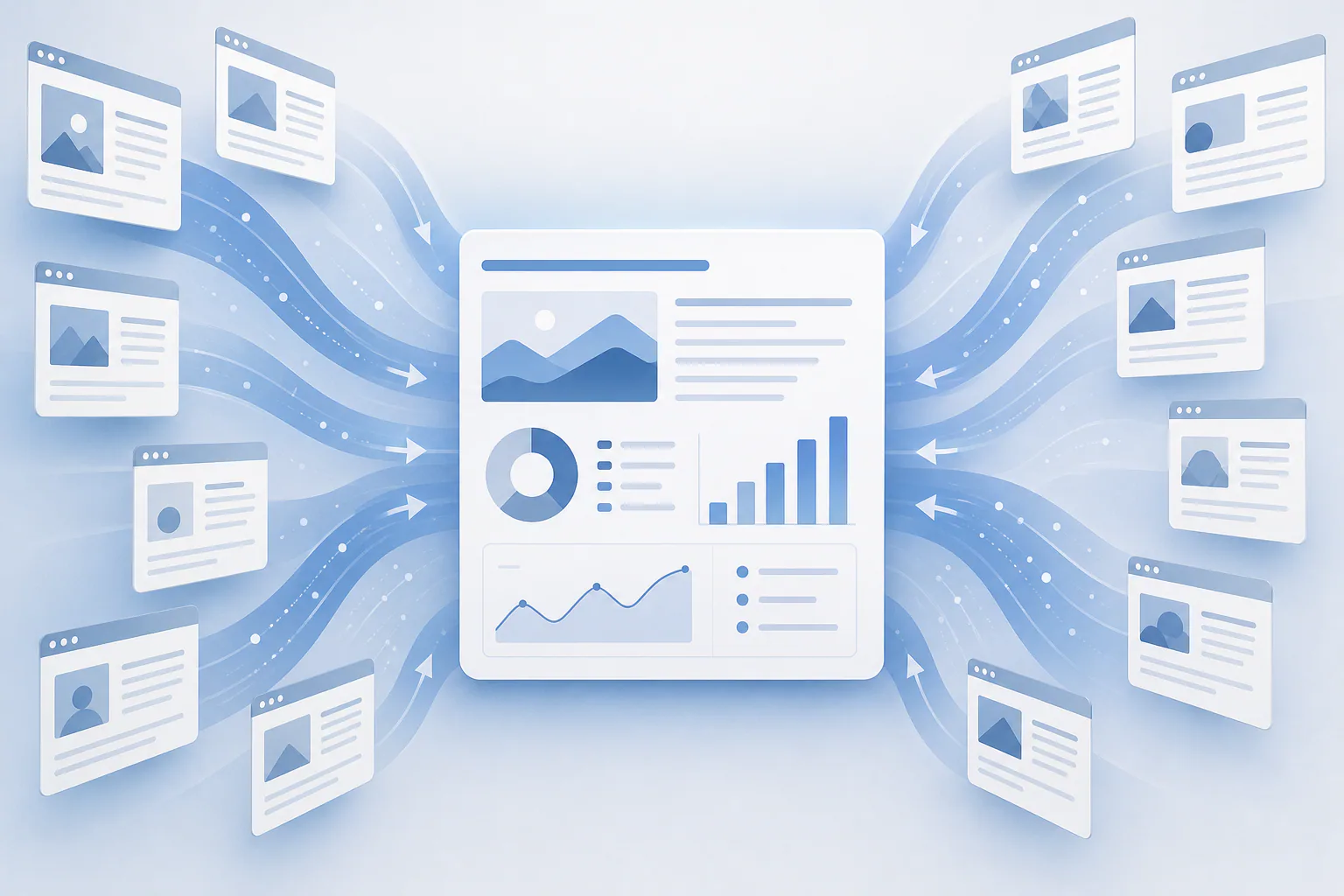
Generative search aggregates information from around the web and generates a summary in response to search queries, with links and sources shown. It in turn evolved from the AI-generated chat answers that Bing launched in February 2023. The sequence runs from the visual results upgrade of March 2021, to chat answers in February 2023, to generative search in the July 2024 preview, to a graphic summary on single snippets reported in November 2026.
As with Google’s AI Overviews, users could dismiss AI-generated summaries in favor of traditional search from the same results page. That meant the classic list of links stayed within reach even when an AI summary was shown. Bing’s settings also include a toggle for Copilot responses, but some users report that switching it off does not remove the AI summaries from results. Whether the new button can be hidden or switched off is not stated.
Three Bing AI features compared
The table sets the three features side by side using only what the facts say about each.
| Feature | What it produces | What it is tied to | Where it appears |
|---|---|---|---|
| AI visual summary | An AI-generated, infographic-style graphic | One linked page, through a button on its snippet | Right side of the search page after a click |
| Bing generative search | A generated summary with links and sources shown | The search query, aggregating information from around the web | Search results, with the option to dismiss it |
| Bing AI Image Generator | Images, in a way similar to OpenAI’s DALL-E | Not described as tied to search results | Built into Bing Chat and Microsoft Designer |
The main difference is scope. Generative search answers a query using material gathered from many pages, while the Bing AI visual summary looks at one page. The image generator is a separate creative tool and is not part of the results list.
Publisher traffic questions that earlier AI search features raised
When generative search was previewed, Microsoft said it was maintaining the number of clicks to websites and looking closely at how generative search impacts traffic to publishers. It did not publish stats, so the claim could not be checked from outside the company.
Publishers have had some control over earlier AI summaries. XDA Developers reports that website owners could opt out of Bing’s AI summaries by adding the NOCACHE and NOARCHIVE tags to their pages. Whether those tags also keep a page out of the new visual summary has not been reported.
Data on the effect of AI summaries in search comes from a different engine. One study found that AI Overviews could negatively affect a sizable share of publisher traffic due to the de-emphasis on article links. That finding concerns Google’s feature, not Bing’s.
Accuracy and what is still untested
Accuracy is the other recurring concern. Google’s AI Overviews infamously suggested putting glue on a pizza, which became a widely cited example of how an AI summary can state something wrong in a confident format. A summary that condenses a page can only be as reliable as the system reading it, and the visual summary is another case of AI condensing a page for the searcher.
None of these points has been tested on the new button. How a graphic placed beside a single result affects clicks to that result has not been reported. The traffic figure and the pizza example apply to earlier text features, and they show what questions publishers raised before, not what Bing AI visual summary graphics do.
For content teams and agencies that report on search performance, the practical point is narrow. A new AI element has appeared in one search engine’s results, and no numbers exist yet on its effect. Any claim about gains or losses from it would be an estimate until someone measures it.
What remains unclear
Several basic questions are open. The facts do not say how widely the button has been rolled out, whether Microsoft has officially announced it, or how the graphics are generated. What is established is limited to the button on a snippet, the click behavior, the infographic-style image placed at the right of the page, and the reactions of the person who spotted it and the author who covered it.
Whether the feature will keep sending clicks to publishers is untested. Microsoft published no figures when it made similar assurances about generative search, and no Bing AI visual summary data has appeared. Until Microsoft says more or independent measurements are published, the effect on traffic to the pages being summarized remains unknown.
Sources
Photo: Search Engine Roundtable
Frequently asked questions
What is Bing’s AI visual summary?
What is Bing’s AI visual summary?
It is a new feature in Microsoft Bing’s search results. A button on an individual snippet generates an AI-generated graphic summarizing the linked page’s content.
Where does the AI visual summary appear on the page?
Where does the AI visual summary appear on the page?
After a click on the button, an AI-generated, infographic-style image appears on the right side of the search page.
Who spotted the Bing AI visual summary feature?
Who spotted the Bing AI visual summary feature?
Khushal Bherwani spotted it and posted about it on Search Engine Watch and on X, where he shared a GIF of it in action.
What is a search snippet?
What is a search snippet?
A search snippet is the short preview of a web page shown under its link in search results.
Is the AI visual summary the same as Bing AI Image Generator?
Is the AI visual summary the same as Bing AI Image Generator?
No. Bing AI Image Generator is a separate tool, similar to OpenAI’s DALL-E, built into Bing Chat and Microsoft Designer.
How does this relate to Bing generative search?
How does this relate to Bing generative search?
Bing generative search, previewed in July 2024, generates a summary with links and sources in response to queries. The visual summary is a graphic tied to one snippet, and it follows that earlier AI work.